
 4.9
4.9 4.5
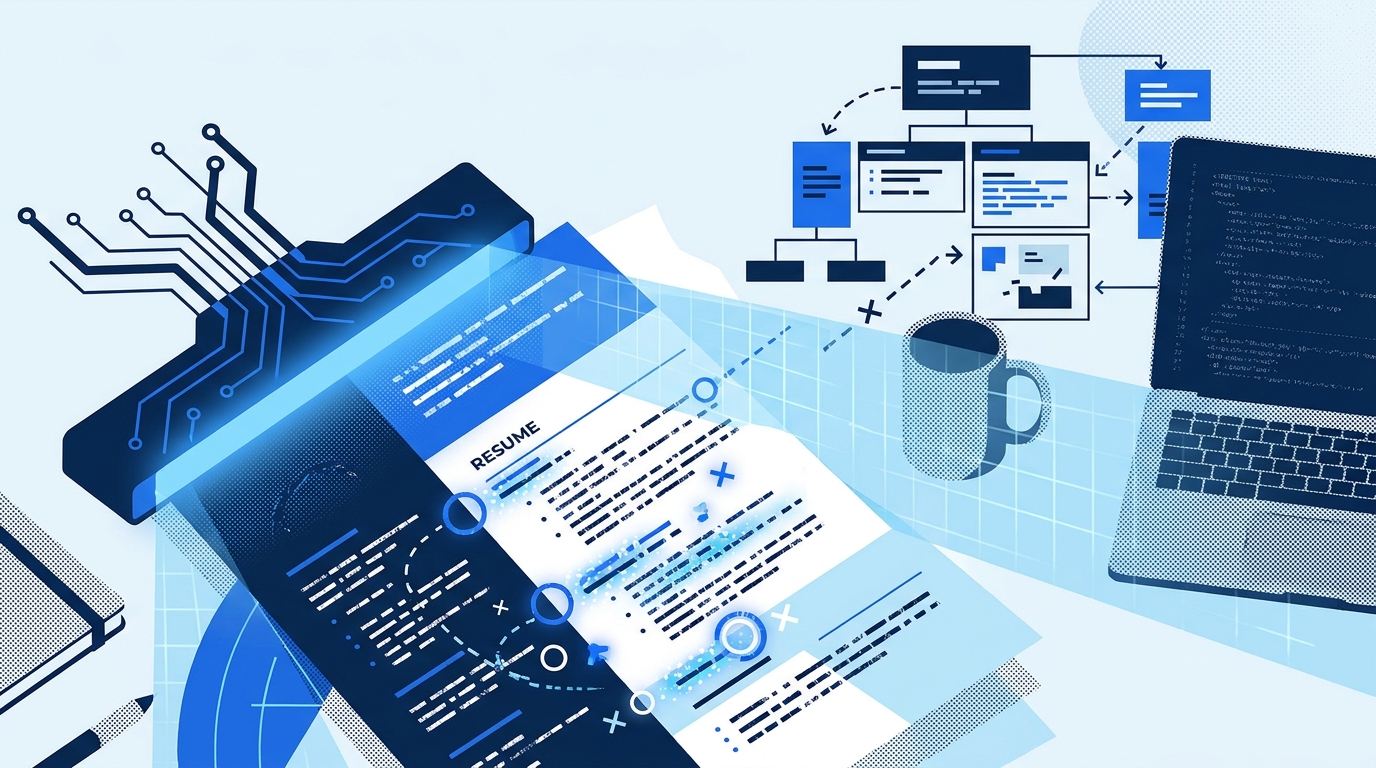
4.5Copy your resume into Notepad. Strip away every font choice, every careful margin, every bold header you spent an hour adjusting. What remains is roughly what Workday’s Illuminate, Greenhouse, iCIMS, and dozens of other applicant tracking systems actually see when your file hits their parser. If the text looks scrambled, if sections appear out of order, or if your bullet points have turned into garbled symbols, you’ve identified the exact reason your applications aren’t generating callbacks. The fix, though, depends entirely on which of three approaches you take: letting an AI resume builder handle formatting for you, manually optimizing keywords yourself, or rebuilding your resume around readability and information hierarchy from the ground up. Each solves a different piece of the problem. Each introduces its own risks.
Where the Parsing Actually Breaks
Before weighing the three approaches, you need to understand what’s failing and why.
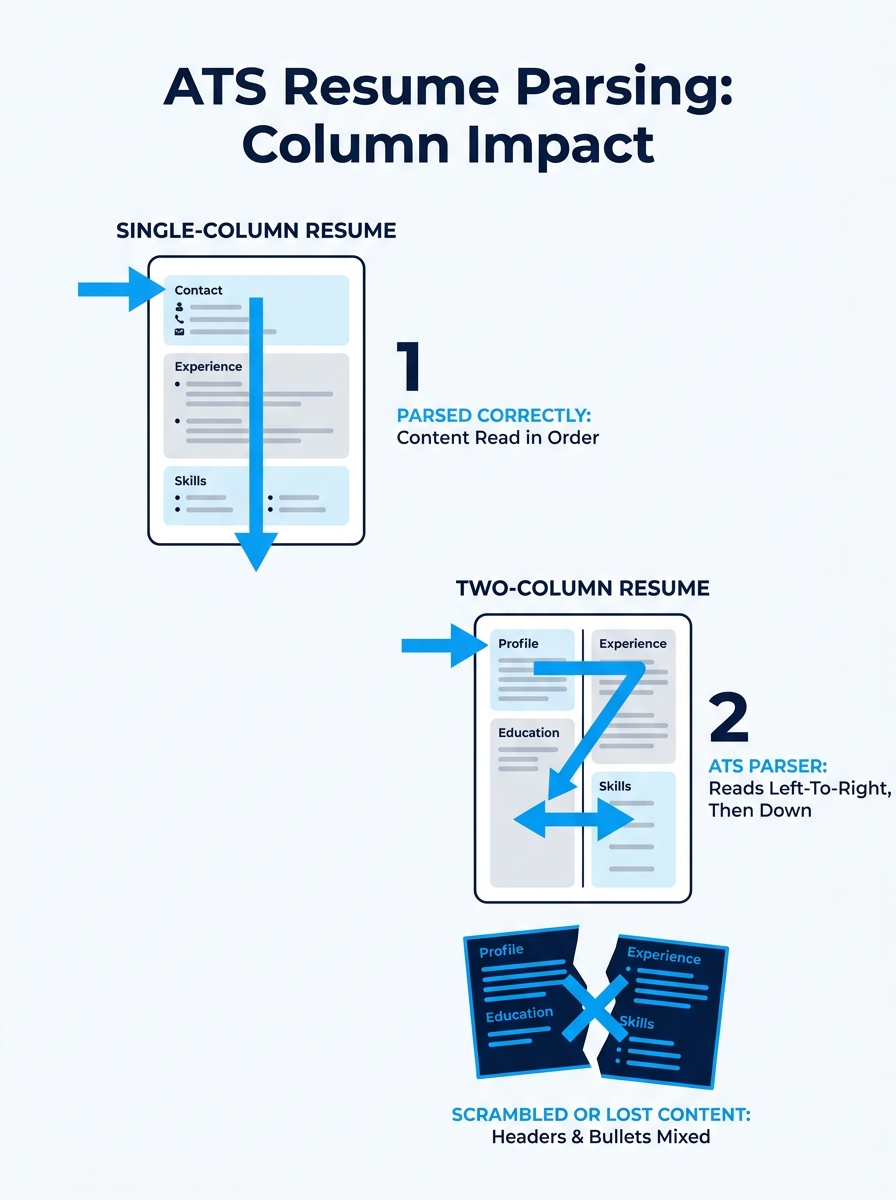
Applicant tracking systems in 2026 don’t read resumes the way you do. They parse them linearly, top to bottom, extracting text strings and mapping them to fields: name, contact info, work experience, education, skills. When that linear parsing gets disrupted, the system either misfiles your content or skips it entirely. Workday’s AI-powered ranking module scores resumes that fail to parse cleanly at zero, effectively making you invisible to recruiters regardless of your qualifications.
The most common resume formatting mistakes that trigger parsing failures:
- Multi-column layouts scramble reading order. The ATS reads left-to-right across the entire page width, so your carefully designed two-column resume becomes an incoherent alternation of unrelated text fragments. Jobscan’s analysis of ATS formatting errors confirms that columns, charts, and skill-level bar graphs are functionally unreadable.
- Non-standard bullet characters (imported from Wingdings or decorative fonts) convert to question marks or empty boxes.
- Tables and text boxes break field extraction. Content trapped inside a text box may not get parsed at all.
- Headers and footers are ignored by most systems, meaning your contact information disappears if it lives there.
- “Print to PDF” can create image-based files rather than text-based ones, making your entire resume a blank page to the parser.
And here’s the part that catches people off guard: systems like Taleo and Lever may not recognize acronyms unless they’re spelled out alongside the abbreviation. Writing “SEO” without ever mentioning “Search Engine Optimization” means you might not get indexed for that skill.
So the crisis is real. The question is how you respond. Three distinct strategies have emerged, each with a different philosophy about what “ATS-friendly” actually means.
AI Resume Builders and Their Hidden Formatting Traps
The pitch is appealing: upload your old resume or LinkedIn profile, pick a template, and let the AI generate polished, keyword-rich bullet points that sail through ATS screening. Platforms like Rezi, Kickresume, and dozens of competitors promise ATS compatibility as a core feature. Rezi explicitly states that ATS compatibility is a priority in their system design.
And for basic formatting, many of these tools do deliver. They’ll output single-column layouts, standard fonts, and clean section headers. The templates have been tested against common parsers. If your current resume is a graphic design disaster with infographics and skill bars, switching to an AI builder will almost certainly improve your parse rate.
But the AI resume builder drawbacks become apparent once you look past formatting.
The first problem is content homogeneity. When thousands of applicants feed the same job description into the same GPT-powered writing assistant, the output converges. Hiring managers who review 200 applications for a single role start recognizing the cadence. Phrases like “spearheaded cross-functional initiatives to drive operational efficiency” appear so frequently that they’ve become a signal the resume was machine-generated. We explored this phenomenon in depth when looking at why recruiters are pushing back against AI-generated resumes, and the pattern has only accelerated.
The second problem is keyword context. AI builders are good at injecting relevant terms, but they don’t always place them in ways that make sense to the ranking algorithms used by newer ATS platforms. Workday’s Illuminate doesn’t just count keywords; it evaluates whether the keyword appears in a context that suggests genuine experience. “Managed Python-based data pipelines processing 2M daily records” ranks differently than “Familiar with Python, data pipelines, and data processing.” The AI builder might produce either version depending on your input, and it won’t necessarily know which one the target ATS weights more heavily.
The third problem is false confidence. You see a clean-looking document and assume it’s optimized. But many templates still use subtle formatting choices that cause issues: narrow margins that get cropped on upload, creative header designs that confuse field mapping, or font sizes that render poorly across systems. Unusual margin settings can cause parsing failures when your resume hits different ATS platforms, and most users never test for this. If you want a clear-eyed comparison of what these tools actually deliver versus what they promise, our breakdown of free and paid resume builder tradeoffs covers the financial and quality gaps in detail.
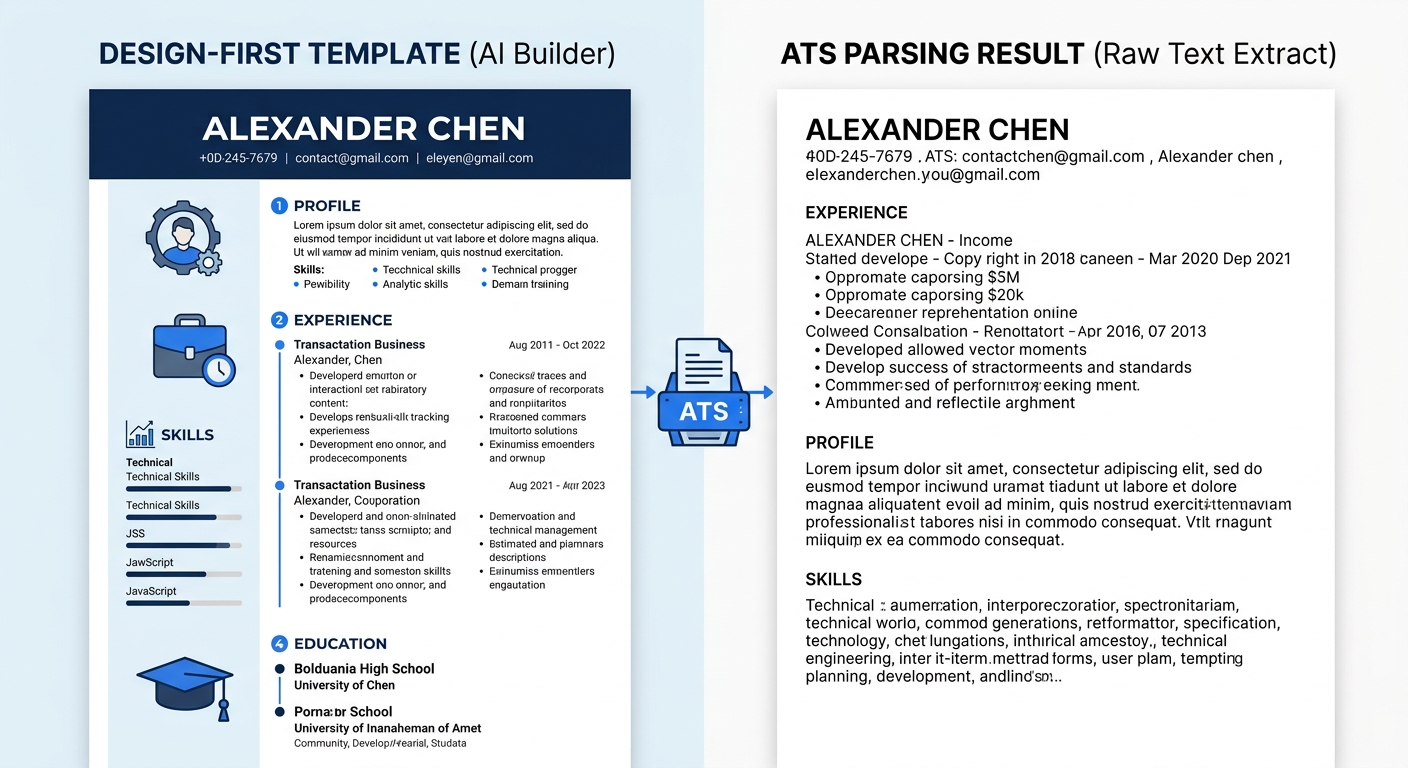
When this approach works best: You have a fundamentally good resume with strong content, and your main problem is that your current formatting is visually complex. An AI builder can get you to a clean baseline fast. Just don’t trust the generated bullet points without heavy editing, and always run the Notepad test on the final output.
Going Manual With Keyword Optimization
The DIY keyword optimization approach starts from a different premise: the resume’s content matters more than its container. Proponents of this method extract keywords directly from job descriptions (using ChatGPT, Gemini, or manual analysis), then weave those exact phrases into their existing resume.
The logic is sound. ATS systems match literal strings. “JavaScript” won’t always match “JS.” “Client success” may not match “customer success.” If the job posting says “project management,” your resume needs to say “project management,” not “project leadership” or “program oversight.” Our guide to AI-powered keyword matching for resume customization walks through this extraction process step by step.
Best practice suggests aiming for 15-25 relevant keywords per resume, distributed across your summary, skills section, and experience bullets. That range demonstrates genuine expertise without triggering the keyword stuffing detectors that modern ATS platforms now employ.
But this is where keyword optimization pitfalls start multiplying.
The biggest risk is over-optimization. In the rush to mirror job description language, people end up with bullet points that read like a requirements list rather than evidence of accomplishment. “Utilized SQL, Python, and Tableau for data analysis and business intelligence” is technically keyword-rich and functionally meaningless. It tells the ATS you mentioned the right words. It tells the hiring manager nothing about what you actually did or how well you did it.
The second risk is neglecting formatting entirely. Someone who spends three hours perfecting keyword placement but never checks whether their file parses correctly has optimized the wrong layer. Keywords that land inside a text box the ATS can’t read might as well not exist.
The third risk is a lack of sustainability. True manual optimization means rewriting significant portions of your resume for every application. That’s 45-90 minutes per job posting. Most people either burn out after a dozen applications or start cutting corners, reusing the same “optimized” version for dissimilar roles.
Keywords that land inside a text box the ATS can’t read might as well not exist.
When this approach works best: You’re applying to a small number of highly targeted positions, you have the time to customize each application thoroughly, and your resume already has clean, single-column formatting. The manual keyword method is the most precise tool available. It’s also the most labor-intensive, and it does nothing to fix structural readability problems.
The Readability-First Approach
This third strategy flips the priority order. Instead of starting with keywords or AI-generated content, it starts with the document’s structural readability and builds everything else on top of that foundation.
The core principle: a resume that parses perfectly and reads clearly will outperform a keyword-stuffed document that the ATS mangles during extraction. Structure first, content second, keywords third.
What readability-first looks like in practice:
Single-column layout, always. No exceptions. Even if you’ve seen beautiful two-column templates on Pinterest or Canva, the parsing risk eliminates any visual benefit.
Two font sizes maximum. Enhancv’s resume structure guide recommends using no more than two font sizes and styles across headings, subheadings, and body text. This creates a visual hierarchy that guides both the ATS parser and the human reader. More variety signals inconsistency. Studies cited by Resumly indicate that 85% of recruiters spend less than 30 seconds on an initial scan, and during that window, visual hierarchy determines what information they absorb.
Information hierarchy matters more than density. The most important content belongs at the top. Your strongest, most relevant experience goes first. Skills that match the target role appear before tangential capabilities. An ATS readability audit checks for this ordering specifically: are your highest-impact qualifications positioned where both the parser and the recruiter encounter them first?
Standard margins (0.5″ to 1″), standard fonts (Arial, Calibri, Garamond, Times New Roman), standard bullet points (the default round bullet), left-aligned text throughout. Every deviation from these defaults is a potential parsing failure point.
Save As PDF, never Print to PDF. And test the output by selecting all text in the PDF to verify it’s actually selectable, not a flat image.
The readability-first approach also addresses keywords, but treats them as something you integrate into already-strong bullet points rather than the starting point for construction. You write “Reduced customer churn by 18% over six months by rebuilding the onboarding email sequence in HubSpot” first, then check whether “customer retention,” “email marketing,” and “HubSpot” all appear naturally. Usually they do, because specific accomplishment statements tend to contain the technical terms that job descriptions reference.
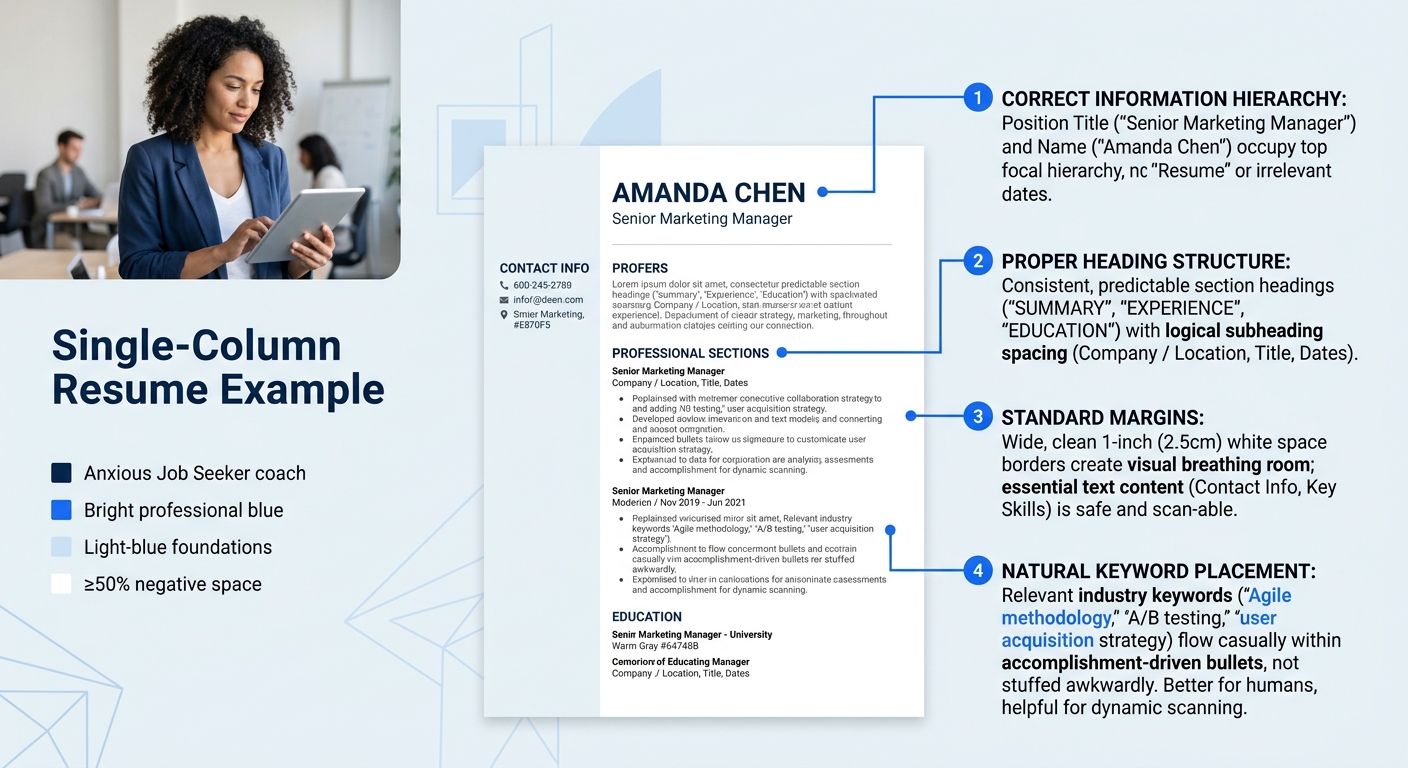
Tip: Run an ATS readability audit on your resume before optimizing keywords. Copy the text into Notepad, verify everything appears in the correct order, then check that your contact information, section headers, and bullet points survived the conversion intact. Fix any structural problems first. Keywords added to a broken structure accomplish nothing.
When this approach works best: Almost always. The readability-first method is the safest default strategy because it prevents the formatting errors that cause catastrophic parsing failures. Its main downside is that it requires you to resist the temptation of visually striking templates, and it demands that your actual accomplishments be strong enough to carry the document without design flourishes. If you’re struggling to write compelling bullets without leaning on AI generation, converting vague experience into measurable outcomes is a good place to start.
The Verdict
If you’re comparing these three approaches as mutually exclusive options, you’re thinking about it wrong. The best results come from layering them in the right order.
Start with readability. Get your formatting clean, your information hierarchy correct, your file parsing properly. This is the foundation, and without it, nothing else matters. It takes real discipline to choose a plain template when flashy options exist, but the data on parsing failures is unambiguous.
Then layer in targeted keywords for each application, matching exact phrasing from the job description and placing those terms in context-rich bullet points. If you want to use AI to extract keywords from job postings, that’s one of the genuinely useful applications of the technology. Where AI tools help with keyword identification is a different question from whether you should let them rewrite your resume content wholesale.
Use AI resume builders only if you need a formatting reset and you plan to substantially rewrite the generated content. The templates can save time. The auto-generated bullet points will cost you differentiation. If you’re evaluating which builder to use for that formatting baseline, our resume builder reviews compare the major options on exactly these tradeoffs.
The uncomfortable truth about the ATS readability crisis is that it rewards boring resumes. Clean structure, standard fonts, linear layouts, specific accomplishment statements with numbers. The candidates who perform best in automated screening are the ones willing to sacrifice visual creativity for structural reliability, then make up the difference with genuinely compelling content that no AI could have written for them. Your resume doesn’t need to look interesting. It needs to parse correctly and say something worth reading once it does.