
 4.9
4.9 4.5
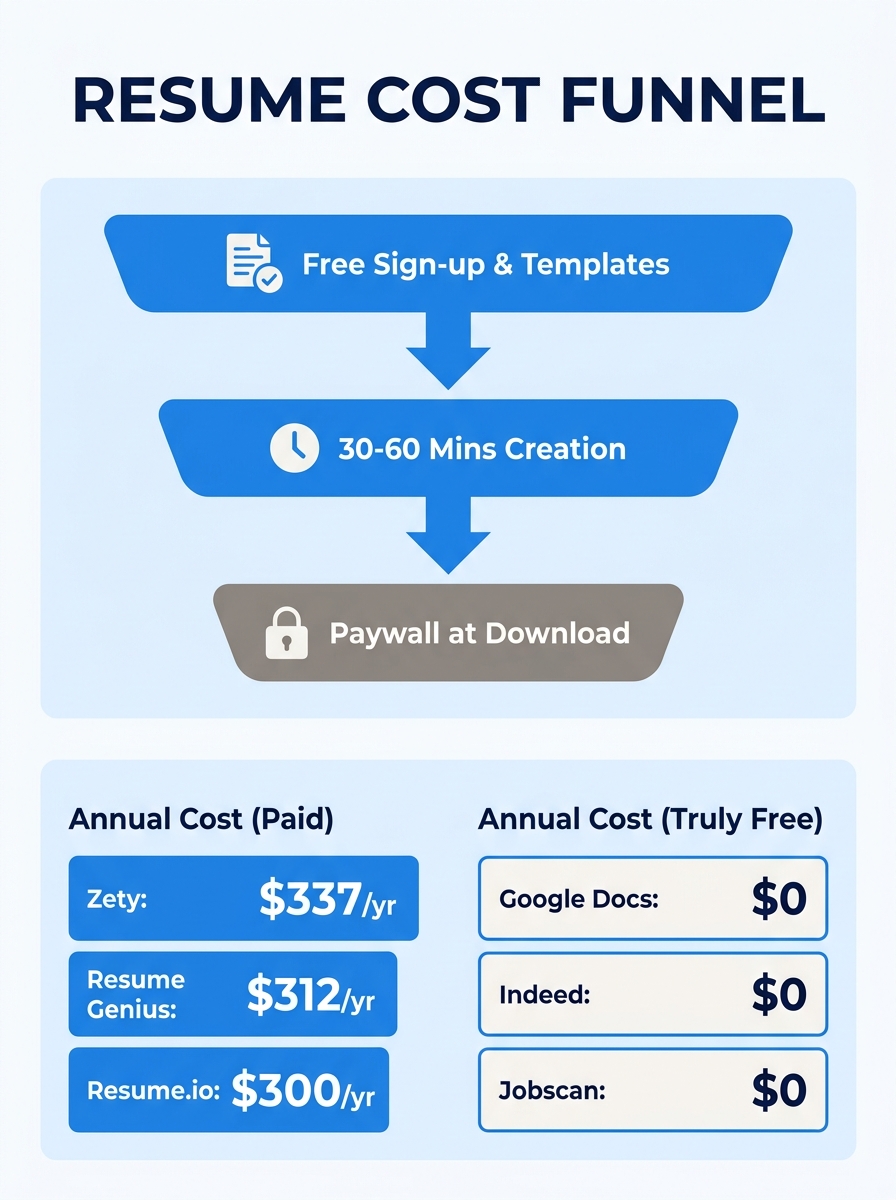
4.5Zety charges $1.95 for a 14-day trial, then auto-renews at $25.95 every four weeks. That’s roughly $337 per year. Resume Genius follows the same playbook: $2.95 trial, $23.95/month renewal. Resume.io won’t even export plain text without payment information. These three platforms rank among the most visible results when you search for “free resume builder,” and they all operate on an identical financial mechanism that job seekers don’t understand until they’ve already spent 45 minutes entering their work history. The misunderstanding at the center of the free resume builders vs paid debate isn’t about quality. It’s about where in the process the tool extracts value from you, and what you lose at each extraction point.
How the Bait-and-Switch Funnel Works
The business model is straightforward once you see it laid bare. A resume builder advertises itself as free. You click through, pick a template, and start typing. The interface is polished. You enter your contact info, your work history, your education. You tweak bullet points. You adjust formatting. Somewhere between 20 and 60 minutes later, you click “Download PDF.”
That’s when the paywall appears.
The platform has already captured your time investment. You’ve done the work. Your resume exists inside their system. And now you face a choice: pay the trial fee to retrieve your own document, or abandon the effort entirely and start over somewhere else. The psychology is deliberate. Sunk cost makes it extremely easy to justify $1.95. What the fine print doesn’t emphasize is the auto-renewal that kicks in two weeks later.
This pattern is so common that experienced job seekers on Reddit now recommend searching “[builder name] paywall” before creating an account on any platform. The trap works because the free tier is real. You can genuinely build a resume for $0. You just can’t take it with you.
What Free Tools Actually Produce
Strip away the marketing, and free resume builders generate one of two things: a formatted document with no optimization intelligence, or a document with basic ATS compatibility but limited customization.
Google Docs falls into the first category. Its resume templates are clean, they export to PDF reliably, and they cost nothing. But Google Docs has no opinion about your resume. It won’t flag weak bullet points, suggest keywords from a job description, or tell you whether an applicant tracking system can parse your formatting. You’re responsible for all of that.
Indeed’s builder sits closer to the second category. According to testing by JobScoutly, Indeed is one of the few platforms where AI optimization, ATS-friendly templates, and unlimited PDF downloads are all genuinely free. Reddit users confirm this — people have landed interviews using Indeed’s builder without spending a dollar. The trade-off is limited template variety and no multi-version management, which becomes a problem when you need to tailor resumes across different roles.
Jobscan’s free builder offers another angle: unlimited ATS-compatible resume creation and downloads, though its premium ATS scanning feature (the part that scores your resume against a specific job listing) requires a paid plan.
The quality floor for free tools is higher than it was even two years ago. If you have strong writing skills and understand how to match keywords from a job description on your own, a free builder can produce a document that clears basic ATS parsing. The problem is that “basic ATS parsing” and “optimized for ATS ranking” are two very different outcomes.
The ATS Compatibility Gap Between Tiers
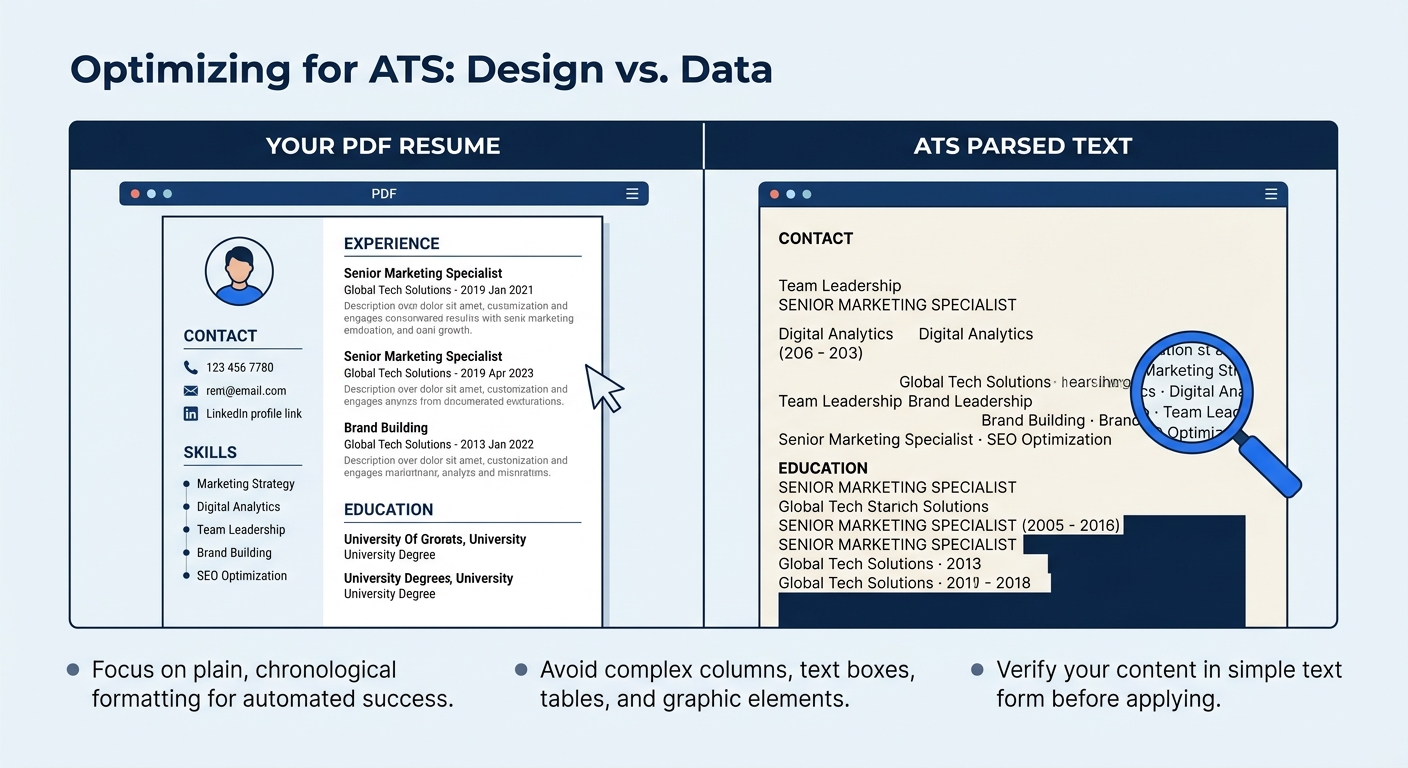
Applicant tracking systems don’t just scan your resume for keywords. They parse it, extracting your name, contact info, job titles, dates, education, and skills into structured data fields. A resume that parses cleanly looks like a neatly organized database entry on the recruiter’s screen. A resume that parses poorly shows up as a jumbled mess of text fragments, with your job title accidentally filed under education or your skills scattered across random fields.
Free tools from Canva are a common offender here. Canva produces beautiful resumes, but its multi-column layouts, text boxes, and graphical elements confuse most ATS software. The resume looks impressive as a PDF, but when an ATS tries to read it, the data comes out scrambled. You’ve essentially submitted a corrupted file while thinking you submitted something gorgeous.
Paid ATS-friendly resume tools take a different approach. Instead of letting you design freely, they constrain your choices to templates that have been tested against actual ATS software. Tools like Kickresume and Novoresume include real-time ATS scoring, meaning you can see how well your resume will parse before you submit it. Some offer keyword suggestions pulled from the job description you’re targeting.
Warning: If you’re using Canva or any design-first tool for resumes you submit through online application portals, test the output. Copy-paste the text from your PDF into a plain text editor. If the text order is scrambled or sections appear out of sequence, the ATS will see the same chaos.
This is the core of any honest ATS-friendly resume tools comparison: free tools can produce ATS-parseable documents if you stick to single-column, text-based templates. Paid tools add a verification layer that tells you whether your specific resume will survive a specific ATS. For someone applying to five jobs, manual checking might be fine. For someone applying to fifty, the verification layer starts saving real time.
How Paid Builders Earn Back Their Cost
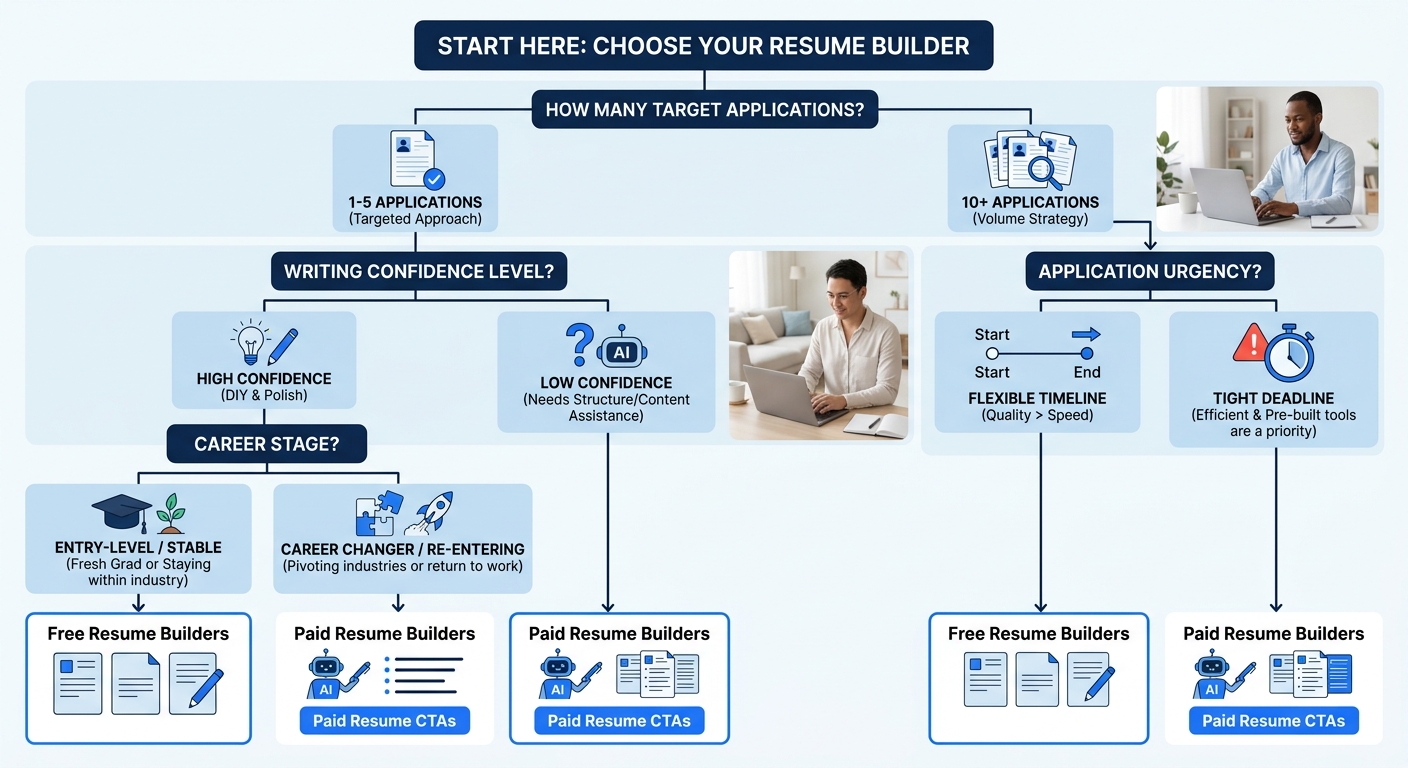
The resume builder ROI calculation depends almost entirely on volume and urgency.
If you’re applying to one or two positions, a free builder works fine. The cost-benefit analysis from Seekario’s 2026 comparison confirms this directly: low-volume applicants don’t need keyword optimization engines or multi-version management because they can handle that work manually.
The equation shifts when you’re applying to 15, 20, or 50 jobs. Each application ideally gets a tailored resume, which means adjusting keywords, reordering bullet points, and sometimes rewriting your professional summary. Doing this manually in Google Docs takes 30 to 45 minutes per application. A paid builder with AI-powered keyword matching and one-click tailoring can compress that to five or ten minutes.
Run the numbers. At 30 applications, manual tailoring in a free tool costs roughly 15 to 22 hours of focused work. A paid tool at $20/month might cut that to 3 to 5 hours. If your time has any value at all, the paid tool saves you the equivalent of $200 to $500 worth of hours in a single month. That’s before accounting for any improvement in callback rates from better optimization.
The real cost of a free resume builder is measured in hours, not dollars, and those hours compound with every application you send.
The other scenario where paid tools earn their keep is urgency. When a promising job posting has a 48-hour window, quickly creating a tailored, professional resume can make the difference between getting your application in and missing the deadline entirely. Free tools require you to bring all the optimization knowledge yourself. Under time pressure, that’s a real disadvantage.
Paid builders also tend to include features that compound over a long search: cover letter generators, LinkedIn optimization suggestions, and application tracking dashboards. None of these are essential individually, but together they reduce the friction of a search that might stretch across months. If you’re going through a career transition and need to reframe experience across different industries, the content suggestion features in paid tools become particularly useful.
When Free Is Genuinely Enough
A free resume builder is sufficient when three conditions are true simultaneously: you’re targeting a small number of positions, you have strong enough writing skills to craft your own bullet points, and you’re comfortable verifying ATS compatibility yourself.
That third condition is the one people underestimate. Verifying ATS compatibility means using an ATS checker tool (some are free at a basic level) and reading the results carefully enough to know what to fix. If you can do that, and you can write specific, measurable achievement bullets without prompting from an AI, you genuinely don’t need to pay for a builder.
Students and recent graduates often fit this profile well. They’re typically applying to a handful of entry-level positions, their work history is short enough that formatting is simple, and their resumes don’t need heavy tailoring between applications because the roles they’re targeting tend to be similar.
Career changers, by contrast, almost always benefit from paid tools or professional help. Translating experience from one industry into language that resonates in another requires the kind of keyword intelligence and content suggestions that free builders don’t provide. The same goes for anyone re-entering the workforce after a gap or navigating a search after a layoff.
And here’s an important caveat that applies to every tier: a resume builder improves how your experience is presented, but it doesn’t guarantee interviews or job offers. The tool produces a document. Whether that document lands you callbacks depends on your actual qualifications, the competitiveness of the market, and how well you’ve targeted roles where your experience genuinely aligns. Affordable resume optimization through a paid builder raises your floor. It doesn’t change what’s written on it.
Where the Model Breaks
The entire free-vs-paid framework assumes that the resume builder is the bottleneck. Often, it isn’t.
If your resume has weak content, the fanciest paid builder in the world will produce a beautifully formatted document full of vague responsibilities instead of specific achievements. No amount of ATS optimization fixes “Responsible for managing projects” when it should say “Led migration of 14 client accounts to new platform, reducing onboarding time by 40%.” The builder is a container. If what you’re putting inside is generic, the container doesn’t matter.
Similarly, the framework breaks when you’re dealing with problems that aren’t resume problems at all. If you’re applying to 200 jobs and getting zero responses, the issue might be targeting. You might be reaching for roles where you don’t meet the core requirements, or you might be caught in the ghost job trap where the listings were never real to begin with. A paid resume builder won’t diagnose that.
The framework also collapses at the high end of the market. Senior executives, C-suite candidates, and specialized professionals in fields like architecture or medicine often need a level of narrative positioning that no builder can provide, free or paid. That’s where professional services or career coaching enter the picture, and they operate on completely different economics.
Where the model holds up well is in the broad middle of the job market: professionals with 2 to 15 years of experience, applying to roles where ATS screening is the first gate, who need a clean, keyword-optimized document and have the self-awareness to put good content inside it. For that population, the choice between free and paid comes down to volume, time, and how much of the optimization work you’re willing to do yourself.
The honest answer to “should I pay for a resume builder?” is almost always “it depends on how many resumes you need to produce this month.” One resume, one job? Google Docs and your own judgment will get you there. Twenty resumes across three different role types in a competitive market? The $20/month paid tool pays for itself before the second week is over. Everything in between is a judgment call, and the judgment that matters most is a realistic assessment of your own writing and optimization skills, not the price tag on the software.