

 4.9
4.9 4.5
4.5Resume.io’s auto-tailor feature parses a job posting, extracts the keywords your resume is missing, and injects them into your existing bullet points—all triggered by a single button. The common assumption is that this process works like a find-and-replace script, swapping your words for the employer’s words. That assumption is wrong, and understanding why requires looking at each layer of the mechanism separately: what gets scanned, how matches are scored, where suggestions land, and which parts of the process still depend entirely on you.
The distinction matters because keyword alignment done badly turns a distinctive resume into a wall of jargon that reads like the job posting rewrote itself. Keyword alignment done well threads specific terms into sentences you already wrote, keeping your phrasing, your metrics, and your professional identity intact. The gap between those two outcomes lives in the details of how Resume.io’s system generates, presents, and lets you filter its suggestions.
How the Job Description Gets Parsed
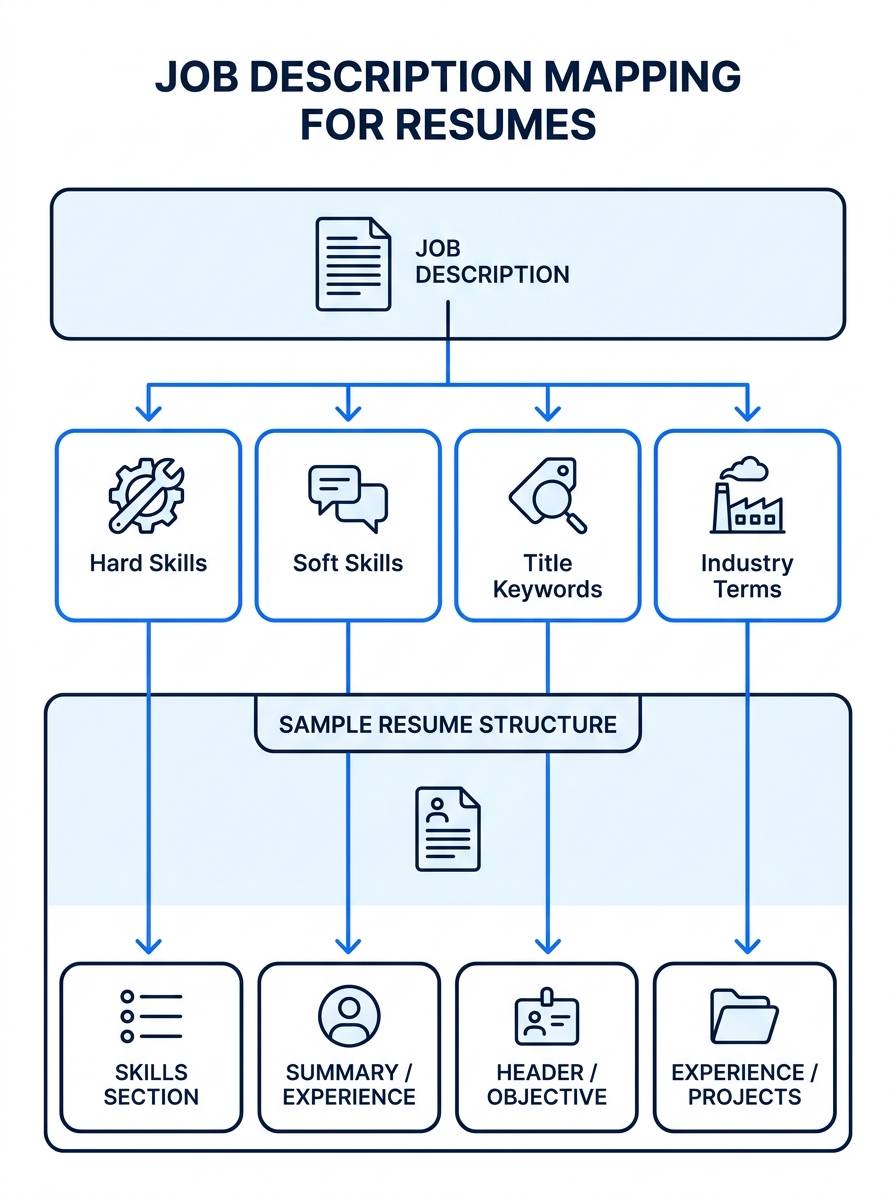
When you paste a job link or description into Resume.io’s tailoring tool, the platform doesn’t treat the entire posting as a single block of text. It segments the description into categories: hard skills (specific tools, certifications, technologies), soft skills (collaboration, leadership, communication), job-title-level keywords (the role name and its common variants), and industry-specific terminology.
This parsing step is where Resume.io’s approach to job description keyword analysis diverges from simpler tools like basic ATS checkers. A tool like Jobscan scans your resume against a job description and shows you a match percentage. Resume.io goes a step further by attempting to understand where in your resume each missing keyword should logically appear. A missing mention of “Salesforce” won’t get suggested for your education section; it’ll be flagged near a bullet point about CRM systems or sales pipeline management.
The parser also weights keywords by frequency and placement. A skill mentioned three times across the job description—once in the summary, once in the requirements, once in the preferred qualifications—carries more weight than a skill buried in a single sub-bullet. This frequency mapping determines the priority order of the suggestions you’ll see.
The Matching Engine and How It Scores Gaps
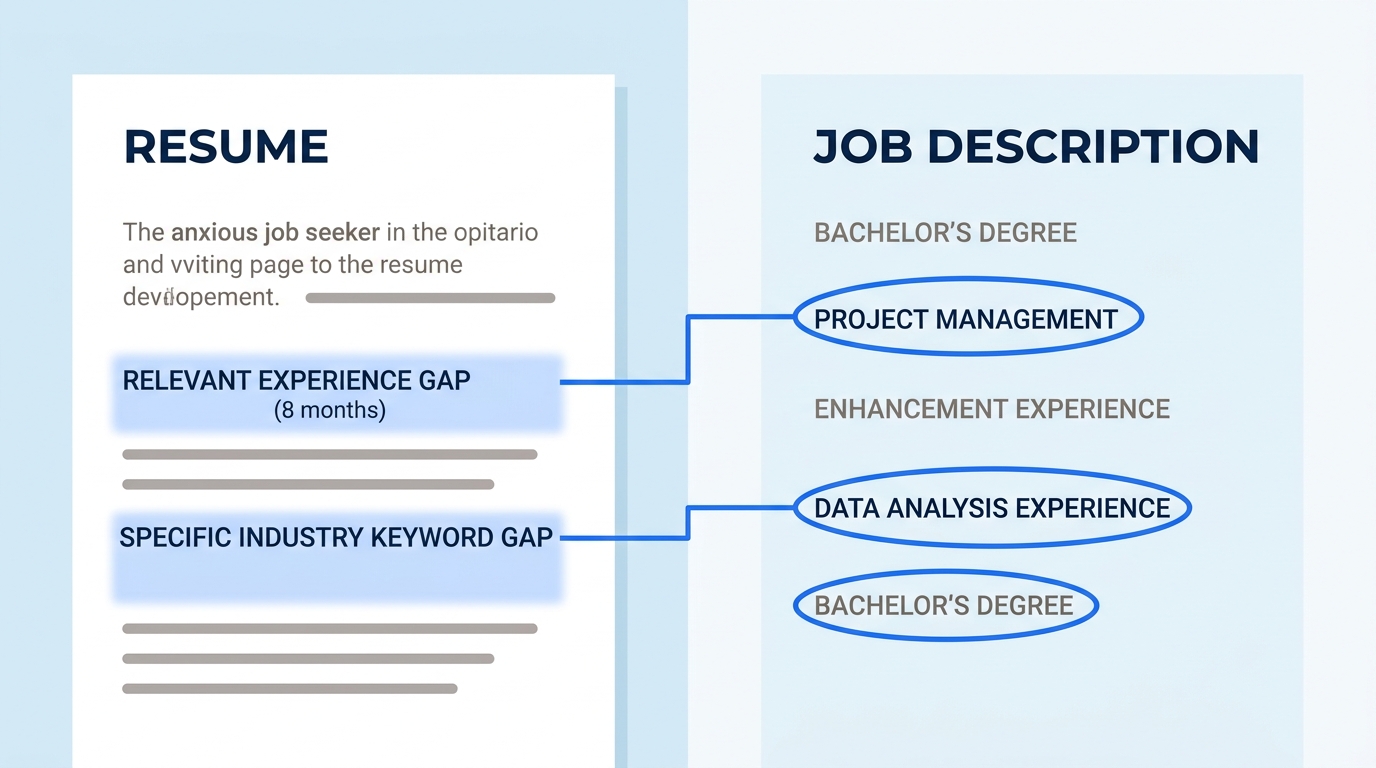
Once the job description is parsed, Resume.io runs it against your existing resume content. The matching engine does three things in sequence:
Direct keyword matches come first. If the job asks for “Python” and your resume already says “Python,” that’s a confirmed match. No suggestion needed.
Semantic near-matches come second. If the job asks for “cross-functional collaboration” and your resume says “worked with engineering and marketing teams,” the system recognizes partial overlap. It may suggest rephrasing to include the exact term, or it may mark it as covered depending on how close the semantic match is.
Complete gaps come third. These are keywords from the job description that have zero representation—direct or semantic—anywhere in your resume. These generate the strongest suggestions.
The system produces what amounts to a gap report, ranked by keyword importance. This is the core of the personalized resume matching process. Each gap gets a suggested edit: a rewritten bullet point, an added skill entry, or a tweaked summary line that incorporates the missing term.
Here’s the critical design choice: you see every suggestion individually. As Resume.io’s own feature announcement explains, you can accept them all with one click or deselect any that don’t suit you. The “one-click” label describes the fastest path through the tool, not the only path. The interface is built to let you cherry-pick.
Where the Suggestions Actually Land
This layer is where people’s resumes go wrong with any AI tailoring tool, Resume.io included. Understanding where suggestions get placed—and why—protects you from the kind of generic bloat that makes hiring managers’ eyes glaze over.
Resume.io places keyword suggestions in three zones:
The skills section gets the simplest treatment. If a job asks for a tool or certification you haven’t listed, the system adds it to your skills list. This is low-risk because skills sections are expected to be dense, scannable lists. Adding “Tableau” to a list that already contains “Power BI” and “SQL” doesn’t damage your voice because that section never had much voice to begin with.
The professional summary gets the most aggressive rewriting. The system often proposes replacing or augmenting your opening paragraph to mirror the job’s language. This is where the biggest danger lives. Your summary is the most “you” section of the resume—the one place where tone, emphasis, and self-framing carry significant weight. If you’ve spent time on crafting a summary that avoids buzzword overload, accepting a wholesale rewrite here can undo that work.
The experience bullet points get targeted insertions. Rather than rewriting entire bullets, the system typically modifies a phrase or adds a parenthetical. A bullet reading “Led migration of customer database to new platform” might become “Led migration of customer database to Salesforce (CRM), reducing ticket resolution time by 30%.” The original achievement stays; the keyword gets woven in.
Your resume must pass the “Robot” test for keywords but win the “Human” test for flow—a 6-second scan by a recruiter has to convey your value clearly, or the keyword score won’t save you.
The Human Review Gate (Where Your Voice Survives or Dies)
The entire one-click resume customization workflow hinges on what happens after the suggestions appear. Resume.io saves auto-tailored versions in a separate tab on your dashboard, which means your original resume stays untouched. You’re editing a copy, not overwriting your base document.
This architecture gives you a specific review workflow:
- Open the tailored version side-by-side with your original.
- Read every changed bullet point aloud. If it sounds like something you’d never say in an interview, reject that edit.
- Check the summary section first—it’s the most likely to have been over-rewritten.
- Look for redundancy. AI tailoring tools sometimes add the same keyword in three different places. One or two natural placements beat three forced ones.
- Verify your metrics survived. Numbers are the strongest differentiators on a resume, and sometimes AI rewrites dilute or remove them during keyword insertion.
This review step is where the mechanism succeeds or fails at the individual level. The tool has no way to know that your phrasing of “built a reporting pipeline that cut quarterly close from 12 days to 4” is more powerful than its suggested “developed data analytics reporting infrastructure using SQL and Tableau.” Both contain relevant keywords. Only one sounds like a real human describing real work.
The gap between what ATS systems reward and what hiring managers actually want to read is exactly the space this review step occupies. Skip it, and you optimize for machines at the expense of humans.
Warning: Auto-tailored resumes saved without human review tend to converge toward the same language as every other applicant using the same tool on the same job posting. The whole point of customization is differentiation, which requires your judgment in the loop.
How ATS Systems Read the Output
Understanding the ATS optimization workflow on the receiving end helps explain why Resume.io’s approach works when used correctly.
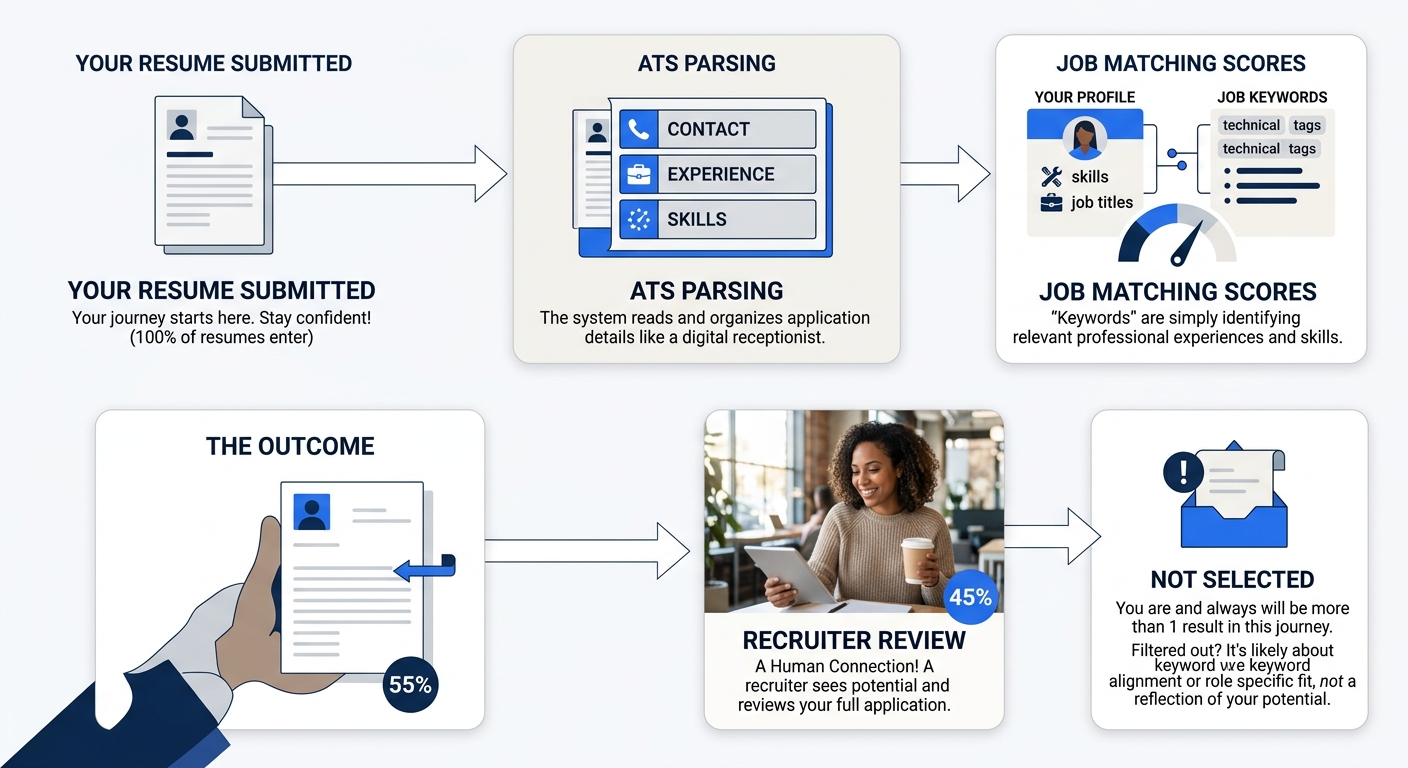
Modern applicant tracking systems parse resumes into structured fields: contact info, work history, education, skills. They then run keyword matching against the job requisition. The matching is more sophisticated than it was five years ago—most systems now handle synonyms and related terms to some degree—but exact keyword matches still carry the highest weight in ranking algorithms.
Resume.io’s templates are designed to be ATS-parseable, meaning the underlying document structure uses standard headings, avoids tables and columns that confuse parsers, and keeps text as actual text rather than embedded images. This structural layer works independently of the keyword-tailoring feature, but the two combine to produce a resume that both parses cleanly and scores well against the specific job it was tailored for.
The practical result: a tailored resume from Resume.io typically scores significantly higher on ATS match metrics than the same person’s generic resume. If you’ve been comparing free and paid resume builders and wondering what the paid tier of Resume.io actually buys you, the auto-tailor feature is the primary differentiator. Free users can still access the Resume Optimizer for manual suggestions, but the one-click batch application of changes requires a premium subscription.
What the Feature Can’t See
Resume.io’s resume.io automation handles keyword density and placement well. It handles structural ATS compatibility well. But several important dimensions of resume quality sit outside its detection range.
Tone consistency isn’t measured. If your original resume uses direct, confident language (“Cut costs by $2.1M”) and the AI suggestions default to passive corporate-speak (“Contributed to cost-reduction initiatives”), the mismatch creates a jarring reading experience. No scoring algorithm catches this.
Achievement hierarchy isn’t preserved. You probably ordered your bullet points deliberately—strongest accomplishment first, supporting details below. The tailoring engine doesn’t understand that ordering. It may suggest inserting a keyword-rich but weaker bullet above your strongest one.
Industry context has limits. A job description for a “Product Manager” at a fintech startup and a “Product Manager” at a defense contractor use overlapping language but operate in completely different contexts. The parser treats both as the same set of keywords. Your knowledge of the industry has to fill that gap.
Authenticity signals are invisible to automation. Hiring managers who’ve read 200 resumes for the same role develop an instinct for which ones were obviously machine-tailored. The tell is usually uniformity: when every bullet point contains a keyword from the job description, the resume reads like a mirror of the posting rather than a document written by someone with genuine experience. The advice from career experts at Reztune captures this well—your resume needs to pass the robot test for keywords while winning the human test for flow.
And if you’re in a field where AI-generated content is already creating bias in screening, understanding these limitations becomes even more important. The tool gives you a strong starting point. The finishing work is yours.
The Tradeoffs
Resume.io’s one-click tailoring feature sits at a specific point on the effort-vs-quality spectrum. At one end, you have fully manual customization: reading the job description, identifying keywords yourself, rewriting bullets by hand for each application. This produces the highest-quality result but takes 30-45 minutes per application, which is unsustainable if you’re applying to dozens of roles. At the other end, you have zero customization: sending the same generic resume everywhere and hoping for the best.
The one-click approach lands in the middle. It gets you 70-80% of the way to a well-tailored resume in about two minutes. The remaining 20-30% comes from your review pass: rejecting bad suggestions, preserving your strongest phrasing, and making sure the final document sounds like you wrote it for this specific job rather than clicking a button.
That middle ground works well for most job seekers, with one important caveat. The more senior your role, the more your resume depends on narrative and positioning rather than keyword density. An entry-level applicant applying to a clearly defined role benefits enormously from keyword alignment. A VP-level candidate applying to a role where the job description is vague and the real requirements are political benefits less. If you’re navigating that distinction, understanding how tools map to different career stages helps you set realistic expectations for what any automated feature can do.
The mechanism works. It works because it automates the tedious keyword-extraction step while preserving your ability to reject any change. It breaks when you skip the review, accept everything, and send a resume that reads like the job description regurgitated itself into a template. The button is fast. The judgment call after it is what determines whether the resume that arrives in a recruiter’s inbox sounds like a qualified professional or an algorithm.