


 4.9
4.9 4.5
4.5Building an effective sample letter cover letter takes about 40 minutes: choose a single-column template, write four focused paragraphs totaling under 400 words, and anchor every claim with a quantified achievement from your work history. This guide covers each step with copy-ready examples.
TL;DR: A winning cover letter uses a clean single-column format, runs three to four paragraphs on one page, replaces generic filler with measurable results, and gets saved as a PDF. Follow the seven steps below to build yours from scratch.
Before You Start
You’ll need four things before you begin writing your sample letter cover letter, and skipping any of them makes the process slower and the output weaker.
What to gather:
- The job posting, open it in a tab or print it. You’re going to pull exact phrases from it.
- Your current resume, you need your dates, titles, and accomplishment bullets at hand.
- The company’s website or LinkedIn page, look up the hiring manager’s name. According to hiring data, 26% of hiring managers specifically value being addressed by name, and 47% of employers won’t consider candidates who show zero company knowledge.
- A word processor or template tool, Google Docs, Microsoft Word, or a platform like Canva all work. Microsoft Word offers free ATS-friendly cover letter templates in dozens of styles if you want a head start.
Time required: 35–45 minutes for your first letter. Subsequent letters using the same base template take about 15 minutes each.
Skill level: No prior cover letter experience needed. If you can write a professional email, you can do this.
Step 1: Pick a Single-Column Template
Your template choice determines whether an applicant tracking system can read your letter at all. ATS software eliminates up to 50% of candidates before a human reviews their file, and multi-column or heavily designed layouts are a primary cause of parsing failures.
Choose a template with these characteristics:
- Single column, no sidebars or text boxes
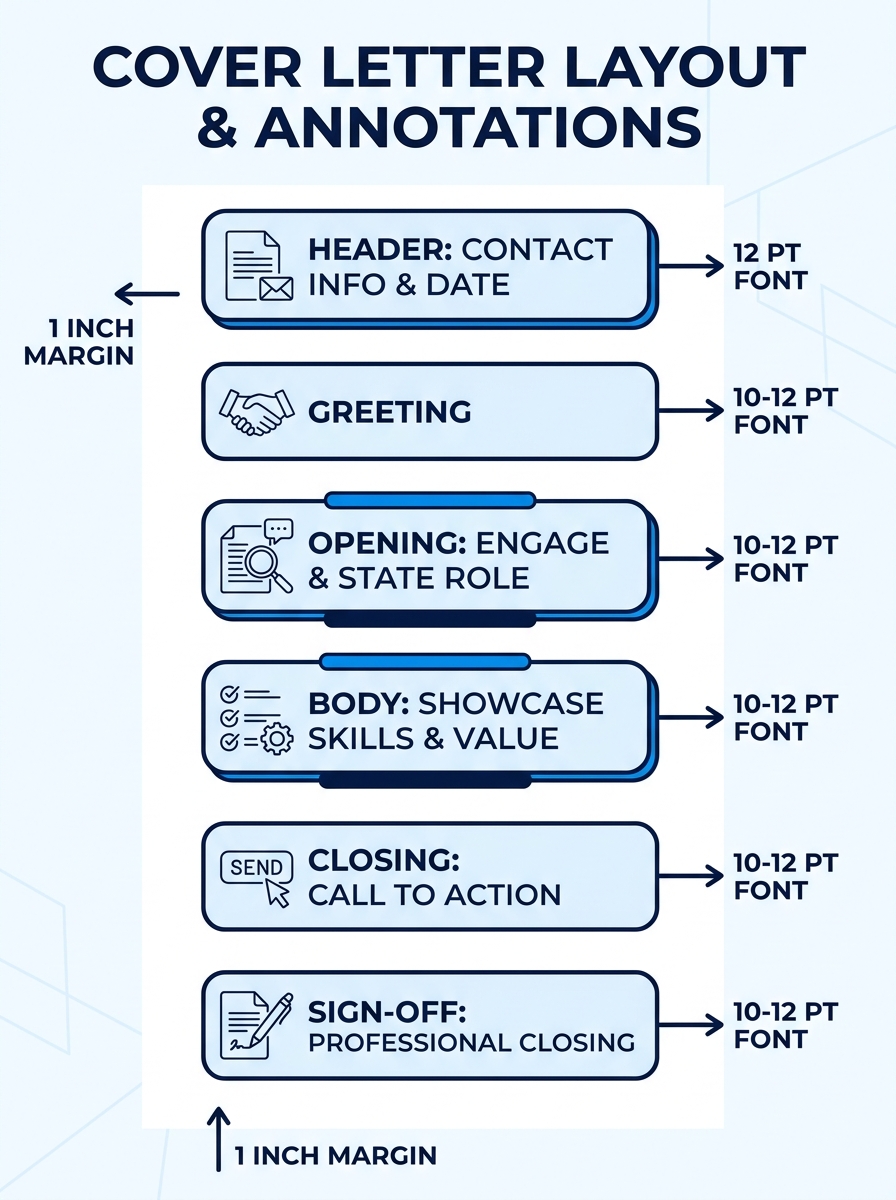
- Standard font (Arial, Calibri, Garamond, or Times New Roman) at 10–12 point size
- Margins between 0.75″ and 1″
- No headers or footers containing critical information, some ATS platforms skip those regions entirely
The Microsoft Word Blog’s 2026 formatting guide confirms correct cover letter formatting includes “clear sections that guide readers through information, including a header, greeting, opening paragraph, middle paragraph, closing call to action, and professional sign off.”
You’ll know this step worked when your template looks clean and readable with no decorative elements blocking the text flow. If you’re evaluating template quality, the same principles apply whether you’re working from a sample cover letter template or building from scratch.
Step 2: Write the Header and Greeting
The header contains your contact information and the recipient’s details. This takes two minutes and follows a fixed format every time.
Your header should include:
- Your full name
- Phone number, professional email, city and state (full street address is optional)
- LinkedIn URL (if your profile is complete, and a well-optimized LinkedIn profile drives significantly more recruiter views)
- Date
- Hiring manager’s name, title, company name, and company address
For the greeting: Use “Dear [First Name] [Last Name],” if you’ve found the hiring manager through LinkedIn or the company website. MIT’s career advising team recommends: “If you are not sure who to address the letter to, write ‘Dear Hiring Manager.'”
You’ll know this step worked when your header fills roughly four to six lines and your greeting names a specific person. If the job posting includes a reference number or code, add it to the first line of your letter body so HR can track your application accurately.
Step 3: Write the Opening Hook
This paragraph is 40–60 words. Its job is to name the role you’re applying for, establish immediate relevance, and give the reader a reason to keep going. Seventy percent of employers prefer cover letters that are one-half page or shorter, so every sentence here needs to earn its space.
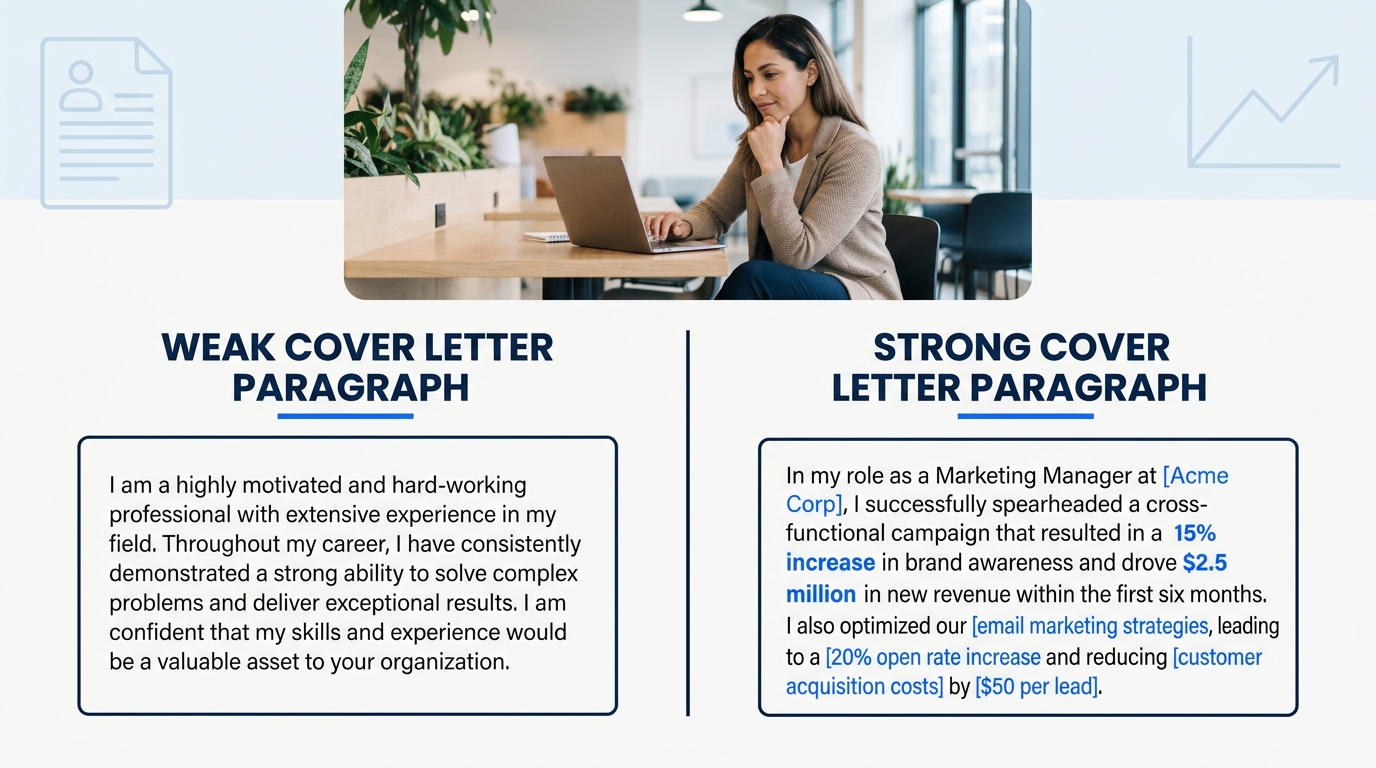
Generic opener (don’t do this):
“I am writing to express my interest in the Marketing Manager position. I believe I would be a great fit for your team.”
Specific opener (do this instead):
“Your Marketing Manager posting caught my attention because Redline Media’s 2025 rebrand campaign mirrors work I led at Forza Digital, where I managed a team of four and grew organic traffic 140% over eight months.”
The difference is measurable specificity. The second version names the company, cites a result, and connects the applicant’s experience directly to the employer’s context. When you browse cover letter examples that lead to interviews, this pattern shows up consistently: named company + quantified result + direct connection to the role.
Tip: Pull two or three keywords directly from the job posting and use them in your opening paragraph. ATS platforms scan for keyword matches, and placing them early increases your score.
Step 4: Build the Body Paragraph
The body paragraph (or two short paragraphs, depending on space) is where you prove the claims you made in the opener. Target 80–120 words. Each point should tie a specific skill or achievement to something the employer asked for in the job description.
Structure each point as: Skill → Context → Result.
Here’s what this looks like in practice:
“At Forza Digital, I designed and executed a quarterly email campaign strategy that increased subscriber engagement by 34% and generated $220K in attributed revenue over two quarters. I also managed our paid social budget of $15K/month, consistently hitting a 4.2x ROAS against a 3.5x target.”
Notice: two achievements, both with numbers, both tied to marketing functions the employer would care about. Thirteen percent of hiring experts note the ideal cover letter length stays under 400 words, so you don’t have room for more than two or three of these proof points. Pick your strongest ones.
If you’re drawing a blank on quantified results to include, our guide on proven cover letter templates shows before-and-after examples across different industries.
Step 5: Write the Closing and Sign-Off
The closing paragraph runs 30–50 words. It does three things: restates your enthusiasm, proposes a next step, and thanks the reader.
Example closing:
“I’d welcome the chance to discuss how my campaign management experience can support Redline Media’s growth goals. I’m available for a conversation at your convenience and can be reached at (555) 123-4567. Thank you for your time and consideration.”
Sign-off options that work: “Best regards,” “Sincerely,” “Thank you,” followed by your full name.
Avoid “Cheers,” “Thanks!,” or anything overly casual unless the company culture explicitly signals informality. You’ll know this step worked when your closing includes a clear action (the reader knows what happens next) and your full letter still fits on one page.
Warning: Don’t repeat your resume bullet points verbatim in the cover letter. The letter explains the *context and reasoning* behind your achievements. The resume lists them. If both documents say the same thing in the same words, the cover letter adds nothing.
Step 6: Format, Proofread, and Export as PDF
This final production step takes five minutes and catches the errors that sink otherwise strong applications.
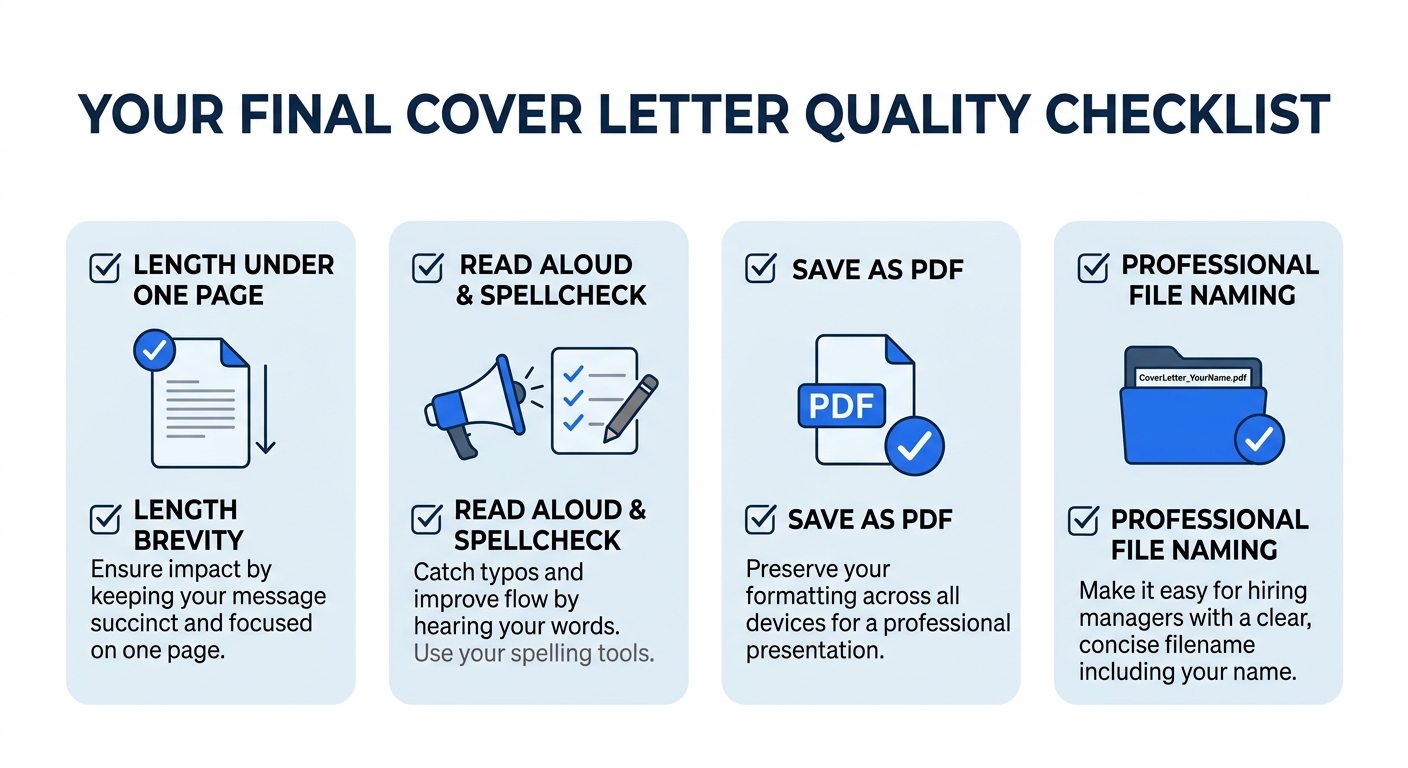
- Check total length. Your finished sample letter cover letter should be one page. MIT’s career advising team states: “A cover letter should be no longer than one page with a font size between 10-12 points.” If you’re over, cut the weakest proof point from the body first.
- Read it aloud. You’ll catch awkward phrasing and run-on sentences that your eyes skip over on screen. Indeed’s formatting guide specifically recommends reviewing aloud before submission.
- Run spellcheck, then have a friend read it. Spellcheck won’t catch “manger” when you meant “manager.”
- Save as PDF. This preserves your formatting across devices and operating systems. A .docx file can reflow on the recipient’s machine; a PDF won’t.
- Name the file professionally: FirstName-LastName-Cover-Letter.pdf. Hiring managers download dozens of files per posting.
You’ll know this step worked when you open the PDF on your phone and every line, margin, and section break looks identical to what you see on your computer.
When Things Go Wrong
Three problems account for most cover letter rejections. Here’s how to spot and fix each one.
Problem 1: The ATS can’t parse your letter. Symptoms: you apply to dozens of jobs with no response at all. Fix: strip all text boxes, tables, columns, and graphics from your template. Paste your letter into a plain text editor, if the text comes through in reading order with no garbled characters, ATS platforms will read it correctly. If you’ve had trouble with this, our comparison of resume builders tested against real ATS platforms covers which tools handle parsing best.
Problem 2: Your letter is too generic. Symptoms: you’re sending the same letter to every employer with only the company name swapped. Fix: rewrite the opening hook and at least one body proof point for each application. The 47% employer rejection rate for candidates who show no company knowledge is driven almost entirely by generic letters.
Problem 3: Your letter exceeds one page. Symptoms: your closing paragraph spills onto page two, or you’ve squeezed margins below 0.5″ to make everything fit. Fix: cut one proof point from the body or trim your opening hook to 40 words. The University of Michigan’s Career Center puts it plainly: “Keep it short and sweet, do not exceed one page.”
Where to Go From Here
Once you have a working sample letter cover letter that passes the one-page test, reads cleanly in PDF, and ties at least two quantified achievements to the job posting, you’ve built a template you can adapt for every future application. The heavy lifting, choosing your format, establishing your proof-point structure, nailing your sign-off tone, is done. Each new application now becomes a 15-minute customization job: swap the company name, adjust the hook, rotate in the proof points most relevant to that specific role. And if you’re looking for more examples sorted by industry and experience level, ResumeBuilder.com maintains a library of cover letter examples created by Certified Professional Resume Writers that’s worth browsing for inspiration. The sample letter cover letter you wrote today is your foundation. Every version you customize from here gets faster and sharper.
