

 4.9
4.9 4.5
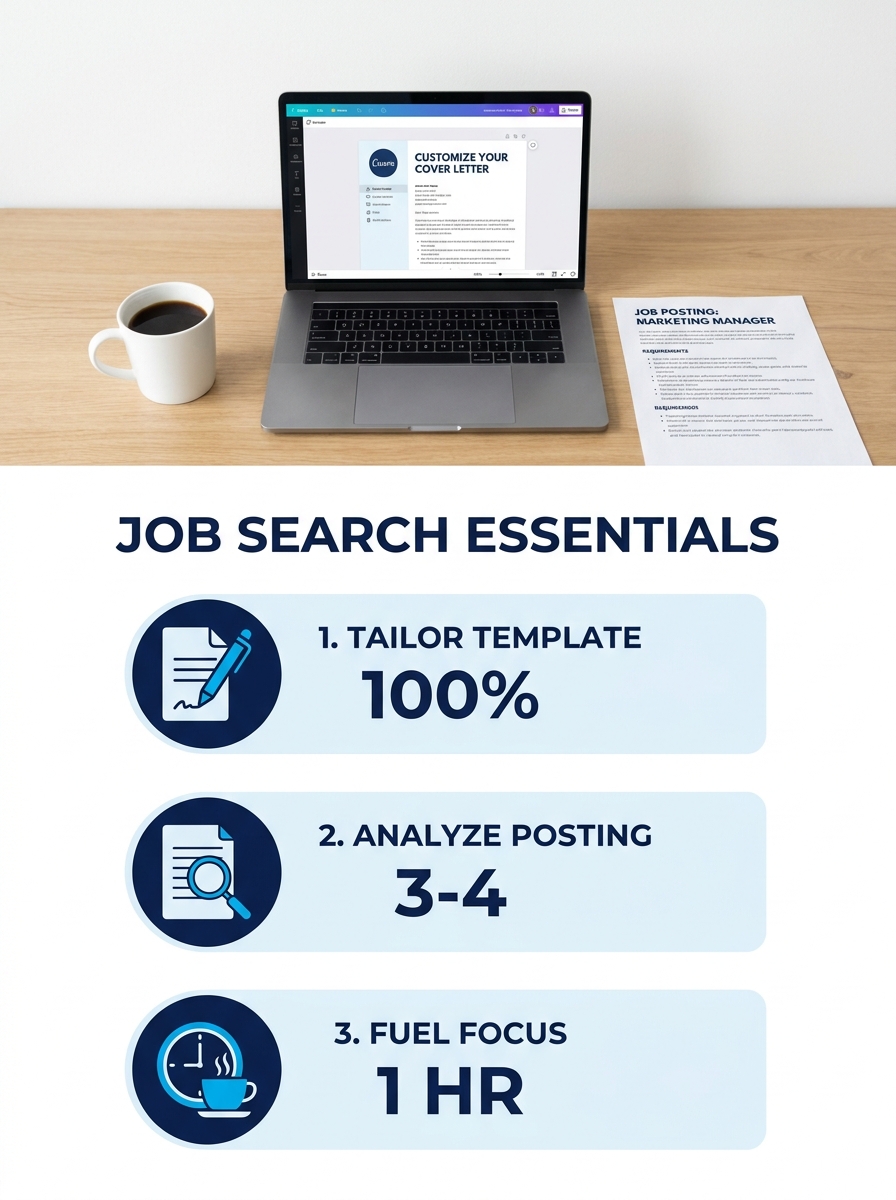
4.5Canva, Microsoft Word, and Resume Genius host more than 400 free cover letter templates between them. By the end of this guide, you’ll know how to pick the right template for your industry, replace every generic line with role-specific content, and export a finished cover letter in under 45 minutes.
TL;DR: A cover letter template handles formatting and layout. Your job is the content: swap out placeholder text with achievements pulled from the job posting, address the hiring manager by name, keep the whole thing under one page, and export as PDF. Follow the six steps below to do it right.
Before You Start
You need four things ready before you open a single template. Skipping any of them adds time later and usually results in a weaker letter.
A job posting you’re applying to. Templates are useless without a specific role. You’ll pull keywords, responsibilities, and the hiring manager’s name directly from the posting. If the posting doesn’t list a name, check the company’s LinkedIn page or team directory.
Your resume, finalized. The cover letter expands on your resume; it shouldn’t contradict it. Have the final version open in a separate tab. If you’re still working on formatting, our complete cover letter template guide covers how the two documents should align.
A free account on one template platform. Canva, Microsoft Word online, and dedicated builders like Cover Letter Now all offer free ATS-friendly templates. You don’t need a paid plan for a single letter. Microsoft Word’s free template gallery has options organized by style and color.
About 45 minutes of uninterrupted time. Customization is the part that matters, and rushing it produces the kind of generic output that 94% of hiring managers say they can spot, according to survey data compiled by Resume Genius.
Step 1: Choose a Template That Matches the Role
The template you pick determines your formatting, font pairing, and section layout. It does not determine your content. Treat it like a container, not a script.
For corporate and finance roles, stick with single-column templates in black and white. Serif fonts like Georgia or Times New Roman at 11pt or 12pt read well in ATS systems like Workday and Taleo. Canva’s “Professional” and “Classic” categories both work. For creative roles in design, marketing, or media, you have more room for color and layout variation, but the letter still needs to parse correctly through applicant tracking software.
A good rule: if the template has sidebars, text boxes, or graphics embedded in the body, skip it. Those elements break ATS parsing. According to Enhancv’s ATS cover letter research, headers, footers, and columns cause the most extraction errors in automated screening.
Our breakdown of cover letter templates for every job type matches specific formats to industries if you want a shortcut.
You’ll know this step worked when you have a single template open, editable, with placeholder text visible in each section: header, greeting, opening paragraph, body paragraph(s), closing paragraph, and sign-off.
Step 2: Replace the Header and Greeting
Open the template and start at the top. The header should contain your full name, phone number, email address, and (optionally) your LinkedIn profile URL or city/state. Delete any placeholder icons or images the template includes. Replace “Your Name” with your actual name in the same font and size the template uses.
Below the header, add the date, then the company name and the hiring manager’s name. This matters: 26% of hiring managers in recent surveys say addressing them by name shows effort that generic greetings like “To Whom It May Concern” don’t. If the posting lists “Taylor Rodriguez, VP of Engineering,” your greeting reads “Dear Taylor Rodriguez.”
If you can’t find a name anywhere, “Dear Hiring Team” works. “Dear Sir or Madam” does not. It reads dated.
You’ll know this step worked when the header has zero placeholder text and the greeting addresses a real person or a specific team.
Step 3: Rewrite the Opening Paragraph
Every template ships with a generic first paragraph. Something like “I am writing to express my interest in the [Position] role at [Company].” Delete it. All of it.
Your opening paragraph does two things: names the exact role and company, and states the single strongest reason you’re a fit. That reason should come from the job posting. If the posting emphasizes “experience managing cross-functional teams,” your opener connects your background to that specific requirement.
Here’s what a rewritten opener looks like for a project management role:
“Your posting for Senior Project Manager mentions reducing vendor costs and accelerating delivery timelines. At Meridian Solutions, I cut vendor expenses by 15% and improved project delivery speed by 20% across a portfolio of 12 concurrent builds.”
That paragraph is 42 words, cites two measurable outcomes, and ties directly to the job posting’s language. The placeholder text it replaced was 28 words of nothing.
Tip: Keep the entire cover letter under one page. The University of Michigan’s Career Center [recommends keeping it “short and sweet”](https://careercenter.umich.edu/content/cover-letter-resources) and offers Lettersmith, a free tool their Center for Academic Innovation built, to help structure your letter with a built-in checklist.
You’ll know this step worked when your opening paragraph names the company, names the role, and includes at least one specific achievement with a number attached.
Step 4: Build the Body With Results, Not Responsibilities
The body is one or two paragraphs. This section does the heaviest lifting, and it’s where most people make the same mistake: they restate their resume bullet points word for word.
Your resume says what you did. Your cover letter explains why it matters to this employer. Pick two or three achievements from your resume and reframe each one around the company’s stated needs.
If the job posting asks for “experience improving operational efficiency,” don’t write “I have experience improving operational efficiency.” Write something like: “I redesigned the intake process for our 40-person customer service team, which cut average ticket resolution time from 4.2 hours to 2.8 hours and saved the department roughly $180,000 annually.”
Specific numbers make the difference between a letter that gets read and one that gets skimmed. A ResumeGo field experiment found tailored cover letters produce a 16.4% callback rate, compared to 12.5% for generic letters and 10.7% for applications submitted with no cover letter at all.
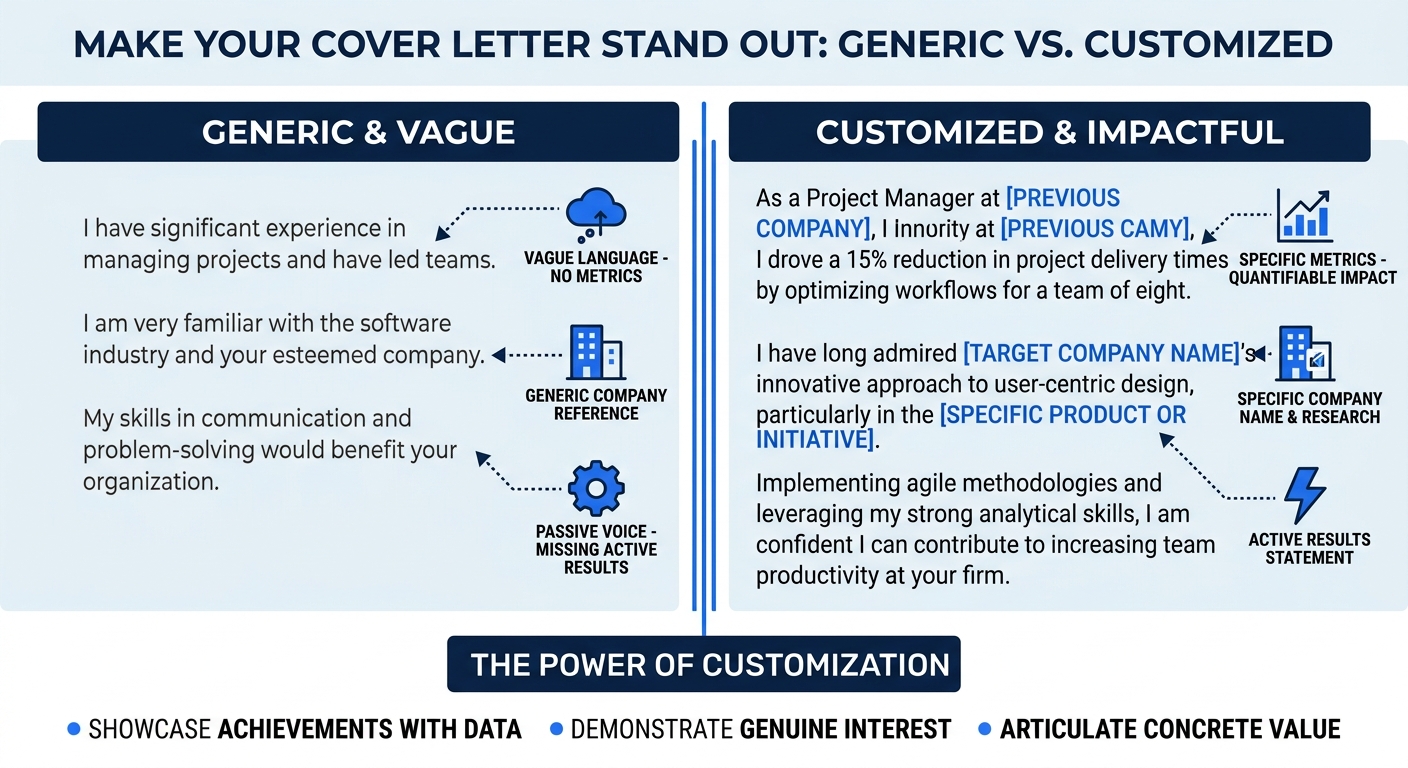
One technique that works well: mirror keywords from the job description in your body paragraphs. If the posting says “stakeholder communication” four times, use that exact phrase at least once. ATS systems score keyword matches, and human readers register familiar language as relevance.
Your resume says what you did. Your cover letter explains why it matters to this employer.
If you’re dealing with the fatigue of customizing dozens of these, you’re not alone. A Reddit thread about needing 47 custom resumes captured how exhausting this process gets at scale. The answer is reusable paragraph blocks: write three or four strong body paragraphs, then swap in the most relevant ones per application.
You’ll know this step worked when every sentence in your body paragraphs connects a specific result you achieved to a specific need the employer listed.
Step 5: Write a Closing That Asks for Something Specific
Template closings are almost always too vague. “I look forward to hearing from you” doesn’t prompt action. A closing paragraph should do three things in about 30 to 40 words: restate your enthusiasm for the specific role (not “this opportunity”), connect one more time to the company’s mission or a recent project, and request a specific next step.
Indeed’s formatting guide includes an example that lands this well: “I look forward to discussing how I can contribute to your editorial team.” That’s a direct, named request tied to a specific team. Adapt the pattern for your role.
Sign off with “Best regards,” “Sincerely,” or “Thank you.” Nothing cute. Include your full name below the sign-off.
You’ll know this step worked when your final paragraph contains the company name, the role title, and a clear sentence requesting a conversation or interview.
Step 6: Format Check, Proofread, Export
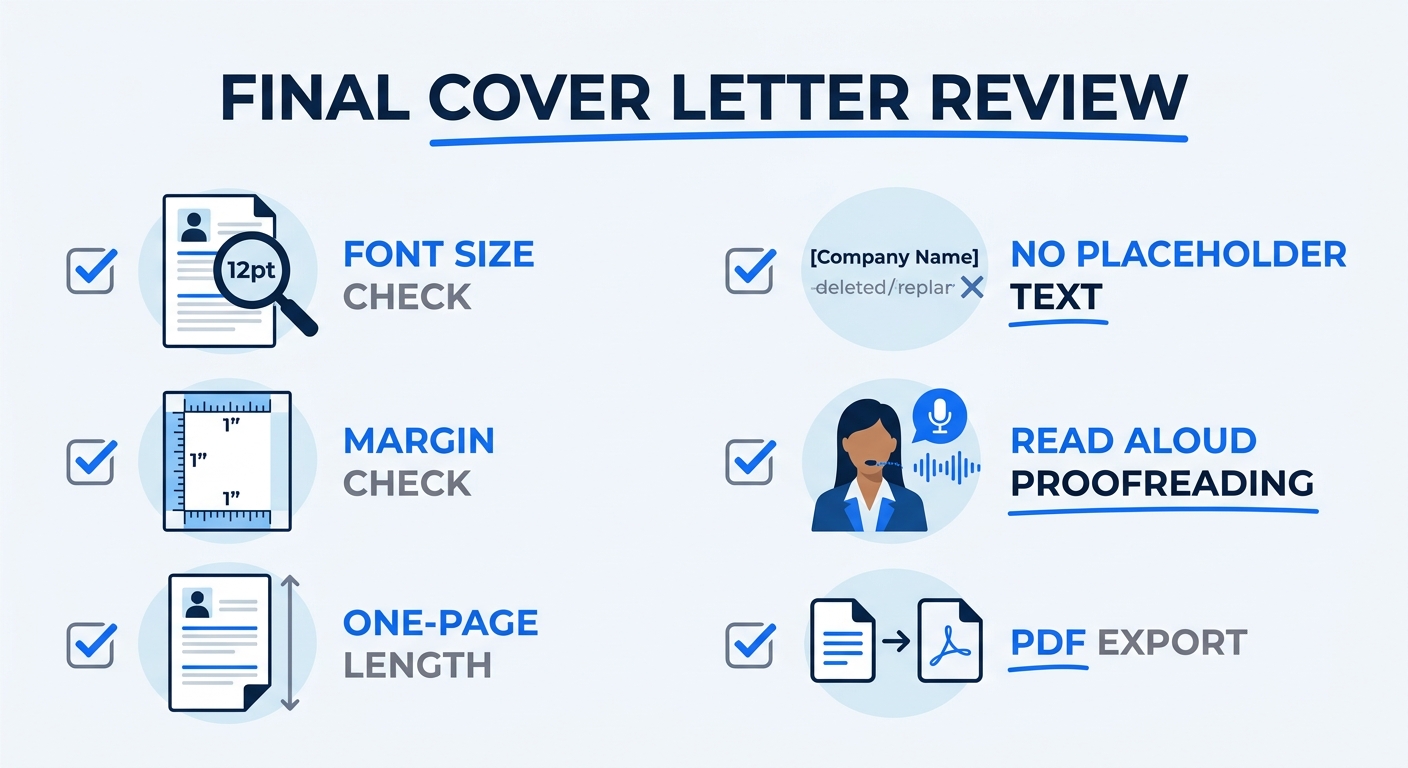
Before you send anything, run through this checklist:
- Font size is between 10pt and 12pt, using a standard font (Arial, Calibri, Georgia, Times New Roman).
- Margins are between 0.5 inches and 1 inch on all sides.
- The letter fits on one page. If it spills onto a second page, cut from the body, not the header or closing. 66% of job seekers in recent surveys prefer cover letters that are half a page or shorter.
- No template placeholder text remains. Search for brackets like “[Company Name]” or “[Your Name].” Even one missed placeholder kills credibility.
- Proofread out loud. Indeed’s formatting guide specifically recommends reading the letter aloud, running spellcheck, and having a friend review for typos.
- Export as PDF. Word documents can reformat on different machines. PDF locks your layout.
A veteran cover letter writer on Reddit’s r/jobsearchhacks put it bluntly about AI-assisted drafts: you can use tools like Kickresume, Zety, or Novoresume to generate a first draft, but “please, for the love of god, always heavily edit an AI generated cover letter.” Unedited AI output reads generic, and hiring managers flag it.
You’ll know this step worked when you have a single-page PDF with zero placeholder text, consistent formatting, and at least two specific achievements with numbers.
When Things Go Wrong
The ATS rejects or garbles your letter. This usually means the template had text boxes, columns, or embedded images that the parser couldn’t read. Rebuild using a single-column, no-graphics template. Test by copying all the text from your PDF into a plain text editor. If the text appears in the correct order with no missing sections, the ATS will read it correctly.
Your letter runs over one page. Cut qualifiers and filler words first. Phrases like “I believe that I would be a great fit” can become “I’m a strong fit.” If the letter still runs long, remove your weakest body paragraph. Two strong achievements beat three mediocre ones.
You can’t find the hiring manager’s name. Check the company’s LinkedIn page, the “About Us” or “Team” section of their website, or search “[Company Name] [Job Title] hiring manager” in Google. If nothing turns up after five minutes of searching, “Dear Hiring Team” is an acceptable fallback.
Where to Go From Here
You have a finished, ATS-friendly cover letter built from a template. The process gets faster with each application because you’ll accumulate reusable body paragraphs tailored to different types of roles.
For a deeper look at how different letter formats map to specific industries, browse our cover letter template examples. If you’re also reworking your resume to match, our sample cover letter examples show how the two documents should complement each other without repeating the same content.
And if you’re sending ten or more applications a week, build a simple spreadsheet: one column for the company name, one for the job title, one for the two or three keywords you mirrored from each posting. That spreadsheet becomes your customization log and saves you from accidentally sending Company A’s letter to Company B. It happens more often than anyone admits.
