

 4.9
4.9 4.5
4.5After following these seven steps, you’ll have a cover letter formatted to standard business-letter specifications, six defined sections, 1-inch margins, single spacing, and a total length between 250 and 400 words. Total build time: about 25 minutes if you already know what you want to say.
TL;DR: Every cover letter follows the same structural skeleton: header, greeting, opening paragraph, body paragraphs, closing call to action, and sign-off. Set your document to block format with 1-inch margins, a 10–12pt professional font, and single line spacing. Keep total word count between 250 and 400 words, and save the final file as PDF.
Before You Start
You need three things ready before you touch your document. First, the job posting you’re applying to, open in a browser tab so you can reference the role title, department, and hiring manager’s name. Second, a working copy of your resume (you’ll pull specific achievements from it). Third, a word processor that lets you set custom margins and export to PDF, Google Docs, Microsoft Word, or LibreOffice all work.
Your knowledge level doesn’t matter here. If you’ve never written a cover letter before, these steps still apply. If you’ve written dozens, the formatting specs below will help you catch common mistakes that get letters filtered out before a human reads them.
Time commitment: 25 minutes for formatting and structure, plus whatever time you spend drafting your actual content. This guide covers the format of cover letter documents specifically, the visual layout, spacing, and section order, alongside enough content direction to fill each section.
Step 1: Set Your Page Layout
The goal of this step is to configure your document’s margins, font, spacing, and page size so the letter looks clean and professional before you type a single word.
Exact settings:
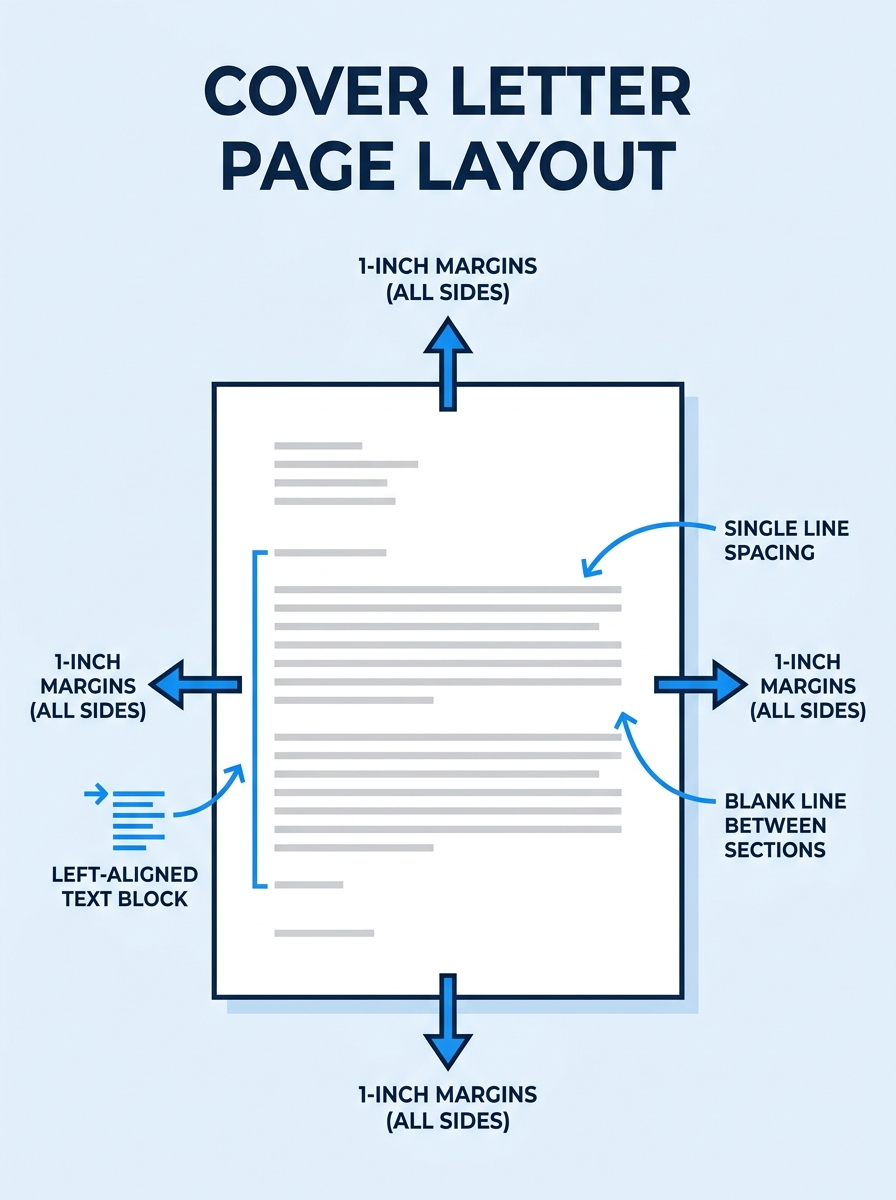
- Margins: 1 inch on all four sides. Purdue OWL’s formatting guidelines specify one-inch margins as the standard for business correspondence, and Grammarly’s cover letter guide independently confirms the same measurement.
- Font: Times New Roman, Arial, Calibri, or Georgia. Size should be 10pt, 11pt, or 12pt. According to Grammarly’s step-by-step formatting guide, 12pt is the baseline for readability, but 10pt is acceptable if you’re running tight on space.
- Line spacing: Single-spaced within paragraphs. Add one blank line between each section (between the date and the recipient’s address, between the greeting and the first paragraph, between each body paragraph, and so on).
- Alignment: Left-justified throughout. Do not center any text. Do not use justified alignment (it creates uneven word spacing).
- Page size: US Letter (8.5″ × 11″). One page maximum.
You’ll know it worked when your document has generous white space on all sides and the text starts at the same left margin from top to bottom. If anything looks crowded, your margins are probably narrower than 1 inch.
Tip: If you’re working from an existing template, check the margins manually. Many [cover letter templates](/blog/templates-of-cover-letter) default to 0.5-inch or 0.75-inch side margins to fit more text, you’ll want to widen those to the full inch.
Step 2: Build the Header
The header sits at the very top of your letter and contains your contact information, the date, and the recipient’s details. The Microsoft Word Blog identifies the header as the first of six required sections in correct cover letter formatting, calling out “clear sections that guide readers through information.”
Your contact block (lines 1–3):
- Full name
- Phone number | Email address | LinkedIn profile URL (optional but recommended if you’ve optimized your LinkedIn for job searching)
- City and state (omit your full street address, 2026 conventions have moved away from including it for privacy reasons)
Date (after one blank line):
Write the full date: September 18, 2026. Don’t abbreviate.
Recipient block (after one blank line):
- Hiring manager’s name and title
- Company name
- Company city and state
You’ll know it worked when the header takes up roughly 6–8 lines and clearly separates your info from theirs with a blank line before the date and another before their address block. The spacing guidelines from the Professional Association of Resume Writers follow this exact pattern: address, skip a line, date, skip, their address, skip, greeting.
Step 3: Write the Greeting Line
Address the hiring manager by name whenever possible. “Dear Ms. Rodriguez,” or “Dear Hiring Manager,” if you genuinely can’t find a name. Avoid “To Whom It May Concern”, 70% of employers responding to industry surveys flag this salutation as outdated. The greeting ends with a comma (American business convention) or a colon (more formal, common in finance and government).
You’ll know it worked when your greeting is a single line that names a real person or uses a specific fallback (“Dear Marketing Team Hiring Manager,”). If you wrote “To Whom It May Concern,” go back and spend 3 minutes on LinkedIn finding the actual person. Our guide on using LinkedIn’s career search features walks through how to identify hiring contacts at specific companies.
Step 4: Draft the Opening Paragraph
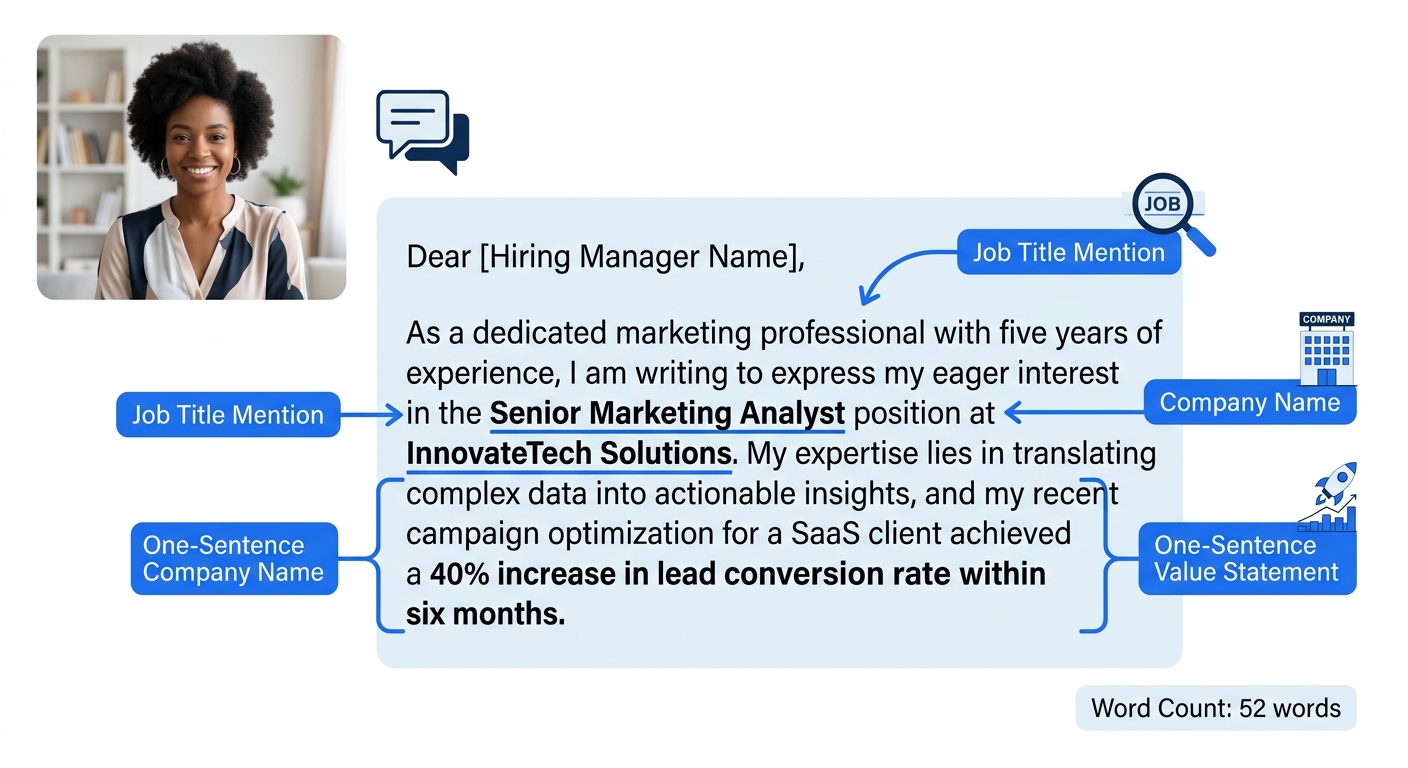
MIT’s Career Advising & Professional Development office states the rule plainly: “State clearly in your opening sentence the purpose for your letter and a brief professional introduction.” That’s the entire opening paragraph in 2–4 sentences.
Name the exact role you’re applying for, where you found the listing, and one sentence about why you’re a strong fit. This paragraph should be 40–60 words. Hiring managers scanning dozens of applications spend an average of 7 seconds on an initial read, your opening paragraph carries most of that weight.
You’ll know it worked when someone reading only your first paragraph can identify which job you want and what makes you relevant. If they can’t answer both questions, the paragraph needs editing.
Step 5: Write the Body Paragraphs
This is where 66% of job seekers go wrong by simply restating their resume in paragraph form. The body section of your cover letter should run 1–2 paragraphs (150–250 words total) and focus on selling specific achievements and relevant skills the resume alone can’t convey.
Novorésumé’s 2026 cover letter guide puts it directly: the body should “focus on selling your skills, achievements, and relevant professional experiences.” Indeed’s formatting advice adds that cover letters should “showcase soft skills and personality” and “address unique circumstances” like career changes or employment gaps that a resume can’t explain.
Three formats that work for the body:
| Format | Best For | Structure |
|---|---|---|
| Problem-Solution | Experienced professionals targeting specific company challenges | Name the company’s problem → show how your past work solved a similar one |
| Achievement-Focused | Roles where quantified results matter (sales, marketing, operations) | 2–3 bullet-style achievements with numbers ($, %, timeframes) woven into prose |
| Narrative | Creative industries, startups, roles where cultural fit is weighted heavily | Short story connecting your background to the company’s mission |
Stories are 22 times more memorable than isolated facts, which explains why the narrative approach works well for roles that prioritize cultural alignment. But for finance, government, and traditional corporate roles, the achievement-focused or problem-solution format signals professionalism more clearly.
Your cover letter body should never summarize your resume. It should answer the question your resume can’t: why this company, why this role, why now.
If you’re struggling with what to actually write, our guide on phrases that hiring managers reject identifies 9 specific lines that get filtered out before the interview stage, avoiding those alone improves your body paragraphs significantly.
Step 6: Write the Closing and Sign-Off
The closing paragraph is 2–3 sentences. It should include a specific call to action (requesting an interview or a conversation), a brief restatement of enthusiasm, and a thank-you. Keep this under 50 words.
Below the closing paragraph, add one blank line, then your sign-off:
- “Sincerely,” or “Best regards,” (safe for any industry)
- Three blank lines (space for a handwritten signature if printing)
- Your typed full name
- Your job title (optional)
Indeed’s cover letter formatting guide confirms this structure with a sample closing: “I look forward to discussing how [I can contribute to your] team. Best regards, [Name].” The sign-off follows standard business letter format conventions that have remained stable for decades.
You’ll know it worked when the closing feels like a natural end to a conversation, not an abrupt stop. If you wrote “Thank you for your time and consideration” and nothing else, add a forward-looking sentence about next steps.
Step 7: Run a Final Format Check
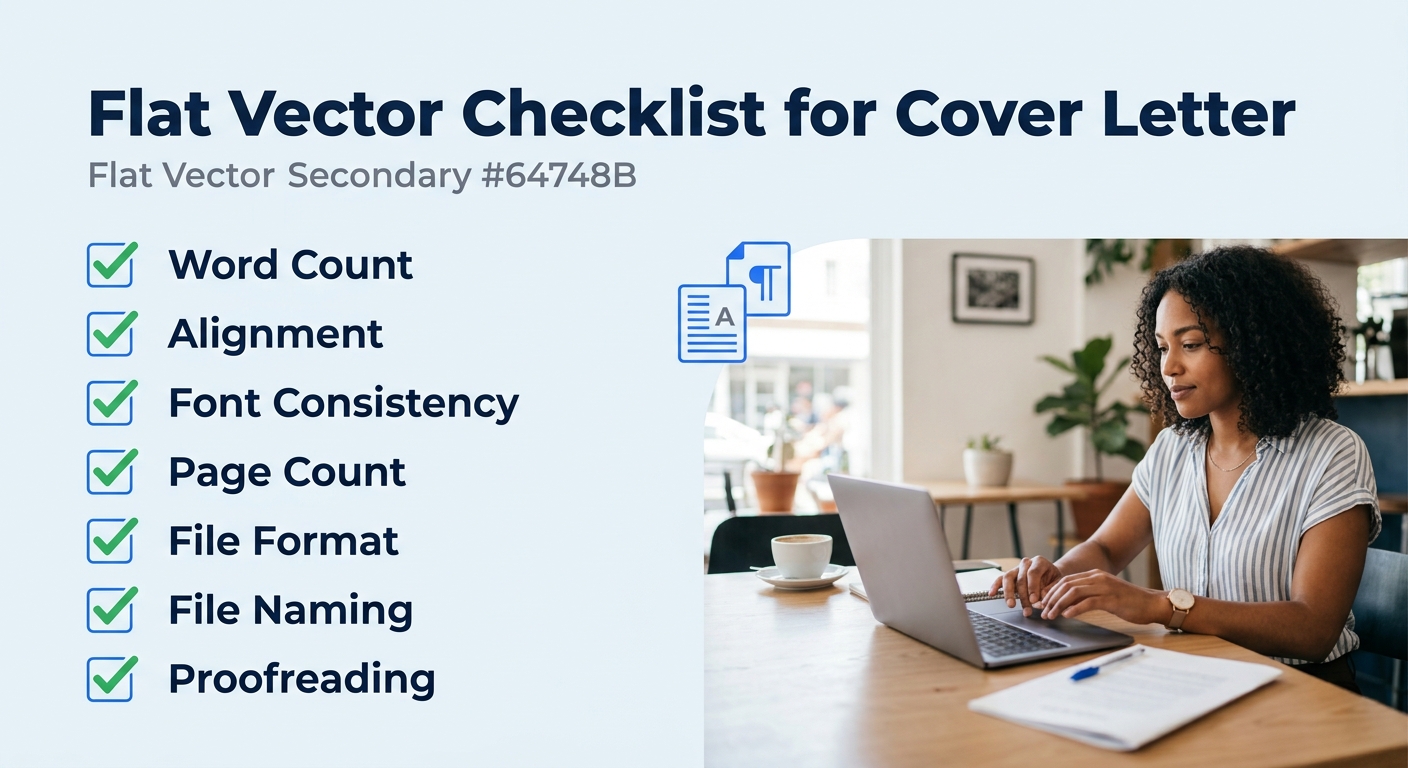
Before you save and submit, run through this checklist. Every item should be true:
- Total word count is 250–400 words. Paste your text into a word counter if your processor doesn’t show this by default. Letters over 500 words are rarely read in full.
- Everything is left-aligned. No centered text, no right-aligned date blocks (a common holdover from older templates).
- Font is consistent throughout. If you copied text from another document, formatting artifacts sometimes carry over. Select all text and re-apply your chosen font.
- One page only. If you’re spilling onto page 2, cut body content before you shrink the font below 10pt.
- File format is PDF. Save as PDF unless the application portal specifically requests .docx. PDFs preserve your formatting across every device and operating system. Our guide on cover letter templates includes downloadable formats that export cleanly to PDF.
- File name is professional. Use the pattern: FirstName-LastName-Cover-Letter.pdf. Hiring managers download dozens of files, “Document1.pdf” gets lost.
Warning: Read the letter aloud before submitting. Indeed’s editorial team recommends reviewing aloud, using spellcheck, and having a second person review for typos and clarity. Formatting errors you’d never catch on screen become obvious when you hear the pacing break down.
When Formatting Breaks
Three problems come up more than any others.
Problem 1: The letter runs over one page. This happens when body paragraphs repeat resume content verbatim. Cut redundant details first. If it’s still too long, reduce your font from 12pt to 11pt, but don’t go below 10pt, readability drops sharply at smaller sizes. If you’re still over a page after both adjustments, your letter has a content problem, not a formatting problem. Trim a full paragraph.
Problem 2: The ATS strips your header formatting. Some applicant tracking systems pull text from uploaded documents and display it as plain text, which turns multi-column headers into garbled lines. The fix: keep your header in a single column with each piece of information on its own line. Avoid tables, text boxes, and columns in the header area entirely.
Problem 3: The greeting defaults to generic. You searched for the hiring manager’s name, found nothing, and defaulted to “To Whom It May Concern.” Try these alternatives in order: “Dear [Department] Hiring Manager,” then “Dear Hiring Team,” then “Dear Recruitment Team.” Each one signals more effort than the default. Industry-specific cover letter examples show how different fields handle this problem.
Where to Go From Here
With the format of cover letter documents locked down, the next step is building a small library of 3–4 body paragraph variations you can adapt per application. One achievement-focused version, one problem-solution version, and one narrative version give you enough range to cover most job postings without starting from scratch each time.
If you’re applying across different industries, note that finance and government roles expect the full formal block layout with complete address blocks, while tech and creative companies tend to prefer shorter letters with portfolio links in the header. The structure you built in these seven steps works for both, you’ll adjust content and tone, not formatting.
And if you’re building out your full application toolkit, pairing a well-formatted cover letter with a strong resume makes both documents hit harder. The Harvard resume template walkthrough uses the same 1-inch margin, single-column philosophy as the cover letter format above, so your materials will look like they belong together.
