

 4.9
4.9 4.5
4.5Formatting a cover letter correctly takes about 20 minutes and comes down to seven settings in your word processor. This tutorial walks you through each one with exact values so the result passes ATS filters, stays under one page, and reads cleanly on a hiring manager’s screen.
TL;DR: Set 1-inch margins, use a 10–12 point standard font (Calibri, Arial, or Times New Roman), single-space your text with a blank line between paragraphs, left-align everything, keep the total length between 250 and 400 words, and save as PDF unless the job posting requests .docx.
Before You Start
You need a word processor (Google Docs, Microsoft Word, or LibreOffice Writer all work), the job posting open in another tab, and the name of the hiring manager if you can find it. LinkedIn, the company’s team page, or a quick email to the front desk can usually surface this. Budget 20 minutes for your first cover letter using this format; subsequent ones go faster because you’re reusing the same document shell.
You should also have a working draft of your resume. The header on your cover letter needs to match your resume’s contact information exactly, and consistency between the two documents signals attention to detail. If you’re still working on your resume, bookmark this page and come back.
Step 1: Set Your Page Layout
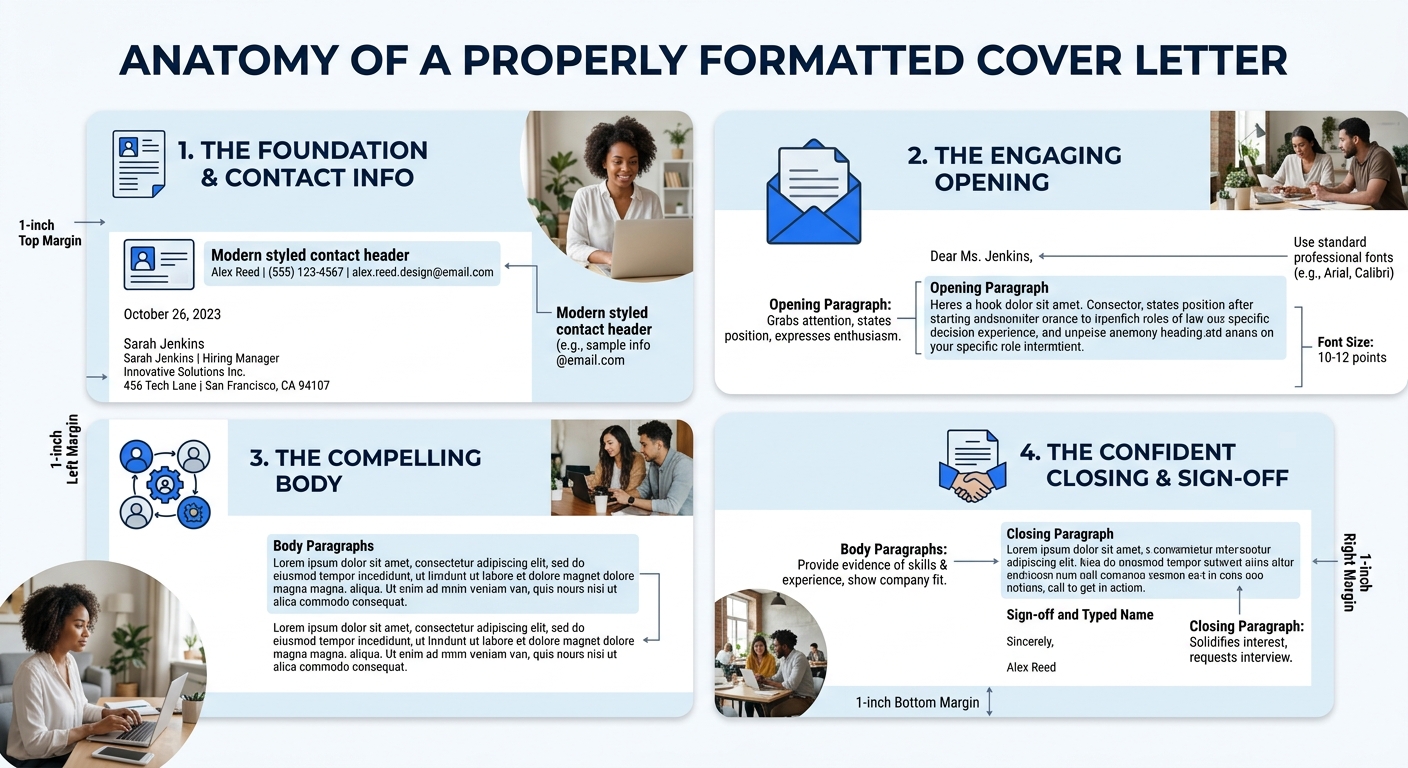
Open a blank document and set all four margins to 1 inch. This is the standard recommended by Purdue OWL’s formatting guide and matches what ATS parsers expect. In Google Docs, go to File → Page Setup. In Word, go to Layout → Margins → Normal.
Set your page orientation to portrait and your paper size to US Letter (8.5 × 11 inches). You’ll know it worked when the ruler at the top of your document shows the text area starting at the 1-inch mark.
Step 2: Choose Your Font and Size
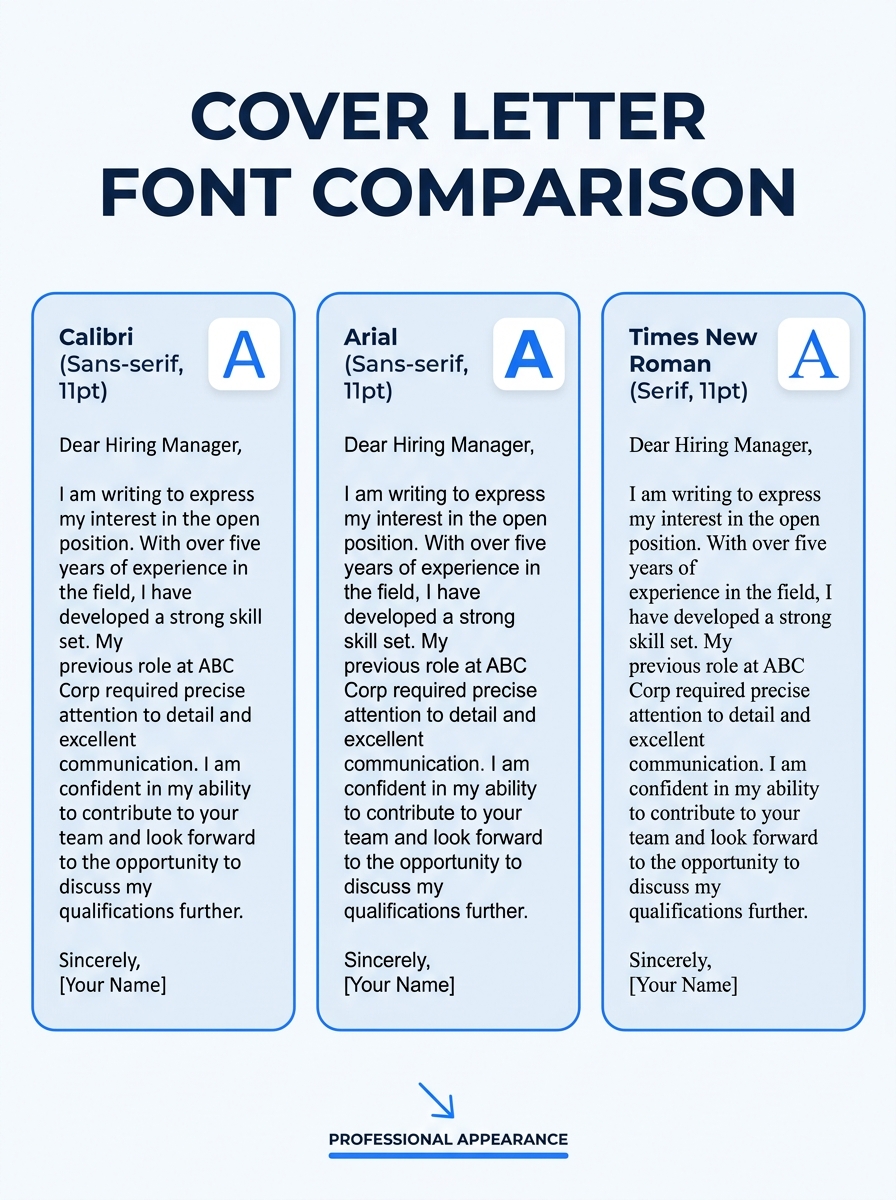
Pick one of these three fonts: Calibri, Arial, or Times New Roman. Set the size to 11 point. According to MIT’s career advising department, cover letters should use a font size between 10 and 12 points. Going below 10 makes the text hard to read on screen; going above 12 eats into your one-page limit.
Stick with the same font you used on your resume. If your resume uses Garamond or Georgia, those work too. The key is that it’s a standard, widely installed font. Decorative or script fonts break ATS parsing and look unprofessional.
You’ll know it worked when your text looks clean and readable at 100% zoom without squinting.
Step 3: Configure Spacing and Alignment
Set your line spacing to single (1.0). Add one blank line between paragraphs instead of using paragraph spacing settings. This gives you manual control and prevents ATS systems from collapsing your paragraph breaks. Left-align all text. Don’t center anything except possibly your name in the header (see Step 4).
According to Indeed’s cover letter formatting guide, you should “single-space your text” and “add a blank line between paragraphs and each major section.” This matches what 70% of employers expect to see in a cover letter format.
The verification here is visual: your paragraphs should have a single blank line of space between them, and every line of text should start flush against the left margin.
Step 4: Build Your Header Block
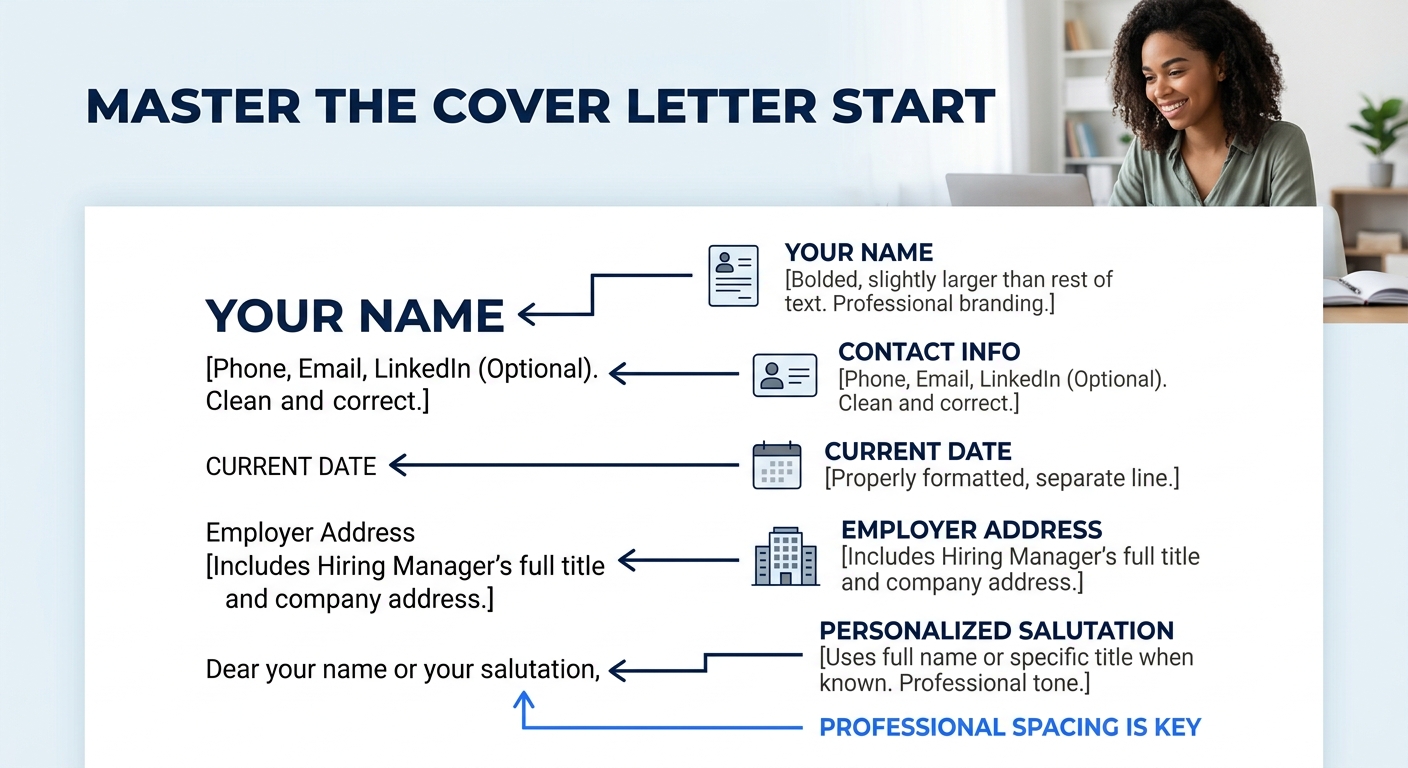
Type your full name on the first line, bolded, in a slightly larger size (14 point works well). Below it, add your phone number, professional email address, city and state (full street address is optional and increasingly omitted), and your LinkedIn URL if it’s polished. Each piece of contact info goes on its own line, or you can separate them with pipes (|) on one or two lines.
For ATS compatibility, place your contact details in the body of the document, not in the header or footer area of your word processor. Many ATS platforms can’t read content placed in Word or Google Docs headers and footers, which means your name and email disappear during parsing. An ATS-friendly cover letter uses “one column, standard font” and keeps “contact details in the body of the letter, never in a header or footer,” according to Apply-Mate’s ATS testing.
You’ll know it worked when you can select your name, email, and phone number as normal body text, not grayed-out header text that only appears when you double-click the top margin.
Warning: Using a novelty email address (gamerking99@, cutiepie@) is one of the fastest ways to get filtered out. About 58% of employer rejections trace back to avoidable formatting errors, and an unprofessional email sits near the top of that list. Set up a firstname.lastname@ address if you don’t have one.
Step 5: Add the Date and Employer Address
Skip one blank line after your header. Type the full date (write out “September 27, 2026,” not “9/27/26”). Skip another blank line, then type the hiring manager’s name, their title, the company name, and the company address, each on its own line.
If you don’t know the hiring manager’s name, write “Hiring Manager” followed by the department name. But try to find the actual name first. As our piece on what hiring managers actually filter out of cover letters explains, personalization is one of the clearest signals that you’re genuinely interested in the role. And 63% of respondents in hiring surveys cite “why you want to work there” as the single most important element in a cover letter, which starts with knowing who you’re writing to.
Step 6: Write the Salutation and Body Paragraphs
Skip one blank line after the employer address. Type “Dear [Hiring Manager’s Name],” with a comma at the end. Use “Dear Hiring Manager,” if you couldn’t find a name. Avoid “To Whom It May Concern,” which reads as outdated and generic.
Then build three to four paragraphs totaling 250 to 400 words. According to Resume.io’s ATS testing, you should “structure it in five clear sections, keep the total length between 250 and 400 words, and save it as a .docx or PDF before submitting.” Letters under 200 words come across as dismissive. Letters over 500 words get skimmed or skipped entirely. Here’s what each paragraph does:
Opening paragraph (2-3 sentences): State the specific job title you’re applying for, where you saw the posting, and one sentence about why you’re a strong fit. MIT’s career advising office recommends that you “state clearly in your opening sentence the purpose for your letter and a brief professional introduction.”
Middle paragraph(s) (1-2 paragraphs, 3-5 sentences each): Connect your specific skills and achievements to what the job posting asks for. Use numbers whenever possible. “Increased quarterly sales by 18%” carries more weight than “improved sales performance.” About 35% of hiring managers disregard cover letters that fail to mention specific, relevant skills, and 83% of recruiters consider cover letters important in their overall hiring decision.
Closing paragraph (2-3 sentences): Restate your interest, mention you’ve attached your resume, and include a call to action like “I’d welcome the opportunity to discuss how my experience aligns with your team’s goals.”
Letters under 200 words come across as dismissive. Letters over 500 words get skimmed or skipped. The 250–400 word range hits the sweet spot where you say enough to be memorable without testing anyone’s patience.
If you’re looking for ready-to-use structures, our cover letter template collection has five options you can customize. And for a deeper walkthrough of body content, our step-by-step cover letter formatting guide breaks down each paragraph with examples.
Step 7: Close, Sign, and Save the File
Skip one blank line after your final body paragraph. Type “Sincerely,” or “Best regards,” followed by a comma. Skip one blank line (for digital submissions, you don’t need the traditional three-line gap for a handwritten signature), then type your full name. Below your typed name, you can optionally re-list your phone number and email for easy reference.
Now name and save the file. Use this format: FirstName-LastName-Cover-Letter.pdf. Hiring managers download dozens of files called “cover letter.docx,” and yours needs to be identifiable at a glance.
Save as PDF to lock your formatting in place. PDF preserves your fonts, spacing, and alignment across every device and operating system. The only exception: if the job posting or ATS upload portal specifically asks for .docx, give them .docx. When in doubt, PDF is the safer choice.
You’ll know it worked when you open the PDF on a different device (your phone works fine for this) and everything looks exactly the same as it did on your computer.
When Things Go Wrong
Three problems come up more than any others:
The letter spills onto page two. Cut body content first. Don’t shrink margins below 0.7 inches or drop font size below 10 point, because both create a cramped, hard-to-read document that signals you couldn’t self-edit. Tighten your middle paragraphs. Remove any sentence that doesn’t directly support your candidacy for this specific role. 66% of job seekers now prefer cover letters that run half a page or shorter, so brevity works in your favor.
The ATS strips your formatting. This almost always happens because you put contact information in the document header/footer, used a two-column layout, or embedded text boxes. Rebuild using plain body text in a single-column layout. If you want to double-check, copy and paste your entire document into a plain-text editor like Notepad. If the text comes through readable and in the correct order, the ATS will parse it correctly.
The letter looks different on the recipient’s screen. This happens when you save as .docx and the recipient doesn’t have your font installed, or when you use tab stops that render differently across word processors. Saving as PDF eliminates this problem entirely. If you must submit .docx, stick to fonts that ship with every major operating system: Calibri, Arial, Times New Roman, or Georgia.
For more detail on how different formats affect ATS parsing, our complete cover letter formatting guide covers edge cases and real-world examples. You can also browse more career guides on our blog for resume-specific formatting tips that complement your cover letter.
Where to Go From Here
You now have a properly formatted cover letter shell that you can reuse for every application. The format itself stays the same across jobs. You’ll swap out the employer address, salutation, and body content for each new posting. Keep one master file as your template and duplicate it each time you apply.
If you want to see what a finished version looks like with real content filled in, our cover letter format samples page has five complete examples across different industries and career levels. And if you’re applying to companies that emphasize cultural fit, consider weaving your research about the company into your opening paragraph. That 63% survey figure about “why you want to work there” isn’t abstract advice. It means your opening lines carry the most weight of any section in the entire document, because they answer the question every hiring manager is already asking: does this person actually want to be here, or did they blast this letter to 50 companies?
