


 4.9
4.9 4.5
4.5LinkedIn’s search algorithm weights your headline at 5x the value of any other profile field, which means a job seeker LinkedIn profile lives or dies on those 220 characters before a recruiter ever scrolls down. This guide walks you through seven steps to build a profile that gets found and gets responses. Total time: about 90 minutes.
TL;DR: Focus your 90 minutes on the five fields recruiters actually filter on: headline (5x algorithm weight), professional photo (21x more views), About section (first 300 characters above the fold), pinned skills with verified badges (30% ranking boost), and Open to Work settings. Each step below includes a verification check so you know it worked.
Before You Start
You need three things ready before touching your profile. First, a professional-quality headshot, a well-lit photo where your face fills about 60% of the frame. Second, a list of 8–12 keywords pulled directly from job postings in your target role. Open five recent postings, highlight every repeated skill and job title variant, and keep that list open while you work. Third, gather 3-5 quantified accomplishments from your career (revenue generated, team size, percentage improvements).
The whole process takes roughly 90 minutes with these materials prepared. Without them, you’ll stall at the headline step and produce a generic profile that blends into the 1 billion+ accounts already on the platform. If you’re also revising your resume alongside your LinkedIn profile, our guide on writing achievement-focused resume bullets covers how to quantify accomplishments that work across both documents.
Set Your Photo, URL, and Background Banner
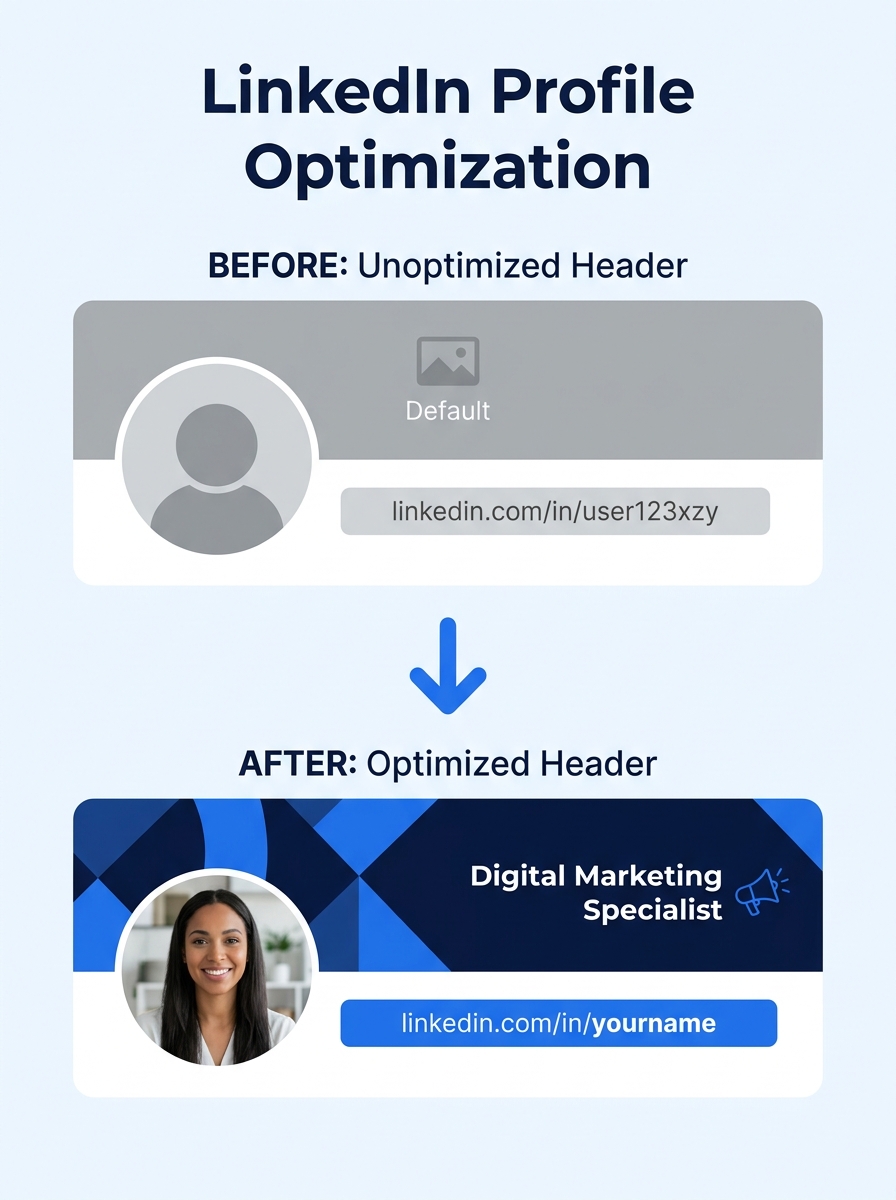
Profiles with professional photos receive 21x more views and 36x more messages than those without, based on LinkedIn’s published platform data. These three visual elements load before any text, and they determine whether a recruiter clicks through or keeps scrolling.
For your photo, avoid selfies, group crops, and anything with sunglasses. A clean background with natural lighting outperforms studio portraits for approachability. Your background banner is free real estate, use a simple graphic reinforcing your industry or a clean text overlay with your specialty area.
For your URL, navigate to your profile’s public settings and replace the default alphanumeric string with your name (linkedin.com/in/firstname-lastname). LinkedIn’s help center confirms that a custom URL improves visibility in search engine results outside LinkedIn, which matters when hiring managers Google your name before an interview.
Verification: Your photo should display without pixelation at full size. Your custom URL should load without a redirect error. Preview your banner on both desktop and mobile to confirm it isn’t cropped awkwardly on either device.
Write a Headline Recruiters Actually Search For
Your headline is the highest-weighted field in LinkedIn’s search algorithm, indexed at 5x the weight of other profile sections according to Jobscan’s 2026 analysis of LinkedIn search ranking. You have 220 characters to work with. Use all of them.
The template that consistently performs: [Job Title] | [Top 2-3 Skills] | [Unique Value or Industry]. A headline reading “Marketing Manager” tells a recruiter nothing useful. One reading “Marketing Manager | B2B SaaS | Demand Gen and Pipeline Growth | Open to New Roles” gives them four filterable data points in a single line.
LinkedIn’s own guidance recommends scanning job postings for repeated skills and using that exact wording in your headline. If postings say “data analysis,” don’t write “analytical insights.” Write “data analysis.” As one recruiter on r/jobsearchhacks put it: “A headline that says ‘Marketing Manager’ tells a recruiter nothing. One that says ‘Marketing Manager | B2B SaaS | Demand Gen and Pipeline Growth | Open to New Roles’ tells them everything they need to know in one line.”
Tip: If you’re unemployed, write your target title normally and add “Seeking New Opportunity” or “Open to [Role Type] Roles” at the end. Recruiters search by job title, not employment status, removing your title to avoid looking “unemployed” actually removes you from the searches that matter.
Verification: Search LinkedIn for your target job title. Does your profile appear in the first 50 results? If not, your headline keywords don’t match what recruiters type into LinkedIn Recruiter. Revise the headline and re-test after 24-48 hours, since LinkedIn’s search index doesn’t update instantly.
Build Your About Section
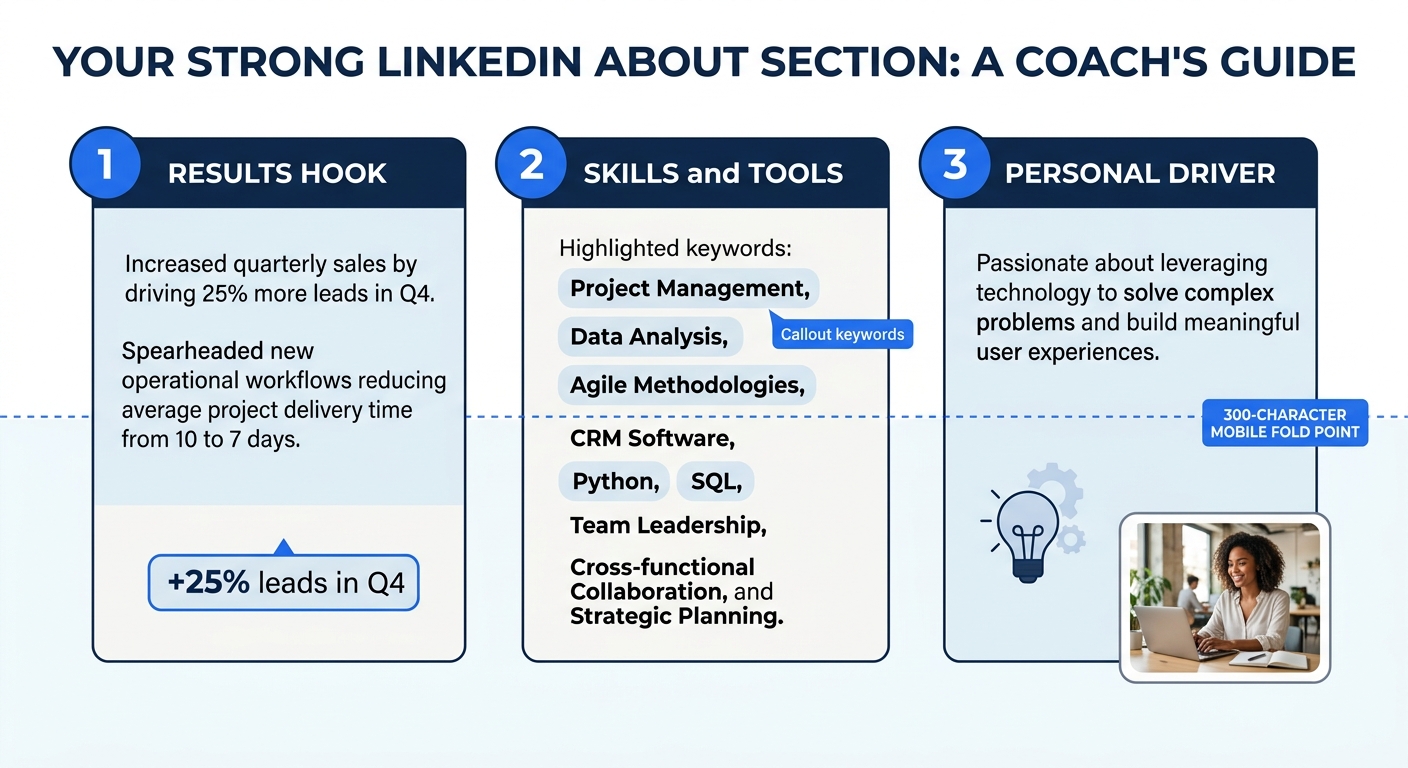
The first 300 characters of your About section display before the “See more” fold on mobile. Your opening line needs to do real work, state what you do, who you do it for, and one measurable result. Everything after the fold is bonus context.
According to The Muse’s profile guidance, you should include your key skills, experiences, and achievements in paragraph form or a bulleted list, and consider mentioning who you are outside of work. Aim for 5-8 natural keyword placements drawn from the list you built during prep. Write in first person. Third-person bios read like press releases and create distance that kills recruiter engagement.
Structure it in three short paragraphs. Paragraph one: what you do and the results you’ve driven (2-3 sentences). Paragraph two: the specific skills, tools, and methodologies you work with (1-2 sentences). Paragraph three: a brief personal note about what drives you professionally (1-2 sentences). That personal note matters more than you’d think. Steven Waudby, senior recruiter at Delta Hire, told Forbes that candidates who share professional updates and engage with their network “show that the candidate is engaged and motivated,” and this kind of authenticity directly shapes recruiter outreach decisions.
Verification: Read your About section aloud. If it sounds like a job description, rewrite it. If a colleague in the same role could paste it onto their profile with only a name change, it’s too generic to differentiate you.
Rewrite Experience Entries Around Achievements
LinkedIn’s own blog on attracting recruiters states the point directly: your profile should focus on accomplishments, not tasks. The blog’s contributor Zach reminds job seekers that “tone matters as well” and advises them to “convey your expertise in what you do and your enthusiasm for your role.”
Each role needs 3-5 bullet points following the pattern: Achievement + Metric + Impact. “Managed social media accounts” becomes “Grew Instagram following from 2,400 to 18,000 in 11 months, driving a 34% increase in inbound leads.” The metric is what separates a profile that gets bookmarked from one that gets scanned and forgotten.
If you don’t have exact numbers, use honest approximations. “Reduced customer response time from ~48 hours to under 4 hours” is concrete and useful. Ranges work too. What doesn’t work is writing “Responsible for customer service improvements” with no numbers attached.
If you’re unemployed, don’t leave an obvious gap. The Muse recommends adding the position you’re seeking with a company line like “Seeking New Opportunity”, this keeps your profile active in recruiter searches for that job title without misrepresenting your current status.
Verification: Each bullet point should contain at least one number. If a bullet has zero numbers, it’s a task description.
Pin Your Skills and Complete Assessments
LinkedIn allows up to 50 skills on a profile, but recruiters filter on your top 3 pinned skills. Profiles with completed LinkedIn skill assessments rank 30% higher in search results for those specific competencies, and verified skill endorsements boost overall search appearances by 40%.
Pin the three skills that appear most frequently in job postings for your target role. Then complete LinkedIn’s skill assessment quiz for each one. Passing earns a verified badge that displays on your profile and signals to recruiters that you’ve been tested rather than self-reported.
Go through your full list and remove anything generic or outdated. “Microsoft Word” and “Teamwork” occupy slots that could go to tools and methodologies recruiters actually search for, “Salesforce,” “Python,” “Agile Project Management,” or “Financial Modeling.” Every generic skill you keep pinned is a slot that could match an actual recruiter query but doesn’t.
Verification: Ask a colleague in your target field to look at your top 3 pinned skills. If they’d describe your expertise using different terminology, your pins don’t match the language your market uses.
Recruiters search by specific skill names. “Microsoft Word” in your top 3 skills is a wasted filter match that could have been “Salesforce” or “Python.”
Configure Open to Work Settings
LinkedIn offers two visibility modes for Open to Work: a public green banner visible to everyone, and a private signal visible only to recruiters using LinkedIn Recruiter. More than 70% of recruiters search for candidates on LinkedIn, according to Elmhurst University’s research on profile optimization, so configuring this setting correctly has a measurable impact on inbound contact.
If you’re employed and searching quietly, use the private recruiter-only setting. LinkedIn states it won’t surface this signal to recruiters at your current company, though no system is perfectly leak-proof. If you’re openly searching or unemployed, the public green badge removes ambiguity and often increases inbound messages.
Set your preferred job titles (up to 5), locations, start date availability, and work type (remote, hybrid, on-site). Be specific. “Marketing Manager” with “Remote” and “San Francisco Bay Area” gives recruiters three clear filters to match against open requisitions. During job searches that currently average nearly 25 weeks, every matching filter matters.
Verification: Toggle between the two settings and preview how your profile appears to someone outside your network. The green frame should appear or disappear accordingly.
Stay Visible Through Weekly Activity
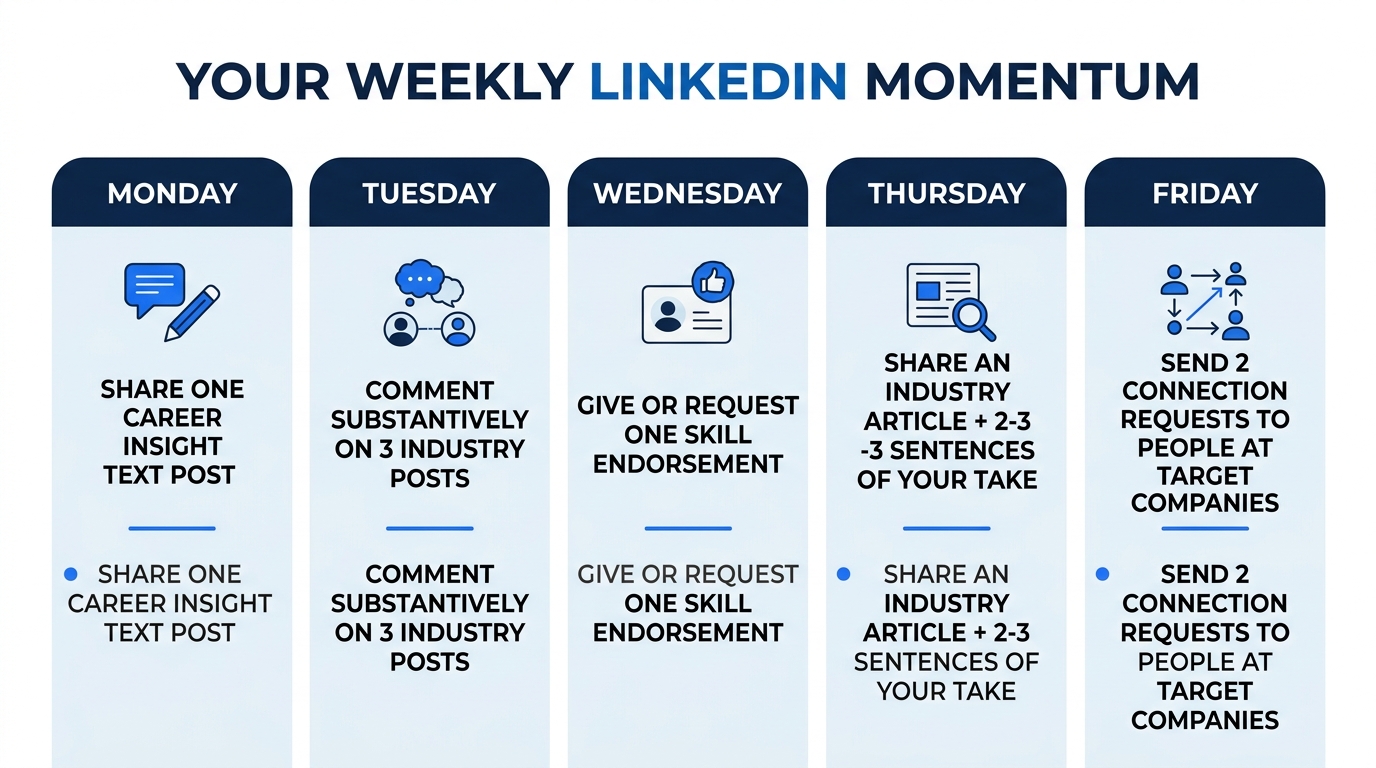
A complete profile that sits dormant loses ranking over time. LinkedIn’s algorithm rewards activity signals, and posting 1-2 times per week while commenting meaningfully on 3-5 industry posts keeps your profile circulating in both recruiter searches and your network’s feed.
Text-only posts drive the strongest engagement under LinkedIn’s current algorithm. Share a specific lesson from your career, a focused take on an industry development, or a short story about a professional challenge you solved. Keep posts under 1,300 characters for maximum visibility. Samantha Humphries, senior talent acquisition partner for Baxter International, models this approach in her own LinkedIn presence by framing her content around helping candidates do their “best work while helping save and sustain lives”, purpose-driven, specific, memorable.
Commenting counts as engagement too. A thoughtful 2-3 sentence comment on a post from a company you’d like to work for puts your profile directly in front of employees at that organization. This is free exposure that cold applications can’t replicate. And when it comes time to interview with those companies, strong interview delivery skills will carry the credibility your profile built online into the conversation itself.
Troubleshooting the Three Most Common Problems
Your profile doesn’t appear in relevant searches. This almost always means your headline and pinned skills don’t match the exact terms recruiters type. Return to job postings, copy their language verbatim, and update your headline and top 3 skills. Re-test after 24-48 hours since LinkedIn’s search index has a delay.
You’re getting profile views but no messages. Your headline is doing its job, but your About section or experience entries aren’t converting interest into action. Check that your About section opens strong above the 300-character fold and that every experience bullet contains at least one metric. Profiles where each entry starts with “Responsible for…” lose recruiter attention after the first scan.
Your Open to Work signal isn’t generating leads. Confirm that your preferred titles match actual job titles in current postings. Expand your location settings if you’re genuinely open to remote roles. Make sure you’ve selected multiple job types and seniority levels, overly narrow settings exclude you from searches where you’d otherwise qualify. If you’re also refining the written materials that go alongside your profile, our collection of cover letter examples by job type helps you match your outreach tone to specific roles.
Where to Go From Here
Set a calendar reminder to refresh your headline keywords every 6-8 weeks as job postings evolve and new terminology enters your industry. Update your experience section whenever you finish a project worth quantifying. Track your profile’s weekly search appearances through LinkedIn’s dashboard, if that number drops below your baseline for two consecutive weeks, your content or activity has fallen behind the algorithm’s threshold for active profiles.
The profiles that generate consistent recruiter interest on LinkedIn are the ones that keep changing. One strong 90-minute setup session gets you to All-Star status and into 40x more searches than an incomplete profile. Staying in those searches, week after week, is what turns visibility into real conversations.
