


 4.9
4.9 4.5
4.5Applicant tracking systems convert every resume into flat text before analyzing content, discarding visual formatting in the process. When that conversion fails, your keywords become irrelevant because the parser never maps them to the right fields. A DEV Community technical analysis found this extraction step causes 75% of resume rejections.
TL;DR: ATS rejections happen during document-to-data conversion, before keyword scoring begins. Five parsing layers determine whether your resume survives: text extraction, heading recognition, field mapping, keyword matching, and rank calculation. Fixing keywords alone won’t help if the parser scrambles your layout into unreadable data.
The Five-Layer Parse Pipeline
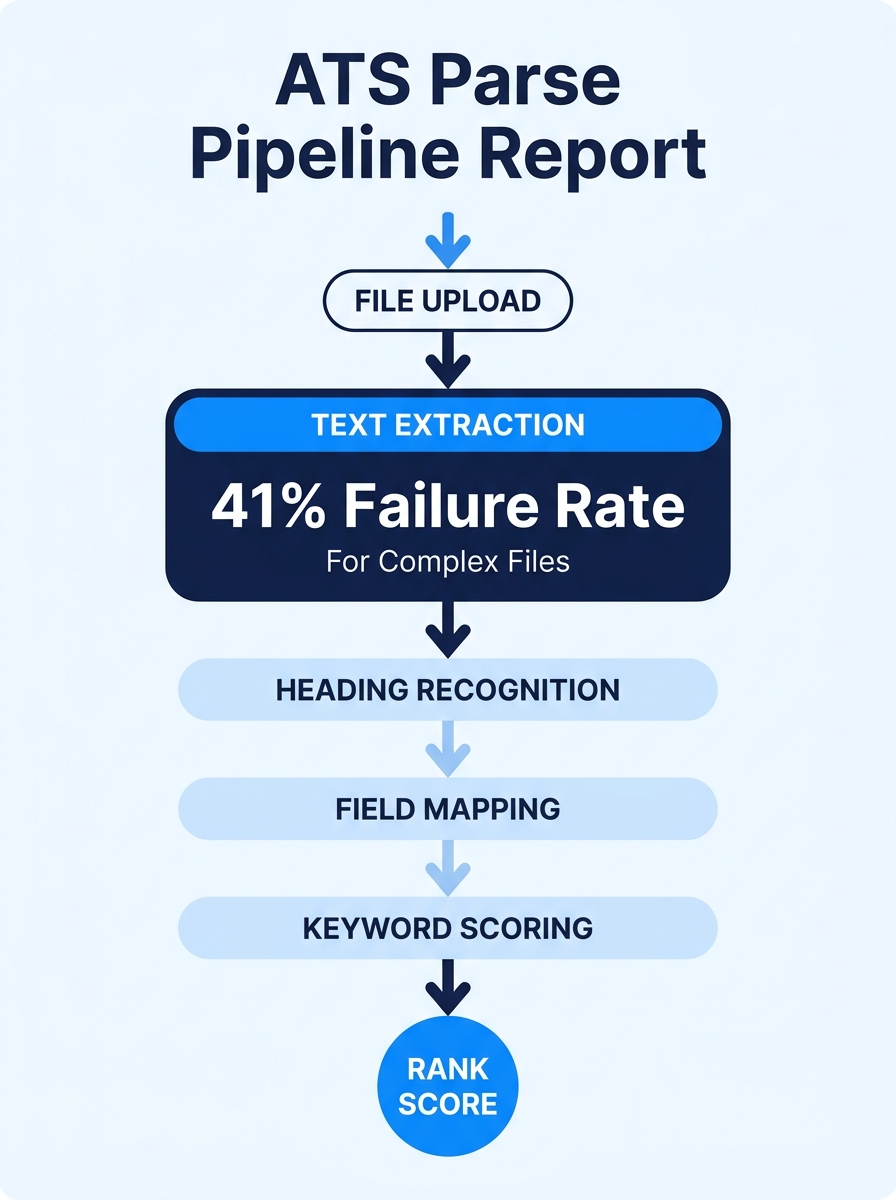
Resume parsing technology operates through a sequence of five distinct processing stages, and a failure at any early stage cascades through every later one. Understanding this pipeline explains why two resumes with identical content can produce wildly different ATS scores.
The layers, in order: text extraction (converting the file into a raw character string), heading recognition (identifying section boundaries), field mapping (assigning extracted text to database fields like “job title” or “employer”), keyword scoring (matching field content against job requirements), and rank calculation (producing the score a recruiter sees). Most ATS-optimization advice focuses on layer four, keyword scoring, while ignoring layers one through three entirely. That’s like tuning an engine while the fuel line is disconnected.
A 2025 EDLIGO analysis of 1,000 rejected resumes illustrates why the early layers matter so much: only 4% of plain .docx files failed parsing, compared to 18% of PDFs and a staggering 41% of AI-generated or visually complex resumes. The content in those documents was fine. The structure wasn’t.
Text Extraction Converts Your Document to a Flat String
The parser’s first job is converting your uploaded file into a continuous stream of plain characters. Every table, column, text box, icon, image, and piece of shading disappears. What remains is raw text, read top to bottom, left to right.
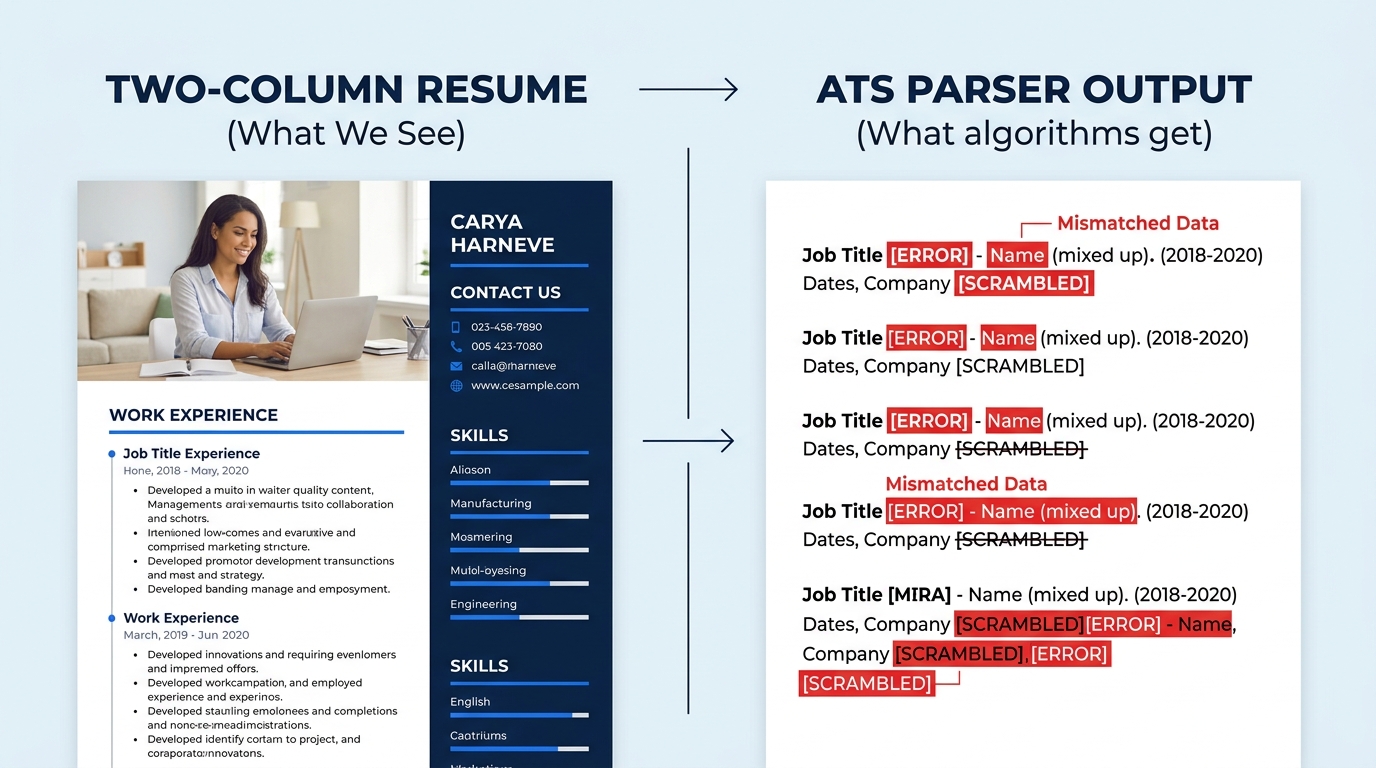
This is where multi-column layouts fall apart. When an ATS reads a two-column resume linearly, it doesn’t process column one and then column two. It reads across both columns simultaneously, line by line. The result can be absurd: “Senior Engineer” on the left merges with “References Available” on the right into a single meaningless string. According to Enhancv’s 2026 parsing benchmark, single-column layouts achieve 93% parsing accuracy versus 86% for double-column designs, and some older systems like Taleo drop as low as 46% accuracy on complex multi-column formats.
Tables cause a related problem. Even invisible tables used for alignment in Word templates can trigger parsing errors that produce up to 50% data loss during extraction when tested against systems like Workday. Contact information placed in headers or footers gets missed by 25% of ATS platforms, according to Jobscan and TopResume research, because many parsers simply skip those document regions.
If your resume builder uses tables or text boxes under the hood to achieve a clean visual layout, you’re likely feeding the parser corrupted data. You can test this yourself: open your resume in Word, go to View > Draft, and check whether invisible table borders appear around your content sections. If they do, the parser sees a jumbled mess where you see a polished page. We’ve written about auditing your resume builder’s output for hidden problems like these in detail.
Why Heading Labels Matter More Than Heading Design
After text extraction, the parser needs to figure out which chunk of text belongs to which resume section. It does this by scanning for heading labels and comparing them against an internal dictionary of recognized terms.
The heading structure for applicant tracking systems is remarkably rigid. According to the DEV Community analysis, parsers reliably recognize standard labels like “Experience,” “Work Experience,” “Education,” “Skills,” and “Contact Information.” Creative alternatives get ignored or misclassified. “Professional Journey” instead of “Experience.” “Academic Background” instead of “Education.” “Core Competencies” instead of “Skills.” “Get In Touch” instead of “Contact Information.” Each of these non-standard headings forces the parser to guess, and guessing means your work history might end up mapped to the wrong database field or dropped entirely.
Warning: Columbia University’s career education office [recommends avoiding](https://www.careereducation.columbia.edu/resources/optimizing-your-resume-applicant-tracking-systems) headers, footers, tables, templates, borders, lines, symbols, shading, fancy fonts, and non-black font colors. Bullet points are fine. Everything else is a parsing risk.
The heading label affects more than just section identification. Over 60% of enterprise hiring teams on platforms like Workday and Greenhouse filter candidates by specific skills before reviewing job history, according to LinkedIn’s 2025 hiring data. If the parser can’t identify your skills section because you labeled it “What I Bring to the Table,” those skills never enter the filterable database. You become invisible to the recruiter running that search.
Font choice matters here too, though less dramatically. Standard fonts like Arial, Calibri, or Times New Roman in 10-12pt render cleanly across parsing engines. Decorative or uncommon fonts occasionally produce character-encoding errors that corrupt nearby text, turning “Project Management” into garbled symbols.
File Format Shapes Everything Upstream
Resume file type optimization starts with understanding what each format actually contains at the code level. A .docx file is essentially structured XML, with document content organized into tagged elements that parsers can navigate directly. A PDF is a page-description language designed for printing, where text coordinates are defined by position on a page rather than by semantic meaning.
Luc Lemerez, Lead Developer at scale.jobs, put it plainly: “PDFs were built for printing, not structured data, and ATS stumble without it.”
The numbers back this up. That 2025 EDLIGO study showed .docx files failing at a 4% rate, while PDFs failed at 18%, a 4.5x difference. And those PDF failures aren’t random. They cluster around specific PDF subtypes: files exported from design tools like Canva or InDesign, scanned-and-OCR’d documents, and PDFs generated through LaTeX compilation. Each of these embeds text in ways that resist linear extraction.
| Format | Parse Failure Rate | Visual Fidelity | Best Use Case |
|---|---|---|---|
| .docx | 4% | Medium (varies by viewer) | Default submission format for ATS-heavy pipelines |
| PDF (simple) | ~10-12% | High (consistent rendering) | When the posting explicitly requests PDF |
| PDF (designed/complex) | 18-41% | Very high | Portfolio pieces, not ATS submissions |
| Plain text (.txt) | ~1% | None (wall of text) | Only if explicitly requested |
| HTML | Varies widely | System-dependent | Rarely accepted; inconsistent rendering |
The practical rule: submit .docx unless the application portal specifically requests PDF. And if you do submit PDF, generate it from Word or Google Docs rather than from a design tool. The conversion path matters because PDFs created from Word preserve more of the underlying text structure than PDFs built in layout-first applications.
A resume with perfect keywords still gets rejected if the parser can’t extract your job titles, dates, or skills from the file structure.
This is also where the gap between ATS optimization and human readability becomes most visible. The ATS-friendly resume format that parses best is often the least visually impressive document in your folder. That tension is real, and pretending it doesn’t exist leads to bad advice.
Keyword Matching Sits on Top of Everything Else
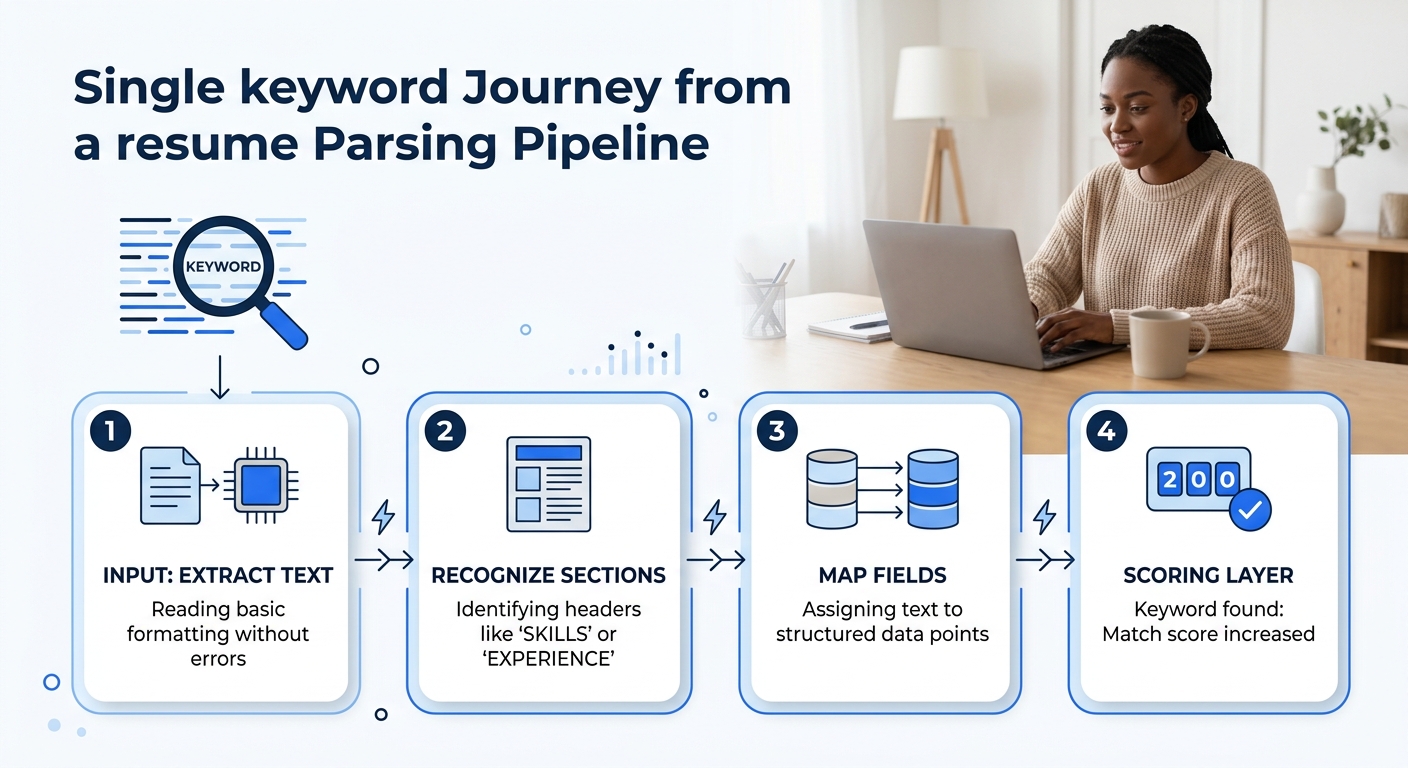
Only after text extraction, heading recognition, and field mapping does keyword scoring begin. By this point, 83% of companies are running AI-assisted screening on the mapped data, according to an extensive ATS testing project shared on Reddit’s r/jobsearchhacks.
The keyword layer compares terms found in your mapped resume fields against terms extracted from the job posting. And the matching is more literal than most candidates expect. If the posting says “Project Management Professional (PMP),” the system looks for that exact phrase. Synonyms don’t count. Abbreviations only count if the posting uses them. Industry jargon that means the same thing to a human gets treated as a different term by the parser.
This is where the old “white text” trick used to live. Candidates would paste the entire job description in white-colored text at the bottom of their resume, invisible to humans but readable by older parsers. Modern AI-assisted systems flag this behavior. Your resume gets penalized, not boosted, as the Reddit testing project confirmed across multiple ATS platforms. We’ve covered this arms race between algorithm-optimized applications and AI screening systems at length.
The target for keyword coverage sits in the 65-80% range. That means matching roughly two-thirds to four-fifths of the specific terms in the job posting, using the exact phrasing the posting uses. A 99.7% recruiter keyword-filter usage rate means nearly every application passes through this stage. But remember: keyword matching only works on correctly parsed, correctly mapped data. A keyword sitting inside a mangled table extraction doesn’t register.
Date Formats and Contact Fields: The Silent Parse Breakers
Two specific data types cause disproportionate parsing failures, and both are easy to fix once you know about them.
Date formatting trips up parsers when candidates mix styles. “Jan 2023 – March 2025” combines an abbreviated month with a spelled-out month. “2023-2025” omits months entirely, which some parsers interpret as a single year rather than a range. “01/2023 – 03/2025” uses numeric formatting that certain systems misread as day/month. The DEV Community analysis flagged date format inconsistencies as one of the top five technical causes of parsing failure. The safest approach: spell out the month and include the year consistently throughout. “January 2023 – March 2025” parses correctly across every major ATS.
Contact information fails when placed in document headers, footers, or text boxes. Put your name, phone number, email, and LinkedIn URL in the main document body, at the top, in regular paragraph text. And on file naming: if the posting specifies a naming convention like “LastName_Position_2026.pdf,” follow it exactly. Some systems, as scale.jobs documents, disqualify applications immediately for incorrect file naming.
These aren’t glamorous fixes. They don’t require you to rethink how you position contract work or rewrite your bullet points. But they prevent your carefully crafted content from being shredded before a recruiter ever sees it.
The Tradeoffs
The ATS-friendly resume format that parses at 93% accuracy is a single-column, .docx document with standard headings, plain fonts, no graphics, and spelled-out dates. It’s also, by most visual standards, boring. It looks like a document from 2008.
And that’s the core tension. Human-reviewed resumes achieve a 2% ATS failure rate compared to 41% for AI-generated visually complex documents, according to scale.jobs’ 2026 data. But human recruiters, once they see your resume, respond to visual hierarchy, white space, and design clarity. The 97.8% of Fortune 500 career sites running ATS-first screening means your resume has to clear the parser before any human aesthetic judgment matters. You’re designing for two audiences with conflicting preferences, and the algorithm goes first.
The practical compromise most successful candidates land on: build one stripped-down .docx master file for ATS submission, and keep a designed PDF version for networking, career fairs, and situations where you’re handing a resume directly to a person. The master file follows every parsing rule. The designed version follows none of them, because it doesn’t need to. Knowing when your optimized resume fails the human reader is just as important as knowing when your beautiful resume fails the parser.
The parsing pipeline is mechanical and specific. It breaks in predictable places, for predictable reasons, and the fixes are concrete. The frustrating part is that none of this is communicated to candidates during the application process. You submit into a black box, and the box has opinions about your heading labels.