


 4.9
4.9 4.5
4.5The correct letter format for a cover letter follows standard US business-letter conventions: block format, 1-inch margins on all sides, a 10-to-12-point professional font, and single spacing with a blank line between each paragraph. All of it fits on one page. This guide walks you through building that format from scratch in about 20 minutes.
TL;DR: Use block format with 1-inch margins, a professional font at 10–12pt, and single spacing. Keep the body between 250 and 400 words on a single page. Save as PDF unless the posting specifically requests DOCX.
Before You Start
You need a word processor, Google Docs, Microsoft Word, or LibreOffice Writer all work. You also need the specific job posting open in a separate tab so you can reference the company name, hiring manager’s name (if listed), and the exact job title. And you’ll want your resume file nearby, because the fonts and header styling on your cover letter should match it.
Time required: 15–25 minutes for your first formatted cover letter. Subsequent letters take about 10 minutes because you’re reusing the same document shell.
Knowledge level: None beyond basic word-processing skills. If you can change a font size and adjust a margin, you’re set.
Info: If you’ve already picked a template and want writing guidance instead of formatting guidance, our [step-by-step cover letter template walkthrough](/blog/template-for-cover-letter-step-by-step) covers the content side in detail.
Step 1: Set Your Document Foundation (Margins, Font, Spacing)
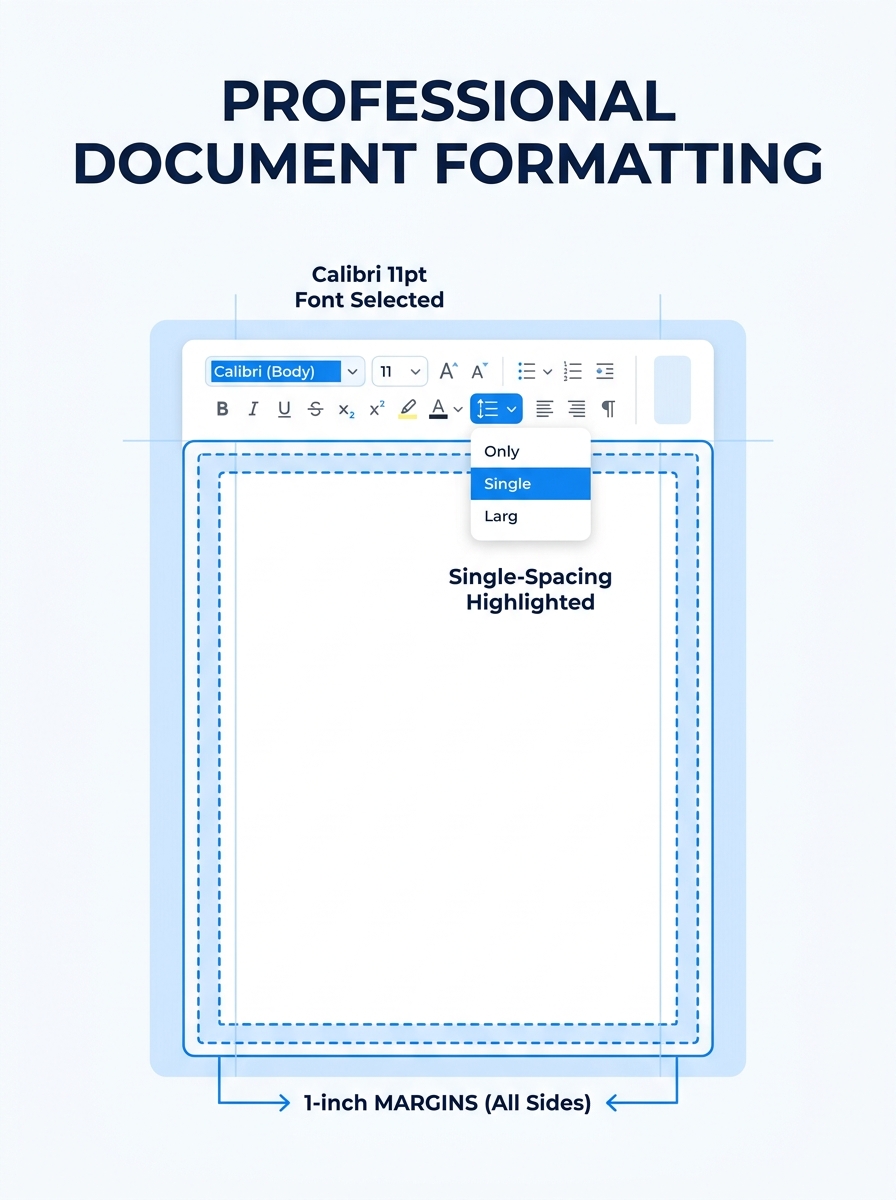
Open a blank document and set these four parameters before you type a single word. Getting them right first prevents reformatting headaches later.
Margins: 1 inch on all four sides. This is the default in most word processors, but double-check under Page Setup or Layout. According to Resume.io’s spacing guidelines, you can reduce margins to 0.75 inches, and no lower than 0.5 inches, only if your letter threatens to spill onto a second page. That should be a last resort, not your starting point.
Font: Pick a professional serif or sans-serif font. Times New Roman, Calibri, Arial, and Garamond are all safe choices. Set the size to 11 or 12 points. Zippia’s formatting research confirms that cover letters should use no font larger than 12-point, and matching your resume’s font creates visual consistency across your application materials.
Line spacing: Single spacing (1.0) or 1.15 at most. Never double-space a cover letter. Double spacing reads like a college essay and pushes the document past one page, which immediately signals that the writer doesn’t understand professional letter format for a cover letter.
Alignment: Left-justified for everything. Block format means every line starts at the left margin, no centered text, no right-aligned blocks (unless you’re deliberately using modified block format, which we’ll address in Step 2).
You’ll know it worked when your blank document shows 1-inch margins on all sides, your cursor sits at the top-left, and the font name and size in your toolbar match what you chose.
Step 2: Build Your Contact Header
The header goes at the very top of the page. Its job is to tell the reader who you are and how to reach you, fast.
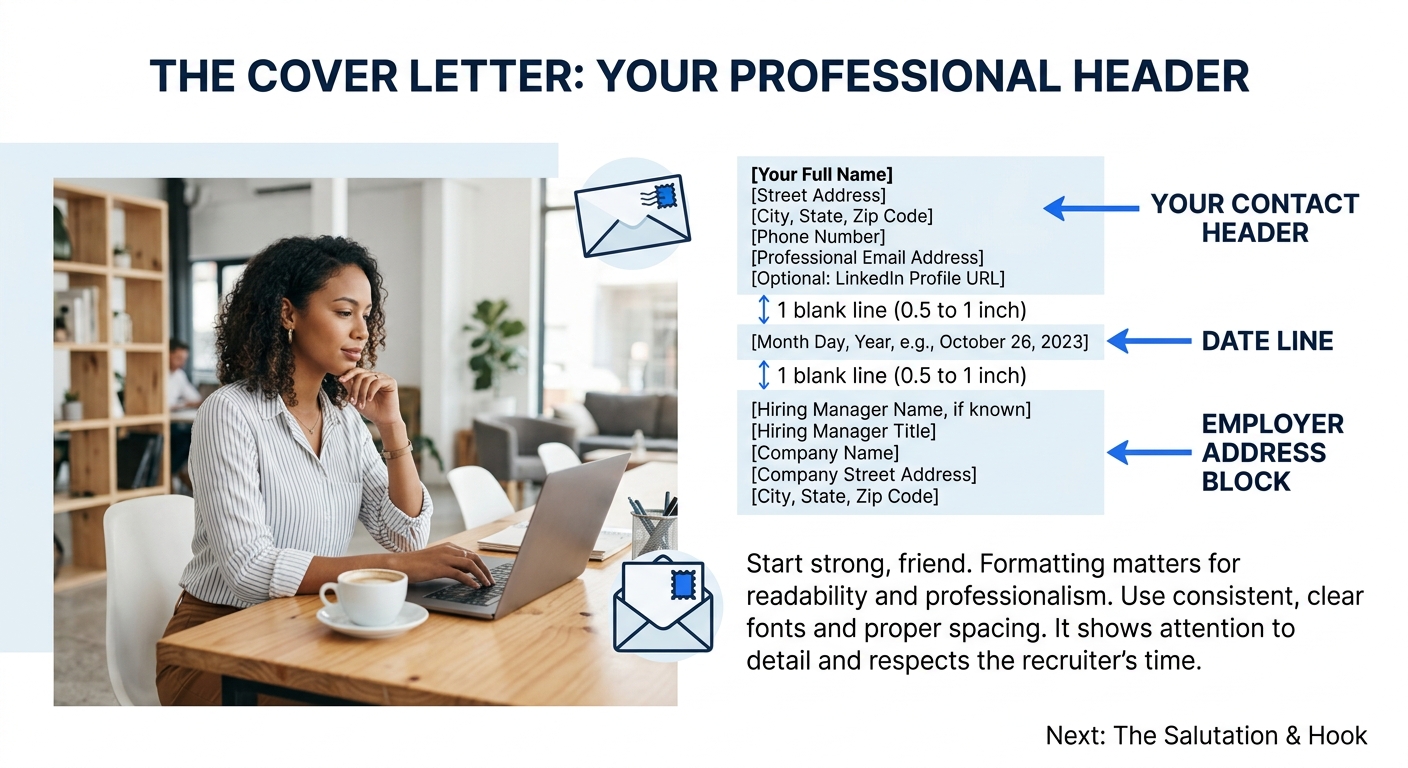
Type your full name on the first line. Below it, add your phone number, professional email address, city and state (full street address is optional and increasingly omitted), and your LinkedIn profile URL if it’s polished. Each piece of contact information goes on its own line.
Indeed’s formatting guide emphasizes using a professional email address, ideally some variation of your actual name. An email like [email protected] introduces doubt before the hiring manager reads a single sentence of your letter.
Bold your name and consider making it 1–2 points larger than the body text (so 13 or 14pt if your body is 12pt). This creates a visual anchor without requiring any graphics, tables, or text boxes that could confuse an applicant tracking system.
Warning: Do not place your contact info inside a Word header/footer field. Many ATS parsers skip header and footer regions entirely, which means your name, email, and phone number vanish from the parsed version of your letter. Keep everything in the main body of the document.
You’ll know it worked when your name, phone, email, location, and LinkedIn URL are stacked at the top-left, clearly readable, and sitting inside the document body, not inside a gray header zone.
Step 3: Add the Date and Employer Address Block
Leave one blank line below your contact header, then type the date. Use a full format: September 15, 2026. Abbreviated or numeric formats (9/15/26) look informal in a business letter context.
Below the date, leave another blank line and type the employer’s address block. This follows the standard business letter convention outlined by Purdue OWL’s business letter guide:
- Hiring manager’s name (if known)
- Their title
- Company name
- Company address
If you can’t find the hiring manager’s name, use the department name or “Hiring Committee” instead. Skipping the employer address block entirely is common in email-only applications, but including it in PDF or DOCX attachments signals that you understand formal letter format for a cover letter.
You’ll know it worked when you see: your header, a blank line, the date, a blank line, and a 3–4 line employer address block, all left-aligned.
Step 4: Write the Salutation
Leave one blank line after the employer address block and type your greeting. The gold standard is “Dear [First Name] [Last Name]:”, for example, “Dear Rachel Torres:”. Use a colon, not a comma. A colon is the standard punctuation for business correspondence in the US.
If you don’t know the hiring manager’s name, “Dear Hiring Manager:” works. Zety’s cover letter guide advises against “To Whom It May Concern” because it reads as generic and outdated. Addressing someone by name shows you did even five minutes of research, which already puts you ahead of candidates who didn’t bother.
Where to find the name: check the job posting, the company’s team page, or search LinkedIn. If you’re using LinkedIn’s career search tools to find the job in the first place, the poster’s name is often right there on the listing.
You’ll know it worked when your salutation addresses a specific person by name, uses a colon, and has a blank line above it.
Step 5: Structure the Body Paragraphs
The body is where most people go wrong, either writing too much or formatting it incorrectly. The research data is clear on length: keep your cover letter between 250 and 400 words total, according to Resume.io’s ATS cover letter guide. That word count gives ATS parsers enough keyword-rich content while keeping the letter readable for the human who reviews it after the software does its pass.
83% of recruiters still value cover letters, but 66% of job seekers prefer concise, half-page documents. The body of your letter should have three to four paragraphs with a clear purpose for each:
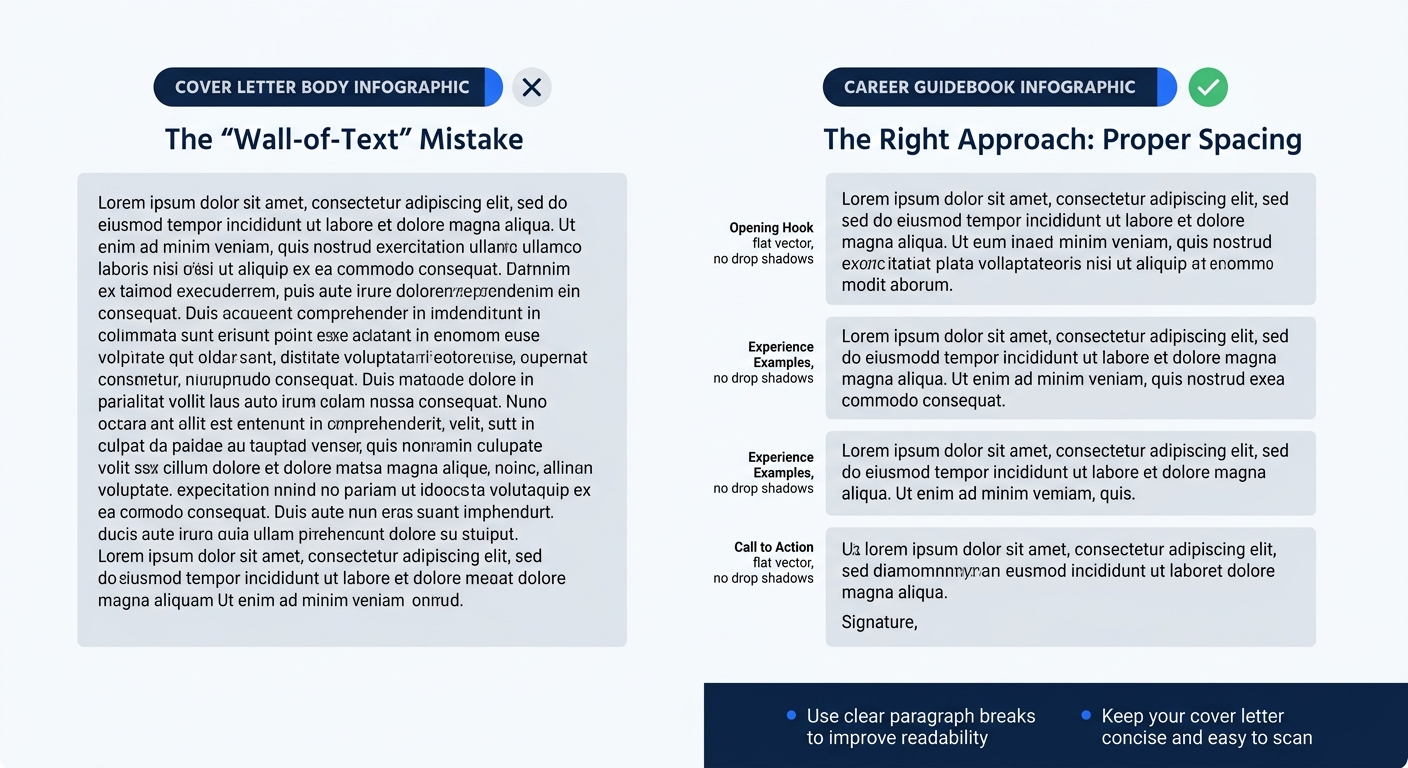
Paragraph 1, The opener (2–3 sentences): State which position you’re applying for, where you found it, and one sentence that hooks the reader’s interest. Zety’s business cover letter guide recommends highlighting your single most relevant professional achievement here, the one that makes the hiring manager want to keep reading.
Paragraph 2, The evidence (3–5 sentences): Connect your specific skills and experience to the job requirements. Pull keywords directly from the job posting and weave them into concrete examples. If the posting says “project management experience,” don’t write “I have project management experience.” Write “I managed a 14-person rollout of [specific project] that came in two weeks ahead of schedule.” Quantified claims matter. Our guide on phrases hiring managers actually reject covers the generic filler that gets your letter filtered out.
Paragraph 3 (optional), Additional fit: If you have a second strong example or want to address something specific about the company’s mission, add a short third body paragraph. Don’t pad. If paragraph 2 said everything, move to the close.
Paragraph 4, The close (2–3 sentences): Express enthusiasm for the opportunity, indicate you’d welcome a conversation, and thank the reader. Include a call to action, “I’d welcome the chance to discuss how my background in X aligns with your needs for this role” is direct without being pushy.
Between each paragraph, leave a single blank line. Do not indent the first line. This is block format, and it’s the standard expected by both human readers and ATS parsers.
Keep your cover letter between 250 and 400 words. That word count gives ATS parsers enough keyword-rich content to process while keeping the letter readable for the human who comes next.
Step 6: Close and Sign Off
Leave a blank line after your final body paragraph and type a professional closing. “Sincerely,” is the safest and most universal. “Best regards,” and “Kind regards,” are also acceptable. Microsoft’s cover letter format guide specifically warns against informal closings like “Cheers” or “Goodbye now”, these undercut the professionalism you’ve spent the rest of the letter building.
After the closing, leave three to four blank lines (this is your signature space if you’re printing the letter), then type your full name. If you’re submitting digitally, which is almost always the case, you can reduce the signature space to one blank line since no handwritten signature is needed.
You’ll know it worked when your letter ends with a closing word followed by a comma, appropriate whitespace, and your typed name.
Step 7: Save and Submit
Save your document as a PDF. PDFs preserve your formatting exactly as you designed it, regardless of what device or operating system the recipient uses. The only exception: if the job posting or application portal explicitly requests a DOCX file, submit DOCX. Some older ATS platforms parse Word files more reliably than PDFs, and following the posting’s instructions always overrides general best practices.
Name the file clearly: FirstName-LastName-Cover-Letter.pdf. Hiring managers download dozens of files per day, and “Document1.pdf” gets lost in the pile.
If you’re pasting your cover letter into an email body rather than attaching it, drop the header, date, and employer address block. Put the job title and your name in the subject line instead. Use the default font of your email client, reformatting an email body with Times New Roman looks strange in most inboxes. Everything else (salutation, body paragraphs, closing, typed name) stays the same.
Troubleshooting Common Format Problems
Problem: Your letter spills onto a second page. Check your word count first, if you’re over 400 words, cut content before adjusting formatting. If the word count is fine, reduce margins to 0.75 inches and drop the font size to 10.5pt. That combination almost always pulls a letter back onto one page.
Problem: The ATS garbles your letter. This usually happens because the document contains tables, text boxes, columns, images, or header/footer content. Strip all of those out. A properly formatted cover letter is plain paragraphs in a single column with no embedded objects. You can test ATS readability by copying your entire document and pasting it into a plain-text editor like Notepad. If the text comes through in the right order and nothing is missing, the ATS will read it fine.
Problem: Your cover letter looks different on the recruiter’s screen. This is why PDF is the default file format. If you submitted a DOCX and the recruiter has different fonts installed or a different version of Word, your layout can shift. Always open your PDF on a different device (or in a browser PDF viewer) to confirm it looks right before sending.
Tip: Before submitting, print your cover letter or view it in Print Preview. Formatting issues that are invisible in the editing view, misaligned spacing, orphaned lines, margin overflow, become obvious in the printed layout.
Where to Go From Here
A solid letter format for your cover letter handles the visual and structural side of the equation. The content side, choosing the right achievements, matching your language to the job posting, avoiding generic filler, is the other half. If you’re looking for free cover letter templates to speed up future applications, we’ve compiled options across industries and career levels. And if the job you’re applying to came through LinkedIn, our guide on job seeking through LinkedIn covers how to align your profile with the same keywords you’re using in your cover letter, so the hiring manager sees a consistent professional story across every touchpoint.
The format itself won’t get you hired. But a sloppy format will get you screened out before anyone reads your qualifications. Twenty minutes spent on proper margins, clean spacing, and ATS-safe structure removes one of the easiest reasons for an application to fail silently.
