


 4.9
4.9 4.5
4.5LinkedIn’s algorithm indexes your headline at 5x the weight of any other profile field, and profiles with “All-Star” completion status appear in 40x more recruiter searches. This guide walks you through every phase of a working LinkedIn job-hunt strategy, from profile construction through application timing to networking, in about two hours of focused setup work.
TL;DR: Optimize your profile for recruiter search (headline, photo, 50+ skills, Open to Work), set up filtered job alerts, apply within 24 hours of postings, and spend 80% of your LinkedIn job-search time networking rather than submitting applications.
Before You Start
You need a LinkedIn account (free tier works for every step below), a current resume to pull content from, a professional headshot (smartphone photos work if the background is clean and the lighting is even), and about two hours of uninterrupted time for the initial setup. A Premium subscription helps with InMail and applicant insights but isn’t required.
Write down your target job titles, the industries you’re pursuing, and 2-3 geographic regions or “Remote” before you begin. Every optimization decision in this guide depends on those inputs.
If your resume needs updating first, professional resume writers can refine your content, and top resume builders give you a structured way to organize experience before transferring it to LinkedIn.
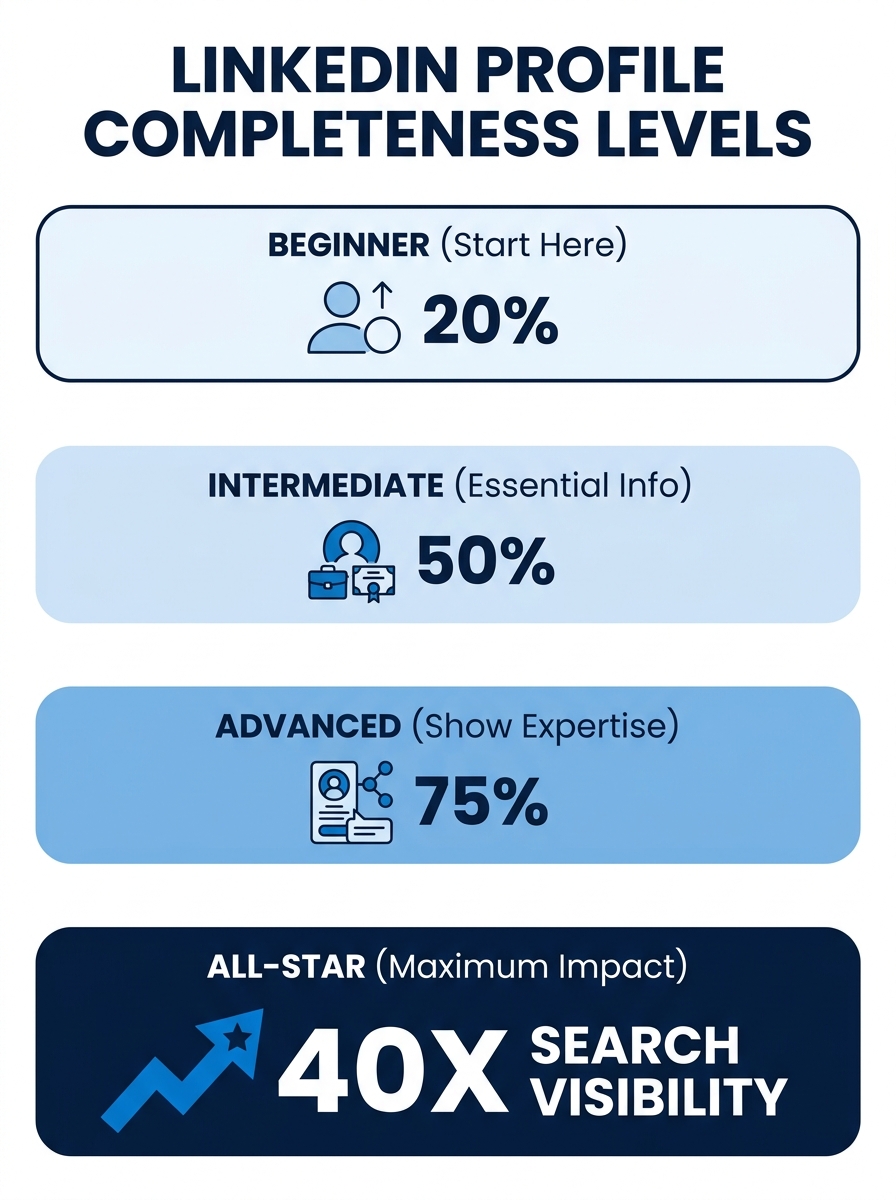
Step 1: Complete Your Profile to All-Star Status
LinkedIn assigns every profile a completeness level. Profiles at “All-Star” appear in 40x more searches than incomplete ones. Almost 50% of hiring managers now use LinkedIn skills data to fill roles, so a bare-bones profile costs you visibility at every stage of the job hunt.
Here’s what All-Star completion requires:
- A profile photo (profiles with professional photos get 21x more views and 36x more messages)
- A headline (covered in Step 2)
- A summary/About section with at least 3 sentences describing what you do and what you’re looking for
- Current position with a description
- At least 2 past positions
- Education
- At least 5 skills
- Industry and zip code
- 50+ connections
Verification: Look at the right sidebar of your profile in edit mode. LinkedIn displays your profile strength indicator. If it reads “All-Star,” this step is done.
Step 2: Rewrite Your Headline for Recruiter Search
The default headline LinkedIn assigns is your job title and company name. That’s a waste of 120 characters of the most algorithmically valuable real estate on your profile. LinkedIn’s own profile guidance recommends you use the headline field to describe your role, purpose, and what makes you distinctive. Headlines over 100 characters generate significantly more search impressions than shorter defaults.
Write a headline that includes:
- Your primary target role title (the exact words recruiters type when searching)
- One or two core skills or specializations
- An outcome or value statement if space allows
Example: Instead of “Marketing Manager at Acme Corp,” write “Marketing Manager | B2B SaaS Growth, Demand Generation, HubSpot & Salesforce.”
Recruiters in 2026 search for skill clusters rather than single job titles. A headline containing “Generative AI + Data Visualization” will surface for a broader set of recruiter queries than “Data Analyst” alone. If you want to understand how LinkedIn’s recruiter AI processes profiles using natural language, we covered how those queries work in detail.
Verification: Search for your target job title on LinkedIn’s search bar while logged out (or in an incognito window). If your profile appears within the first 3 pages of results for a term in your headline, you’re indexed correctly. If you don’t appear at all, add more relevant keywords and check again in 48 hours.
Step 3: Add 50+ Skills and Quantify Your Experience
LinkedIn lets you list up to 50 skills on your profile. Profiles with 50+ endorsed skills rank higher in recruiter search results, and 75% of recruiters now prioritize skills over degrees when evaluating candidates. Add every relevant skill you genuinely have:
- Hard skills (programming languages, tools, certifications, platforms)
- Soft skills (project management, cross-functional leadership, stakeholder communication)
- Industry-specific terminology that recruiters actually search for
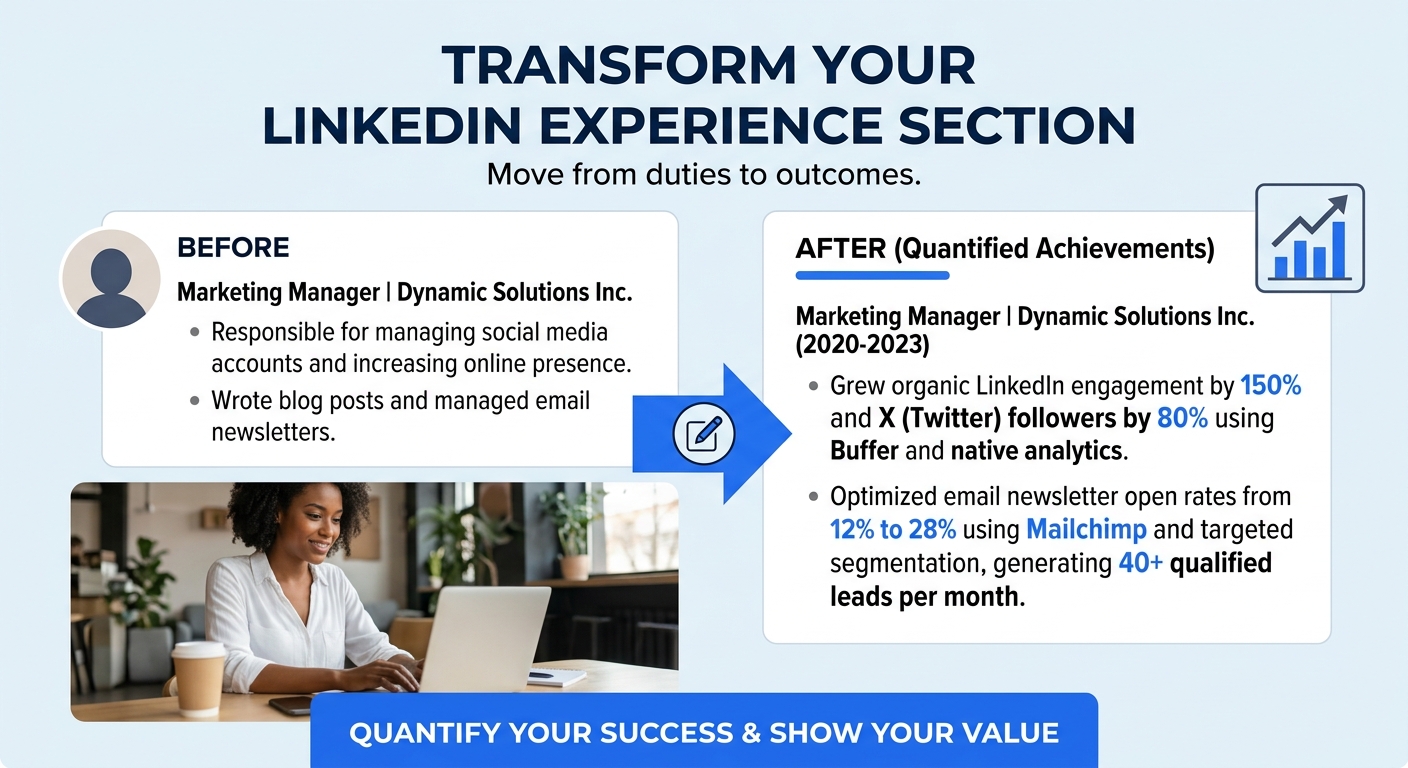
After adding skills, message 10-15 connections and ask them to endorse you for 2-3 specific skills. Offer to endorse them in return. But skills alone aren’t enough. As one contributor on r/jobsearchhacks put it: “showing proof in the Experience bullets (numbers, tools, outcomes) makes recruiters trust the profile fast.” Go through every bullet point in your Experience section and add concrete metrics wherever possible. Revenue generated, team sizes, percentage improvements, and specific tools used all give the algorithm and the recruiter something to latch onto.
Verification: Navigate to your Skills section and count your listed skills. If you have 50 listed and your top 3 each show endorsement counts, this step is done.
Step 4: Toggle “Open to Work” the Right Way
According to executive recruiters at Keynote Search, toggling on the Open to Work feature should be your first visibility move. Candidates with the Open to Work signal receive 40-52% more InMails from recruiters and are 17% more likely to convert those contacts into interviews.
You get two options:
- Visible to recruiters only: A private signal that appears in LinkedIn Recruiter searches but doesn’t display the green banner on your profile photo. Use this if you’re employed and searching confidentially.
- Visible to all LinkedIn members: Adds the green #OpenToWork photo frame. Use this if you’re openly looking.
Fill in your target job titles (up to 5), preferred locations, work types (remote, hybrid, on-site), and your start date. Be specific. The algorithm matches these fields against job postings and recruiter searches, so vague entries reduce your match rate.
The debate around the personal branding implications of the Open to Work badge continues. The data, though, is clear: the visibility increase outweighs any perceived stigma.
Verification: Ask a friend with LinkedIn Recruiter access to search for your target title in your region. If your profile shows the “Open to Work” indicator in their results, the feature is active.
Step 5: Set Job Alerts and Apply Within 24 Hours
Go to LinkedIn’s Jobs tab, search for your target roles, and click “Set alert” at the top of the results. LinkedIn will email you when new jobs matching those criteria are posted. You can also save individual listings while browsing to revisit them later.
The critical timing detail: applying within the first 24 hours of a posting increases your chance of being reviewed by 4x. After 24 hours, the applicant pool balloons and many ATS systems begin batch-filtering. Use LinkedIn’s “Under 10 Applicants” filter (available in the “All filters” dropdown on the Jobs search page) to find fresh postings where you won’t be buried.
Tip: Set job alerts for 3-5 different keyword variations of your target role. “Product Manager,” “Product Lead,” and “PM” will each surface different listings. The overlap is smaller than you’d expect.
Verification: Check your email within 24 hours. If you receive at least one job alert notification, your alerts are working. If nothing arrives, verify your notification preferences under Settings > Communications.
Step 6: Network Before You Need Anything
Estimates suggest 60-90% of jobs are secured through networking that produces referrals or recommendations. Successful candidates spend roughly 80% of their time networking and 20% applying. Most people do the inverse, and their results reflect it.
Here’s how to network effectively on LinkedIn:
- Connect with people at your target companies. Search for employees by company, filter by role, and send personalized connection requests that mention something specific about their work or team.
- Join 3-5 industry groups. Participate in group discussions and start conversations before you need anything. As one Redditor on r/linkedin advised, “Follow people in your industry, join industry related groups, and start getting into conversations with people. You have to do this ahead of time.”
- Request informational interviews. Once connected, ask for a 15-minute phone call to learn about their role and team. Don’t ask for a job in the first message. These conversations often surface unadvertised openings.
- Engage with your connections’ content. Leave substantive comments on their posts. Candidates who engage with company content before applying are 3x more likely to receive a response.
Referrals bypass algorithmic filtering and guarantee your resume gets human review. A single connection at the company can walk your application past every ATS hurdle. For a deeper breakdown of building a LinkedIn profile that supports ongoing networking, see our full LinkedIn profile guide for job seekers.
Verification: Track your outreach in a spreadsheet with columns for date, person, company, and response status. Once connections start replying to messages, accepting informational interview requests, or proactively sharing job leads, your networking is working.
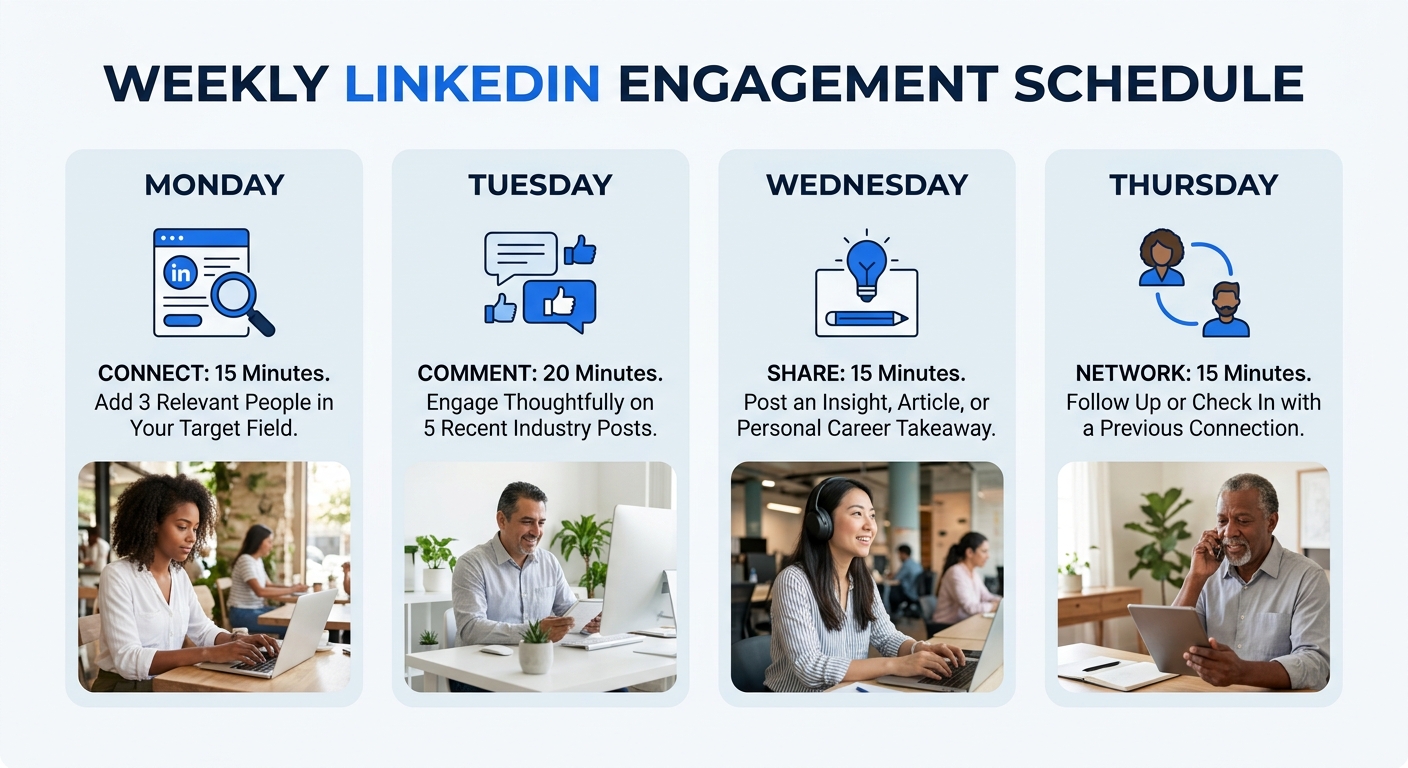
Step 7: Post and Comment to Stay Visible
A working LinkedIn job search goes well beyond the Jobs tab. Careerflow’s research confirms that regularly posting content, sharing industry insights, and actively expanding your network are essential for staying visible in recruiter searches. Verified profiles get 60% more views, but even verified accounts benefit from consistent engagement activity.
You don’t need to produce viral thought leadership. Here’s what works:
- Comment on 3-5 posts daily. Write substantive comments (3+ sentences) on posts from people in your industry. This puts your name and headline in front of their entire network.
- Post once or twice a week. Share a lesson from your work, a reaction to industry news, or a summary of something you learned. Text-only posts with clear formatting tend to get more engagement than link shares.
- Share articles with your take. Add 2-3 sentences of commentary above the link explaining why it matters to your field.
Verification: After one week of consistent engagement, check your “Who viewed your profile” section. If the number is trending upward compared to the previous week, your visibility is increasing.
Candidates who engage with company content before applying are 3x more likely to receive a response from that company.
Troubleshooting
You’re applying but getting no responses. Check whether you’re applying within 24 hours of postings. If your applications go out days later, you’re competing against hundreds of candidates for the same slot. Verify that your headline contains the exact keywords from the job descriptions you’re targeting, because a mismatch between your headline and the recruiter’s search terms makes you invisible to the algorithm. And make sure each application includes a tailored cover letter. If yours reads generic, certain phrases get it filtered out immediately.
Your profile views are low despite optimization. 93% of recruiters are increasing their use of AI tools for candidate screening. If your Experience section lacks specific metrics and outcomes, the AI deprioritizes you. Go back and add numbers to every bullet: revenue generated, team size managed, percentage improvements, tools used. Then confirm you have 50+ skills listed and that your headline fills at least 100 characters.
Your network isn’t responding to outreach. Connection requests without personalization get ignored at high rates. Write 2-3 sentences in every request explaining who you are, why you’re reaching out, and what you’re hoping to learn. Don’t mention job hunting in the first message. Build the relationship first, then let the conversation lead naturally toward opportunities.
Where to Go From Here
Once your profile is optimized, alerts are running, and your networking cadence is established, the daily maintenance drops to about 20-30 minutes: respond to messages, comment on posts, apply to fresh alerts, and follow up with connections you’ve already contacted.
Consider expanding beyond LinkedIn’s native tools. Boolean search on Google (typing site:linkedin.com followed by a job title and company name) can surface listings that don’t appear in LinkedIn’s own results. And if you’re open to contract or temporary work as a bridge to a permanent role, those postings often have far less competition and frequently convert to full-time offers.
Your LinkedIn presence feeds into a larger job-search system. The profile determines whether recruiters find you. The resume determines whether you pass ATS. The cover letter determines whether a hiring manager reads past your name. The network determines whether someone walks your application to the front of the line. Each piece supports the others, and the candidates who build all four are the ones whose inboxes start filling up with interview requests.
