


 4.9
4.9 4.5
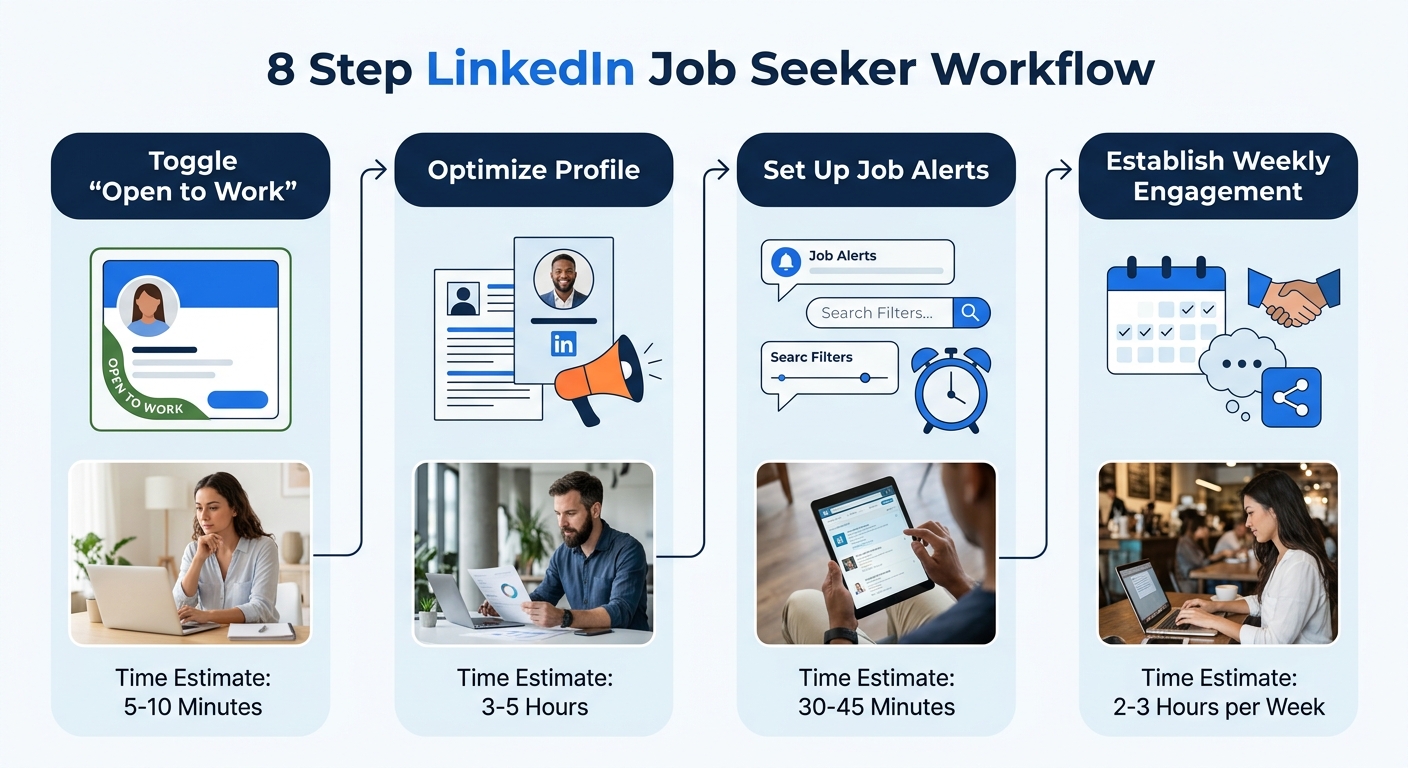
4.5LinkedIn job seekers who reach All-Star profile status appear in 40x more recruiter searches than incomplete profiles, according to LinkedIn’s own platform data. This guide covers every step, from profile configuration to weekly engagement workflows, so you can build a fully optimized, search-ready presence in under two hours.
TL;DR: Optimize your LinkedIn profile for semantic search, switch on recruiter-only visibility, set up 10–15 targeted job alerts, verify your identity, and commit to a 20-minute weekly engagement routine. The full initial setup takes roughly two hours.
Before You Start
You’ll need four things before step one: a LinkedIn account (free tier works), an updated resume to pull bullet points from, a short list of 3–5 target job titles, and about two uninterrupted hours. If you’re searching confidentially while employed, review the guidelines on conducting a confidential job search before changing any settings.
A few notes on context. With 52% of professionals globally planning a job search in 2026 and US applicants per open role roughly doubling since spring 2022, the competition for recruiter attention is fierce. Profiles with professional photos receive 21x more views and 36x more messages, so have a clean, well-lit headshot ready before you begin. And 93% of recruiters plan to increase their use of AI screening tools this year, which means your profile needs to be readable by machines and humans alike.
Step 1: Switch On “Open to Work” (Recruiter-Only)
The goal of this step is to signal your availability to recruiters without broadcasting it to your current employer, colleagues, or clients.
Go to your LinkedIn profile, click the Open to Work button below your profile photo, and fill in your target job titles, locations, workplace types (remote, hybrid, on-site), and start date. Under “Choose who sees you’re open,” select Recruiters only. This hides the green “Open to Work” banner from your network while making your profile visible in recruiter search filters.
You’ll know it worked when your profile shows a small “Open to Work” note visible only to you (and to anyone with a LinkedIn Recruiter license). If the green photo frame appears on your public profile, go back and switch visibility to recruiter-only.
Step 2: Rewrite Your Headline Using All 220 Characters
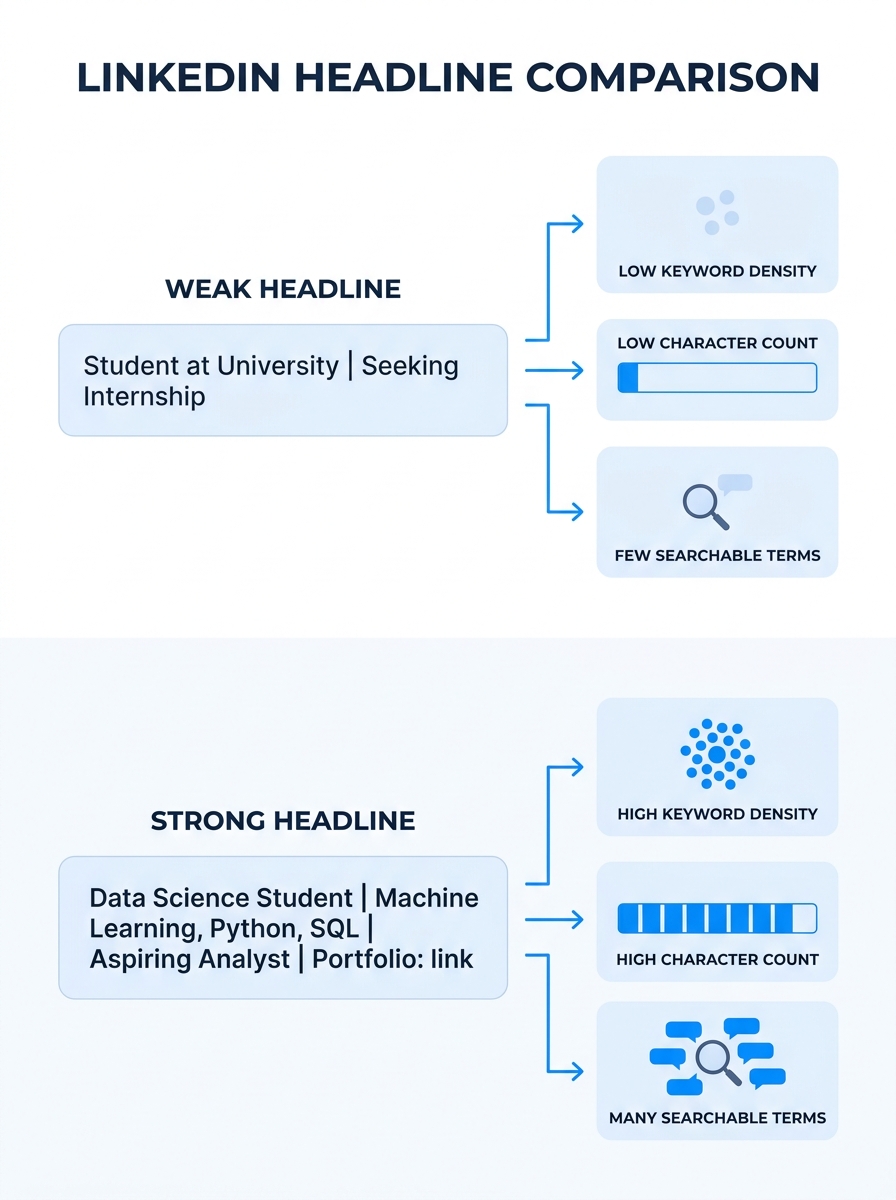
Your headline is the single highest-weight text field for LinkedIn’s search algorithm. LinkedIn gives you 220 characters, but most people use fewer than 40. The goal here is to fill that space with specific job titles, specializations, and industry terms that recruiters actually search for.
A weak headline looks like: “Marketing Professional | Looking for New Opportunities.” A strong one reads: “B2B SaaS Content Marketing Manager | SEO Strategy & Demand Gen | HubSpot & Marketo Certified | Driving Pipeline Growth for Series A–C Startups.” The second version hits six or seven search queries a recruiter might run.
If you need help identifying the right keywords, you can use our guide on building a search-optimized LinkedIn profile for detailed examples across industries.
You’ll know it worked when your headline reads as a string of specific, searchable terms rather than a vague job-status update.
Step 3: Rebuild Your About Section Around Target Roles
LinkedIn’s search engine now uses semantic matching, meaning it understands that “data analysis” relates to SQL and Python even when those exact terms aren’t present. Your About section should work with this system, not against it.
Write 3–5 short paragraphs (the full section can run up to 2,600 characters). Paragraph one states what you do and who you do it for. Paragraph two covers your core skills and tools with specific, named technologies. Paragraph three describes measurable results from your work. An optional fourth paragraph mentions the types of roles you’re targeting.
ORS Partners’ optimization research recommends expanding upon current and former job titles with descriptions that include keywords recruiters are actively searching for. Don’t just list your title as “Account Executive.” Add context: managed a $2.4M book of business across 47 mid-market accounts in financial services.
You’ll know it worked when someone who skims your About section can immediately identify your function, your industry, and the scale at which you’ve operated.
Tip: Add at least three detailed job descriptions to your Experience section. According to Jobscan’s LinkedIn optimization research, profiles with complete role descriptions receive significantly higher match scores from recruiter search tools.
Step 4: Reorder and Refresh Your Skills
Skills are weighted by recency and endorsement volume in LinkedIn’s ranking algorithm. You can list up to 50, but the top three get disproportionate visibility in search results.
Go to your Skills section and reorder the list so your three most relevant, in-demand skills sit at positions one through three. Delete anything outdated or tangential. Then audit this list against job descriptions for your target roles: if a skill appears in 4 out of 5 postings you’re interested in, it belongs on your profile.
Endorsements still matter for ranking. After updating your list, ask 3–5 close colleagues to endorse your top skills. Reciprocate for theirs. Plan to audit this section every 90 days.
You’ll know it worked when your top three skills match the language used in your target job descriptions verbatim.
Step 5: Verify Your Profile
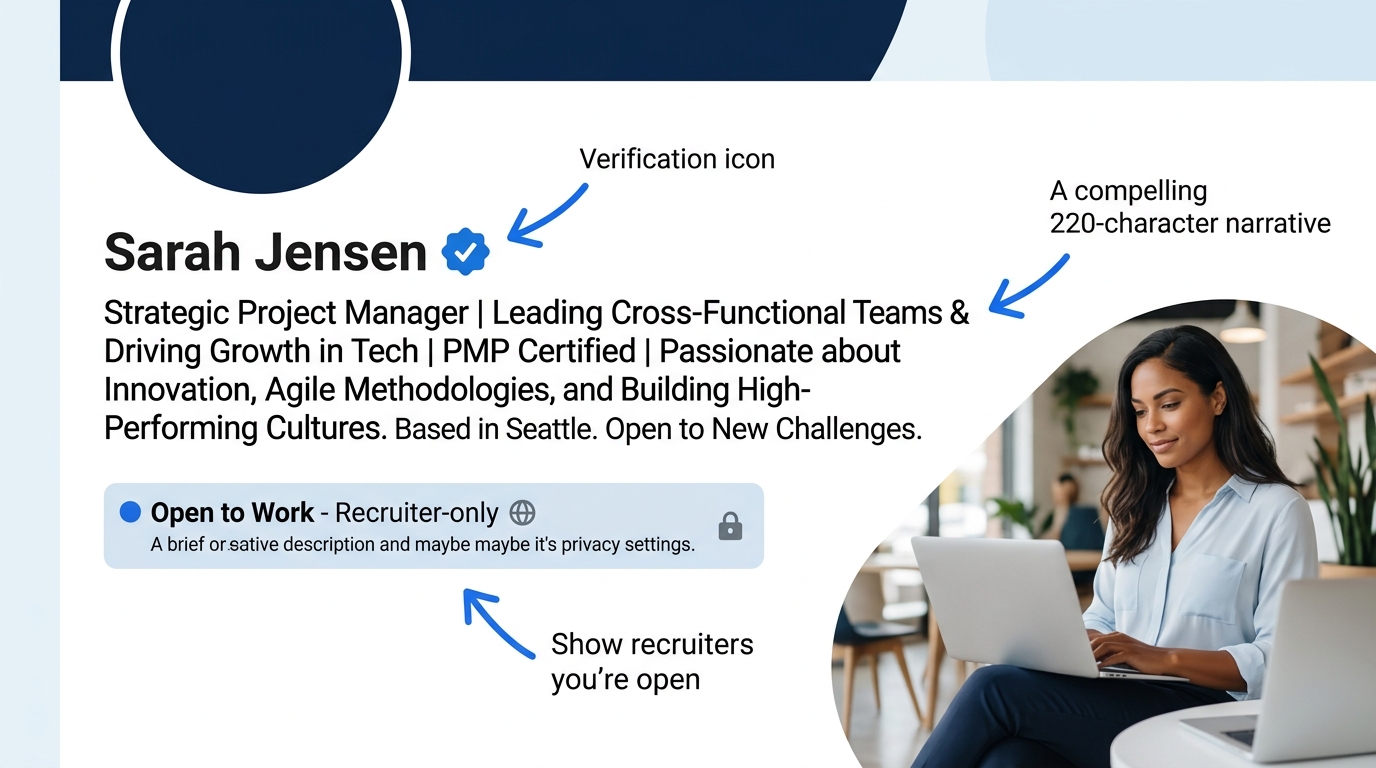
Verified LinkedIn members receive 60% more profile views and 30% more connection requests than unverified members. Verification is free and takes about five minutes.
Go to Settings > Account Preferences > Verify Your Identity. LinkedIn offers verification through government ID, workplace email, or education credentials. Complete at least one method. A blue verification badge will appear on your profile.
You’ll know it worked when a small checkmark badge shows next to your name on your profile page and in search results.
Step 6: Set Up 10–15 Targeted Job Alerts
Elmhurst University’s LinkedIn research found that more than 70% of recruiters search for candidates on LinkedIn, and setting up job-search filters is the fastest way to surface the right openings before they’re buried under hundreds of applications.
Search for one of your target job titles on LinkedIn Jobs. Apply filters for location, experience level, date posted, company, and remote/on-site. Then click “Set Alert” to receive daily or weekly email notifications. Repeat this process for each variation of your target titles. Aim for 10–15 active alerts covering different keyword combinations and geographies.
The critical timing factor: apply within the first 50 applicants whenever possible. Early applications receive significantly higher review rates from hiring teams. Daily alerts, rather than weekly ones, help you hit that window.
You’ll know it worked when you receive email notifications matching your target criteria within 24 hours of setting the alerts. If you’re getting irrelevant results, tighten your filters or adjust your Boolean operators. We’ve covered advanced LinkedIn search techniques in detail if you need help refining your queries.
Step 7: Build a Weekly Engagement Workflow
A profile sitting idle drops out of recruiter search results. LinkedIn’s algorithm surfaces candidates with high engagement, so consistent activity directly affects your visibility. JobWizard Blog’s 2026 research confirms that “a weekly post or comment keeps you visible to the right audience” because recruiters use LinkedIn’s algorithm to surface active candidates.
Here’s a sustainable weekly rhythm:
- Post original content 1–2 times per week. Share observations from your field, comment on industry trends, or describe how you solved a problem at work. LinkedIn’s “360 Brew” algorithm cross-references your posted content with your profile expertise, so stay on-topic. A healthcare professional posting about cryptocurrency actually hurts distribution.
- Leave 5–10 thoughtful comments per day on posts from leaders at your target companies, industry publications, and peers. “Great post!” doesn’t count. Add a specific observation or question.
- Save interesting jobs as you scroll. LinkedIn’s best practices page recommends saving jobs while browsing to revisit them for tailored applications later.
One content format note: document carousels perform well on LinkedIn, but keep them to eight slides or fewer. Longer carousels get penalized for low completion rates. Hashtags no longer carry significant weight in distribution, so spend your effort on the substance of your text instead.
You’ll know it worked when your weekly profile view count increases within two to three weeks of consistent activity. Track this number in LinkedIn’s analytics dashboard.
A network of 300 relevant, engaged connections outperforms 3,000 random ones. Quality compounds; volume doesn’t.
Step 8: Start Targeted Outreach to Hiring Managers
Cold applications through the “Easy Apply” button produce diminishing returns when applicant volumes are this high. LinkedIn’s own career content hub confirms that “a warm introduction often opens the door to decision-makers faster than a cold application.” The goal of this step is to build direct relationships with people who influence hiring decisions at your target companies.
Identify 5–10 companies you’d want to work for. Find the hiring managers, team leads, or department heads for your function at each company. Follow them. Engage with their posts for a week or two before sending a connection request.
When you do send a connection request, personalize it. Reference a specific post they wrote, a project their team shipped, or a company initiative you admire. Personalized connection requests are 3x more likely to be accepted and 5x more likely to lead to a real conversation than generic ones.
After connecting, send a brief message (three to four sentences) introducing yourself and expressing genuine interest in their team’s work. Don’t attach your resume or ask for a job in the first message. Build rapport first. If you’ve been working on relevant skills like explaining your expertise concisely, that practice translates directly to how you present yourself in these conversations.
You’ll know it worked when you start receiving replies, follow-up questions, or referrals to open roles within 2–4 weeks of beginning outreach.
When Things Go Wrong
Problem: Your profile views haven’t increased after two weeks of activity. Check whether your headline contains generic terms like “seeking opportunities” instead of specific, searchable job titles. Also confirm your Open to Work setting is active. If both look correct, increase your daily commenting from 5 to 10 posts per day for a week and track whether views tick up.
Problem: You’re getting job alert emails, but none of the roles match what you want. Your alerts are too broad. Delete alerts with vague titles like “manager” and replace them with specific compound terms: “product marketing manager SaaS” or “senior financial analyst healthcare.” Boolean operators (AND, OR, NOT) help here.
Problem: Connection requests go unanswered. Your message is either too long, too generic, or too transactional. Keep it under 300 characters. Mention something specific about the person’s work. And make sure you’ve engaged with their content before requesting a connection, so your name isn’t appearing cold. Former Google recruiter Farah Sharghi has emphasized that candidates who lead with proof rather than potential get dramatically better responses from hiring teams. We covered her specific advice on what makes candidates invisible to recruiters.
Warning: Avoid “spray-and-pray” applications. Sending 50 generic Easy Apply submissions per day trains LinkedIn’s algorithm to deprioritize your profile. Tailor each application, even if that means applying to fewer roles.
Where to Go From Here
The eight steps above give you a complete LinkedIn job search foundation, and maintaining it takes roughly 20 minutes per day once the initial setup is finished. The profiles that consistently generate recruiter interest share three traits: they’re specific about what the person does, they’re active in their professional community, and they’re verified.
If your resume itself needs work before you start uploading it to applications, browse our career guides on the blog for resume-writing walkthroughs, ATS optimization strategies, and cover letter templates. And if you want one-on-one help preparing for interviews that come from your LinkedIn outreach, our interview coaching services pair well with an active LinkedIn strategy, because the skills that get you a reply on LinkedIn are the same ones that carry you through a first-round conversation.
LinkedIn produces roughly twice the interview rate of other job platforms when used with a structured approach. The structure is what separates the 92.6% of HR professionals who find LinkedIn profiles useful in hiring decisions from the job seekers who never get seen. You’ve now got the structure. Put it to work.
