

 4.9
4.9 4.5
4.5MIT’s career advising office reduces effective cover letter structure to one directive: state your purpose and a brief professional introduction in the opening sentence. Below is a sample cover letter sample you can copy paragraph by paragraph, customize with your own achievements, and submit as a PDF for any job posting.
TL;DR: Copy the 4-paragraph template below, replace the bracketed placeholders with your details, keep the total under 250 words, and save as PDF. Each step includes a verification check so you know the section is done right.
Before You Start
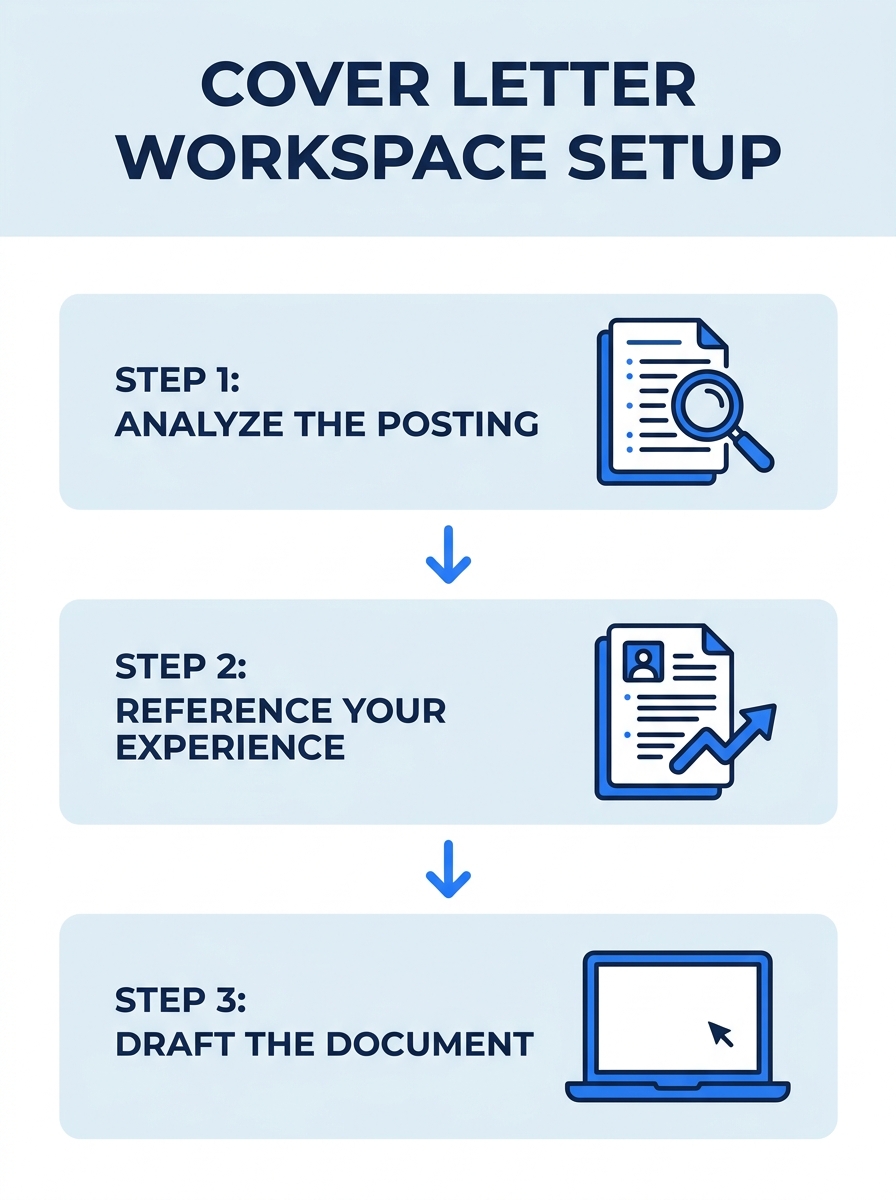
You need four things ready before you open a blank document:
- The job posting itself. Pull it up on screen or print it. You’ll reference specific requirements in at least two paragraphs.
- Your resume. Your cover letter complements your resume. It doesn’t repeat it. Have your most recent version open so you can identify 1-3 achievements to highlight.
- The hiring manager’s name. Check the job posting, the company’s team page, or LinkedIn. If you can’t find a name after 5 minutes of searching, “Dear Hiring Manager” works. According to ResumeGenius’s cover letter guide, both “To Whom It May Concern” and “Dear Sir/Madam” read as outdated and impersonal. Skip them.
- A word processor or text editor. Google Docs, Microsoft Word, or any tool that exports to PDF. Microsoft Word offers free cover letter templates if you want a pre-formatted starting point, though the template below works in any editor.
Time required: 25-40 minutes for a first letter, 10-15 minutes per subsequent application once you have a base version.
The Full Sample Cover Letter Sample Template
Before we walk through each paragraph, here’s the complete template. Read it once, then we’ll break it down step by step.
[Your Full Name] [Your Phone Number] | [Your Email] | [Your City, State]
[Date]
[Hiring Manager’s Name] [Company Name] [Company Address]
Dear [Hiring Manager’s Name],
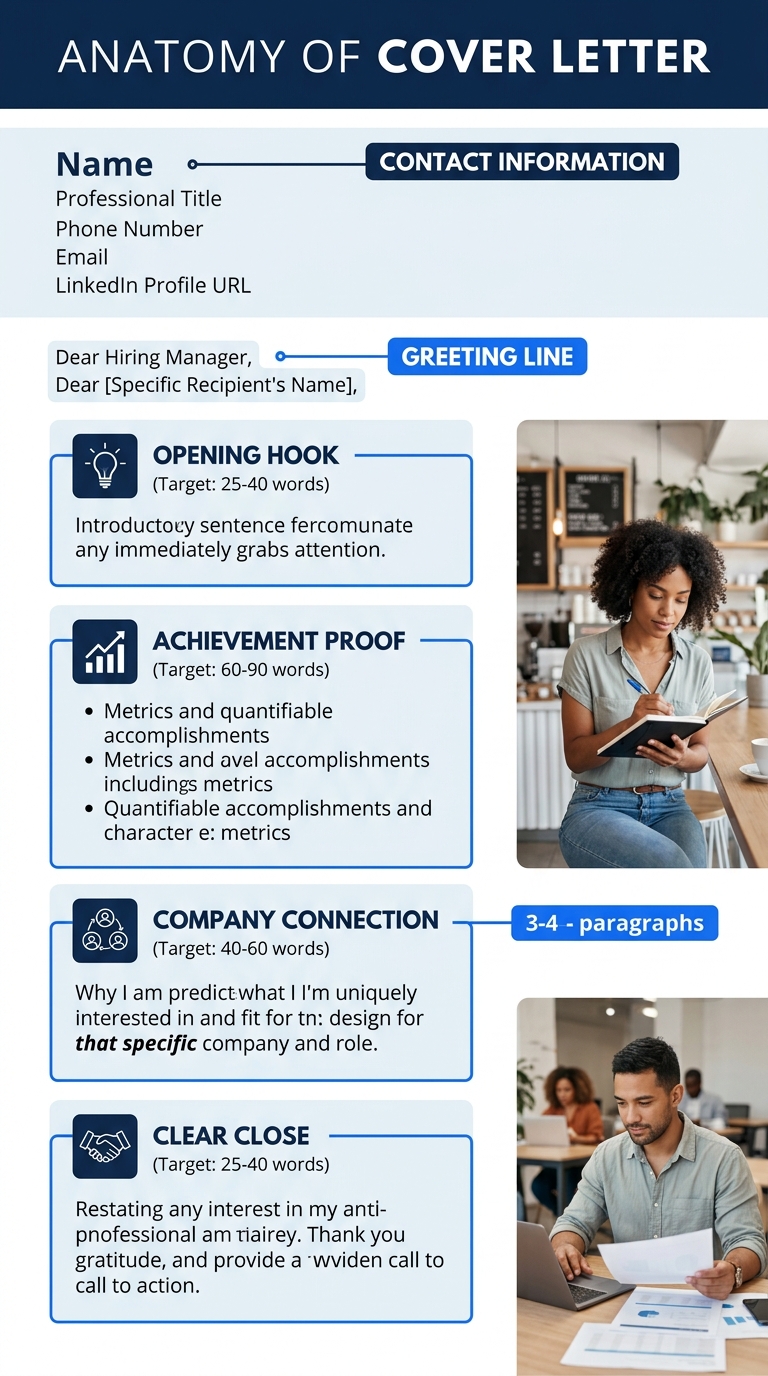
I’m writing to apply for the [Job Title] position at [Company Name], as posted on [where you found it]. With [X years] of experience in [your field], I’m excited to bring my background in [relevant skill area] to your team.
In my current role at [Current/Most Recent Company], I [specific achievement with a number, e.g., “reduced client onboarding time by 35%” or “managed a $2M annual budget”]. This experience directly aligns with your requirement for [specific requirement from the job posting].
What draws me to [Company Name] is [specific detail about the company, a recent project, their mission, a product you admire]. I’d bring [second relevant skill or achievement] to help [specific goal mentioned in the posting].
I’d welcome the opportunity to discuss how my experience in [skill area] can contribute to [Company Name]’s goals. I’m available at [phone number] or [email] and look forward to hearing from you.
Sincerely, [Your Full Name]
That’s 4 paragraphs, roughly 180 words of body text. MIT’s career development office recommends a font size between 10 and 12 points and a total length of one page maximum. The University of Michigan’s career center reinforces the same ceiling: “Keep it short and sweet, do not exceed one page.” Be persuasive, show enthusiasm, and move on.
Now let’s build each section.
Step 1: Write the Header
Your header mirrors a standard business letter. Include your full name, phone number, email address, and city/state at the top. Below that, add the date, followed by the recipient’s name, company, and company address.
Indeed’s formatting guidance confirms this layout: “Include your personal contact details and the details of the recipient at the top of the page. This makes it easier for a hiring manager or recruiter to follow up with you.” Skip your full street address for privacy. City and state are enough.
You’ll know this step is done when: your header has your contact info, the date, and the recipient’s details stacked in order. Double-check that your email address is professional ([email protected], not [email protected]).
Step 2: Nail the Opening Paragraph
This is where most cover letters collapse. The opening paragraph does two things: identifies the specific job you’re applying for and delivers a 1-sentence professional introduction. MIT puts it directly: “State clearly in your opening sentence the purpose for your letter and a brief professional introduction.”
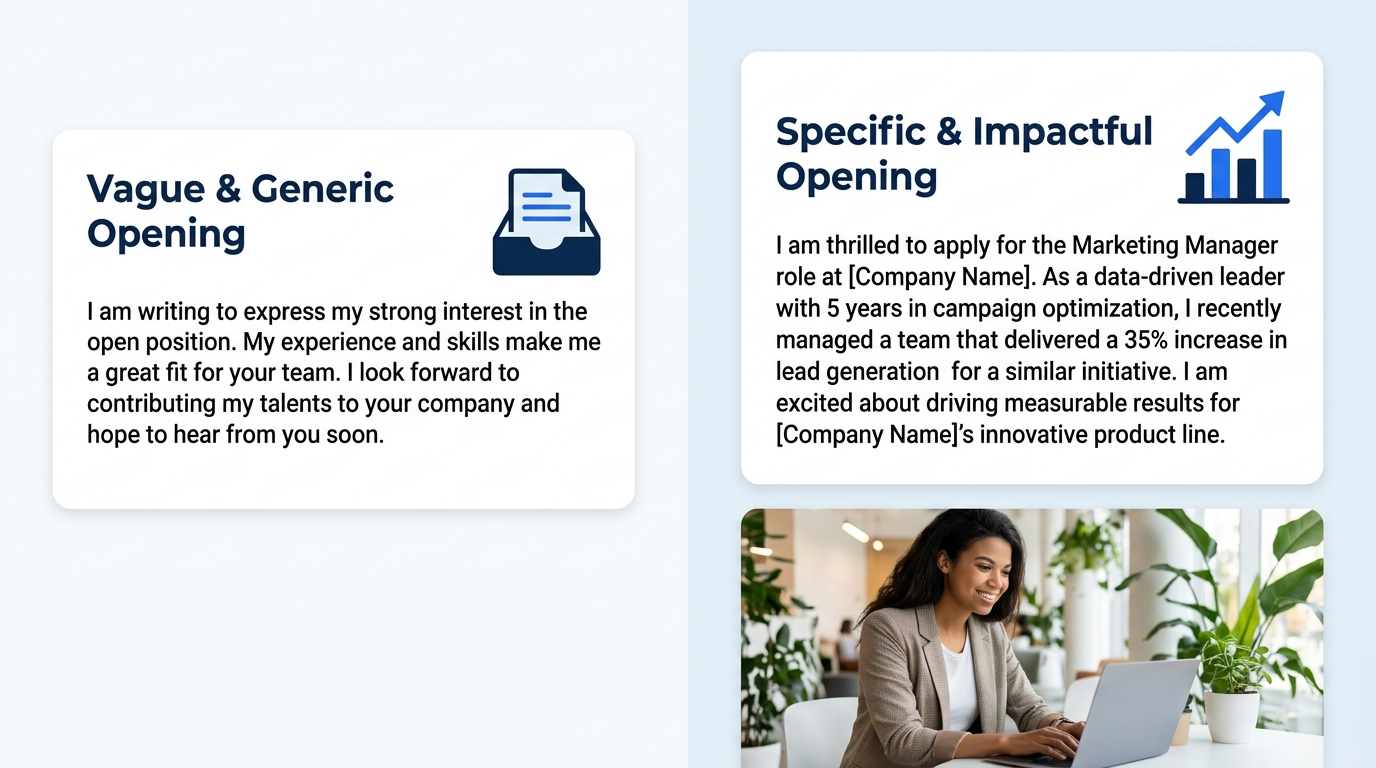
Don’t write: “I am writing to express my interest in exploring potential opportunities…” That’s 12 words before you’ve said anything useful.
Write instead: “I’m writing to apply for the Marketing Manager position at Acme Corp, as listed on LinkedIn. With 6 years leading B2B campaigns that generated over $4M in pipeline revenue, I’d bring proven demand-generation experience to your growing team.”
That’s 2 sentences. The recruiter knows the role, your experience level, and one concrete number. If the posting includes a reference number or code, include it here so HR can track your application accurately.
You’ll know this step is done when: your opening names the job title, the company, and at least one credential or achievement with a number attached.
Step 3: Build the Body Paragraph Around One Achievement
The body paragraph is your proof. Pick one achievement from your resume and expand it into a short narrative that connects to a requirement in the job posting. Current best practices recommend focusing on 1-3 measurable achievements rather than restating resume responsibilities. Your letter is an argument for why you deserve 30 minutes of interview time, and arguments need evidence.
The structure: What did you do? What was the measurable result? Why does it matter for this specific role?
Example: “At TechCo, I redesigned the customer support ticket workflow, reducing average resolution time from 48 hours to 18 hours. That 62% improvement lifted our NPS score by 14 points over two quarters. Your posting mentions scaling customer operations, and I’d apply this same process-driven approach to [Company Name]’s support team.”
That paragraph contains 1 achievement, 3 specific numbers (48 to 18 hours, 62%, 14 points), and a direct tie to the job posting. If you’ve explored how to write strong achievement-based bullets, the same principle applies here: quantify everything, then connect it to what the employer asked for.
You’ll know this step is done when: the paragraph includes at least one measurable number and explicitly references a requirement from the job posting.
Step 4: Show You Know the Company
Your second body paragraph shifts focus from you to them. Mention something specific about the company: a product launch, a value on their about page, a market they’re expanding into. This is the paragraph that proves you didn’t blast the same letter to 50 employers.
Tip: Spend 5 minutes on the company’s website, recent press releases, or LinkedIn page before writing this paragraph. One specific detail (“your recent expansion into the APAC market” or “your open-source contributions to the React ecosystem”) does more than three sentences of generic praise.
This paragraph also houses your second achievement or relevant skill. Pair the company detail with what you’d bring: “What draws me to [Company Name] is your commitment to [specific thing]. In my previous role, I [second achievement], which I’d bring to [specific goal from the posting].”
You’ll know this step is done when: you’ve named something specific about the company that you couldn’t copy-paste into a letter for a different employer.
One specific company detail does more than three sentences of generic praise.
Step 5: Close with a Clear Next Step
The closing paragraph is brief. Target 2-3 sentences. Restate your interest, mention your availability, and include your contact information one more time.
Write: “I’d welcome the opportunity to discuss how my [skill area] experience can contribute to [Company Name]’s goals. I’m available at [phone] or [email] and look forward to hearing from you.”
Don’t write: “I know you’re incredibly busy and I don’t want to take up too much of your valuable time, but if you could possibly find a moment to review my application…” That’s 32 words of self-sabotage.
Sign off with “Sincerely,” “Best regards,” or “Thank you,” followed by your full name. All three are professional and ATS-safe.
You’ll know this step is done when: your closing is 3 sentences or fewer and includes a direct way for the hiring manager to contact you.
Step 6: Format and Export as PDF
Formatting determines whether your letter looks professional and whether applicant tracking systems can read it correctly. Follow these specs:
- Font: 10-12 point, standard typeface (Arial, Calibri, Georgia, Times New Roman). MIT’s career office specifies this exact range.
- Margins: 1 inch on all sides.
- File format: Save and submit as PDF unless the application explicitly asks for .docx. PDF preserves your layout across every device and operating system.
- File name: FirstName-LastName-Cover-Letter.pdf. Hiring managers download dozens of files daily. Make yours instantly identifiable.
- Total length: One page. Both MIT and the University of Michigan enforce this ceiling. If you’re running long, cut adjectives first, then remove the weakest of your achievements.
ATS-safe formatting matters more than visual flair. If you’ve read about how ATS platforms parse application documents, the same principles apply to cover letters: clean single-column layouts with standard fonts parse correctly, while multi-column designs, text boxes, and content stuffed into headers and footers often get stripped entirely.
You’ll know this step is done when: you open the exported PDF on a different device (your phone works fine) and the formatting holds exactly.
When Things Go Wrong
Three problems come up consistently. Here’s how to recognize and fix each.
The letter runs longer than one page
If your draft spills onto page two, you’ve included too much. Cut the weakest achievement. Remove any sentence that restates what’s already on your resume without adding context or a connection to the job posting. Target 150-250 words of body text across 3-4 paragraphs. Your cover letter earns you an interview. Your interview earns you the job. Don’t confuse the two.
You can’t find the hiring manager’s name
Check the job posting first, then the company’s team or leadership page, then LinkedIn (search “[Company Name] + [department] + manager”). If you strike out after 5 minutes, “Dear Hiring Manager” is perfectly acceptable. “Dear [Department Name] Team” also works for large organizations. The greetings to avoid: “To Whom It May Concern” and “Dear Sir/Madam” both signal you didn’t try.
The tone feels robotic or stiff
Read your letter out loud. If you wouldn’t say a phrase to a colleague at coffee, rewrite it. Replace “I am confident that my extensive experience in strategic operations” with “I’ve spent 6 years in operations.” The sample cover letter sample above uses a conversational-but-professional register. Match that tone. And if you’re adapting templates from other sample letters, personalize every single sentence. Recruiters in 2026 flag unedited template language and AI-generated text almost instantly.
Where to Go From Here
You have a template, a 6-step process, and a verification check for each section. The biggest variable now is customization per application. Each letter you send should change in three places: the company name and details, the achievement you highlight (pick the one most relevant to the specific posting), and the company-research paragraph.
If you’re applying to multiple roles in the same field, expect about 60% of your letter to stay consistent while 40% gets rewritten per application. That ratio is normal and efficient. Keep a “base letter” document and duplicate it for each new job.
For more examples across different industries and experience levels, browse our collection of cover letter examples with ready-to-use templates. The same core principle holds for every application document you send: every line earns its place by connecting a specific, quantified result to the role you want.
