

 4.9
4.9 4.5
4.5A template cover letter gives you a pre-built structure (header, three body paragraphs, sign-off) that you customize for each job application in 20-30 minutes. This guide walks you through picking the right template, filling every section with content that clears ATS filters, and adapting it per role so it actually reaches a human reader.
TL;DR: Start with a single-column, ATS-friendly template in Calibri or Georgia at 10-12pt. Write one strong base version, then swap the company name, the role-specific achievement, and the opening hook for each new application. The whole process takes under 30 minutes once you’ve built your first letter.
Before You Start
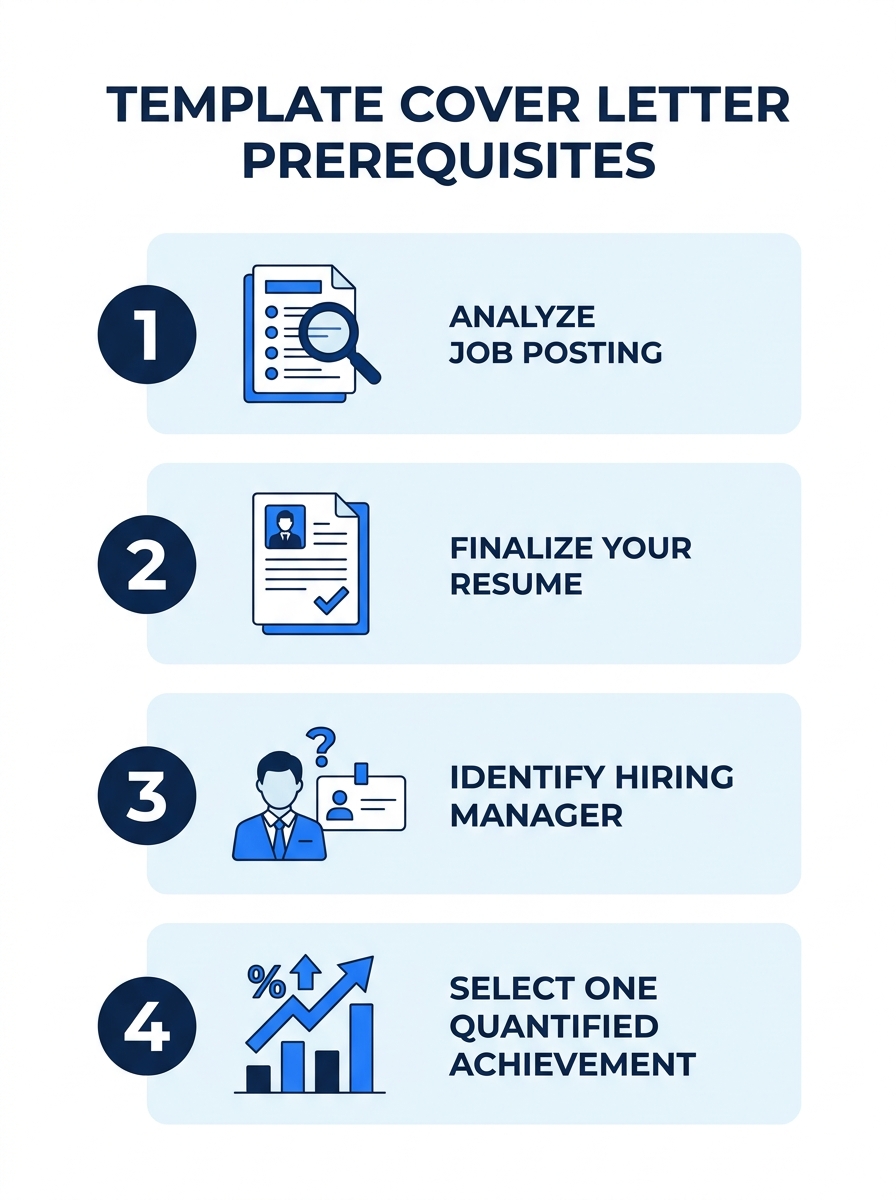
You need four things ready before opening any template. Skipping these turns a 25-minute task into a 90-minute spiral of tab-switching and second-guessing.
- The job posting, copied into a document you can mark up. Highlight the top 3 requirements the employer emphasizes. These become your letter’s backbone. According to hiring data compiled by Novoresume, templates across 60+ industries and job levels succeed when they directly mirror the language in a posting.
- Your resume, finalized. Your cover letter references your resume without repeating it. If you haven’t locked down the final version, do that first. If you’re building your resume from scratch, our guide on how Canva’s resume builder works covers a solid free option.
- The hiring manager’s name. LinkedIn, the company’s team page, or a quick call to the front desk will get you this 80% of the time. “Dear Hiring Manager” works as a fallback, but a named greeting outperforms it in response rates.
- One quantified achievement relevant to this role. A percentage, a dollar figure, a headcount, a timeline. You’ll build your middle paragraph around this single data point.
Time required: 20-30 minutes for your first letter using a template, 10-15 minutes for each subsequent customization.
Choosing the Right Template Format
The format of your template cover letter matters more than its visual design. Recruiters reject 75% of cover letter submissions because of ATS formatting failures or generic, copy-pasted text, and the wrong template structure accounts for a large share of those failures.
Three formats dominate in 2026, each suited to different situations:
| Format | Best For | Structure | ATS Safety |
|---|---|---|---|
| Problem-Solution | Mid-career professionals, roles with clear pain points | Names the company’s challenge, then shows how your experience solves it | High (text-based) |
| Achievement-Focused | Sales, marketing, operations, any role where numbers tell the story | Leads with 2-3 quantified wins, connects each to the job requirements | High (text-based) |
| Narrative / Story-Driven | Creative roles, startups, career changers | Opens with a brief personal story that demonstrates a relevant skill | Medium (depends on layout) |
The Problem-Solution format has the highest success rate across industries because it demonstrates specific value rather than summarizing your resume. Stories are 22 times more memorable than facts alone, which gives the Narrative format an edge in creative fields, but the Problem-Solution structure works everywhere.
Tip: Avoid templates with text boxes, multi-column layouts, heavy graphics, or colored sidebars. These elements cause ATS parsing failures. Stick to a single-column layout with standard fonts at 10-12pt, 1-inch margins, and clean section breaks.
For conservative industries like banking, law, or government, choose a template with minimal design. For startups or creative agencies, you have more flexibility with subtle color accents, but keep the single-column text structure intact. Microsoft Word’s free template library offers options across both ends of this spectrum.
Writing Your Header Block
The header is the first thing a recruiter sees and the first thing an ATS parses. Get this wrong, and the rest of your letter never gets read.
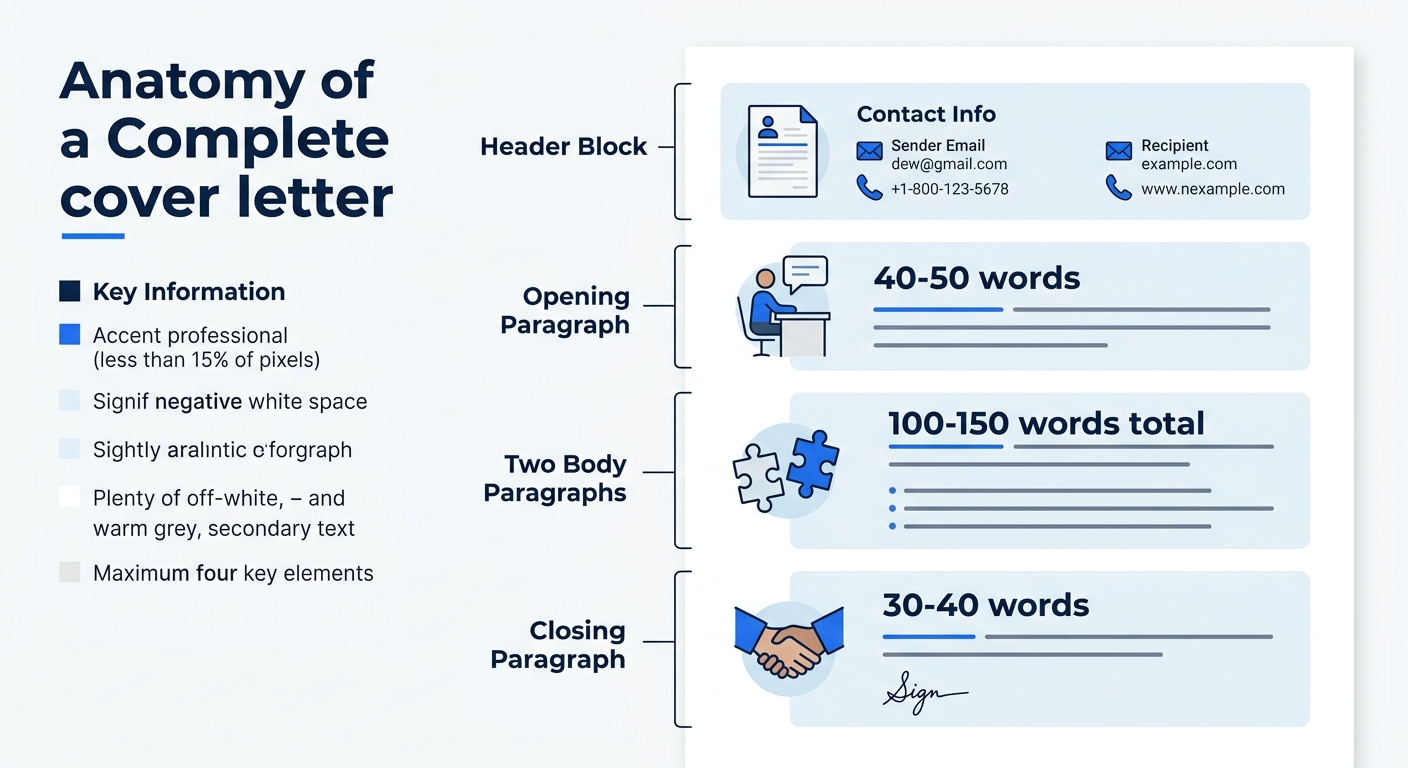
- Add your full name in bold, sized 2-4 points larger than your body text (so 14pt if your body is 11pt).
- List your contact information on one line or two: phone number, professional email, LinkedIn URL, city and state (full street address is no longer expected).
- Add the date in month-day-year format.
- Add the recipient’s block: hiring manager’s name, title, company name, company address.
You’ll know this step is done when your header matches or closely mirrors the header on your resume. That visual consistency signals professionalism. Goldie Chan writes in Forbes that you should “use your cover letter to highlight your value and explain how your skills and expertise can help the company reach their goals”, and that starts with a clean, professional first impression.
The Opening Paragraph
Your first paragraph has one job: make the hiring manager keep reading. You have about 6 seconds of attention, so every word needs to earn its place.
The University of Cincinnati’s cover letter guide for students recommends a clear formula: “Introduce yourself, state the position you’re applying for and mention how you found the job listing” (whether through a job board, company website, or personal reference). This three-part opener works because it immediately tells the reader why this letter is on their desk.
Here’s what that looks like in practice:
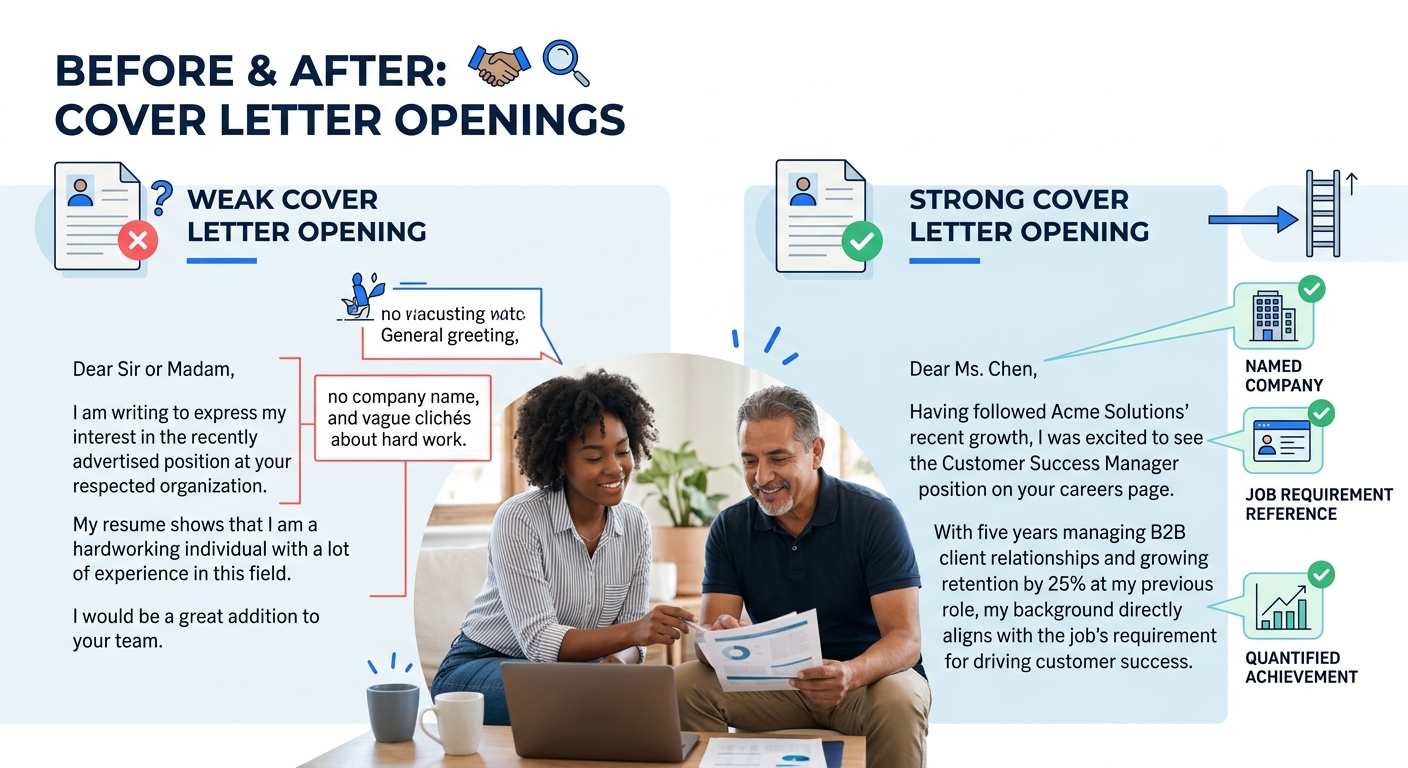
Weak opener: “I am writing to express my interest in the Marketing Manager position at your company. I believe I would be a great fit for this role.”
Strong opener: “Your posting for a Marketing Manager on LinkedIn caught my attention because of the emphasis on conversion rate optimization. At Vericel, I led a landing page overhaul that increased demo sign-ups by 34% in Q3 2025, and I’d like to bring that same focus to Acme Corp’s growth team.”
The strong version names the company, references a specific job requirement, and drops a quantified result inside the first three sentences. That’s 42 words doing the work that 150 words of generic interest statements can’t accomplish.
A named company, a specific job requirement, and a quantified result inside three sentences. That’s 42 words doing the work that 150 words of generic interest statements can’t accomplish.
If someone the hiring manager knows referred you for the role, mention that referral in the opening paragraph. Indeed’s customization guide emphasizes this point because a referral name immediately shifts the letter from cold outreach to warm introduction. According to Indeed’s data, referred candidates are significantly more likely to receive interview invitations than cold applicants.
Building the Body Paragraphs
The body of your template cover letter is where most people lose the reader. They default to restating their resume in paragraph form. Don’t do that. Your resume is attached. The hiring manager will read it. Your body paragraphs exist to do something a resume can’t: explain the context behind your results and connect those results to this specific company’s needs.
Paragraph 2 (your main achievement):
- Name the challenge you faced at a previous company.
- Describe the specific action you took, using 1-2 sentences max.
- State the measurable result: a percentage increase, a dollar amount saved, a deadline hit, a team size managed.
66% of job seekers prefer cover letters that run half a page or less, which means you have room for one achievement here, developed well. Pick the achievement that maps most directly to the top requirement you highlighted from the job posting.
Paragraph 3 (your bridge to the company):
This is where you show you’ve done research. Name something specific about the company: a product launch, a recent earnings figure, a strategic direction mentioned in their annual report or a press release. Then connect your experience to that specific initiative.
If you’re pivoting careers, this paragraph is where you address the transition. Our guide on skills-first strategies for job seekers covers how to frame transferable skills when your job titles don’t obviously match the role you’re targeting.
Keep each body paragraph to 3-4 sentences. The total body section should run 100-150 words for the entire middle portion.
Closing Lines and Sign-Off
Your closing paragraph is 2-3 sentences long. It does three things: restates your enthusiasm for the specific role (not “a position at your company”), mentions your availability for an interview, and thanks the reader for their time.
- Write one sentence expressing genuine interest in the role by name.
- Write one sentence offering your availability: “I’m available to discuss how my experience with [relevant skill] could support [company name]’s [specific initiative] at your convenience.”
- Close with “Sincerely,” or “Best regards,” followed by your full name.
You’ll know your closing works when it could only apply to this company and this job. If you could copy-paste it into a letter for a different company without changing anything, rewrite it.
Avoid “I look forward to hearing from you.” It’s passive, and every other applicant uses it. A specific offer of what you’d discuss in an interview stands out because it gives the hiring manager a reason to pick up the phone.
How to Customize One Template for Every Application
TopResume’s career advice team recommends a specific workflow: “Write a specific letter to start. Copy your first cover letter and start with this template. Highlight all tailored information and replace it with brackets ‘[ ]’ for easy identification.” This bracket method turns your template into a reusable system rather than a one-time document.
Here’s the workflow, step by step:
- Save your completed first letter as “Cover_Letter_MASTER.”
- Highlight every instance of: the company name, the hiring manager’s name, the specific role title, the achievement you chose, and the company-specific research reference.
- Replace each highlighted section with a bracketed placeholder: [COMPANY NAME], [HIRING MANAGER], [ROLE TITLE], [RELEVANT ACHIEVEMENT], [COMPANY RESEARCH POINT].
- For each new application, duplicate the master file, fill in the brackets, and read the letter aloud to check that it flows naturally.
- Export as PDF (never .docx) and name it “FirstName_LastName_CoverLetter_CompanyName.pdf.”
83% of recruiters consider cover letters important in their evaluation process, which means skipping this customization step and sending the same generic letter to 50 companies wastes your time and theirs. The 10-15 minutes you spend swapping brackets for real details is the difference between a letter that gets read and one that gets filtered.
This approach pairs well with a broader application strategy. If you’re working LinkedIn into your job search, our guide on LinkedIn strategy for job seekers covers how to align your profile with the same keywords you’re using in your cover letters.
When Things Go Wrong
Three problems account for most template cover letter failures. Here’s how to recognize and fix each one.
Problem 1: The ATS strips your formatting. You’ll know this happened if you never hear back from companies where you’re clearly qualified. Test your letter by copying the text from your PDF and pasting it into a plain text editor (Notepad on Windows, TextEdit in plain-text mode on Mac). If the text appears scrambled, with headers mixed into body text or paragraphs out of order, your template has formatting elements the ATS can’t parse. Switch to a simpler, single-column template without text boxes or tables.
Problem 2: Your letter reads identically to your resume. Read your cover letter and your resume side by side. If any sentence in the letter could be pulled directly from the resume without anyone noticing, rewrite it. The letter should explain the why and the how behind results that the resume states as bullet points. An ex-Google recruiter has flagged that repetitive application materials make candidates blend together in a hiring manager’s memory.
Problem 3: You’re sending the same letter to every company. Open your last five sent cover letters. If you can swap the company names between them and each letter still makes sense, you haven’t customized enough. Every letter needs at least one sentence that references something unique to that specific company: a product, a value, a recent announcement, a challenge in their market.
Warning: Don’t use AI to generate your entire cover letter from a prompt. 77% of hiring managers report that resumes and cover letters now appear AI-generated, and documents that read like generic ChatGPT output are increasingly treated as red flags. Use AI to brainstorm or edit, but the voice, the specific achievements, and the company research should be yours.
Where to Go From Here
Your template cover letter is one piece of a larger application system. Once you’ve built a working master template, the next priorities are ensuring your resume tells the same story (same keywords, same achievement framing, same visual style in the header) and making sure your LinkedIn profile reinforces both documents. Recruiters who receive a compelling cover letter almost always check the applicant’s LinkedIn profile within 30 seconds, so consistency across all three touchpoints compounds your credibility. Our full guide on optimizing your LinkedIn profile walks through that alignment process, from headline through the experience section. The template you built today will evolve as your career does. Save it, update it after every major project or role change, and treat it as a living document rather than a one-time chore.
