

 4.9
4.9 4.5
4.5Indeed’s formatting guidelines specify one page, 10–12 point Arial or Helvetica, left-justified throughout. This step-by-step tutorial turns those specs into a reusable template for a cover letter you can customize for every application: five steps, about 30 minutes, no design software required.
TL;DR: Build a cover letter template in five steps: set up your header and contact block, write a one-sentence hook, add two achievement-driven body paragraphs with measurable results, close with a specific call to action, then format and save as a PDF under one page.
Before You Start
You need a finished resume (your cover letter will reference it but never repeat it), the job posting you’re targeting, and a word processor. Microsoft Word, Google Docs, and Canva all work. You’ll also want access to the company’s website and LinkedIn page for research.
Time required: 25–35 minutes for the first letter. Subsequent applications take 10–15 minutes once the template exists.
Knowledge level: None beyond basic word processing. If you’ve written an email, you can build this.
Hofstra University’s career services team states it plainly: “Distinguish your cover letter from those of other job-seekers by quantifying and giving examples that boost and prove the claims you make in your letter.” Keep that principle loaded in the back of your mind through every step below.
Step 1: Set Up the Header and Contact Block
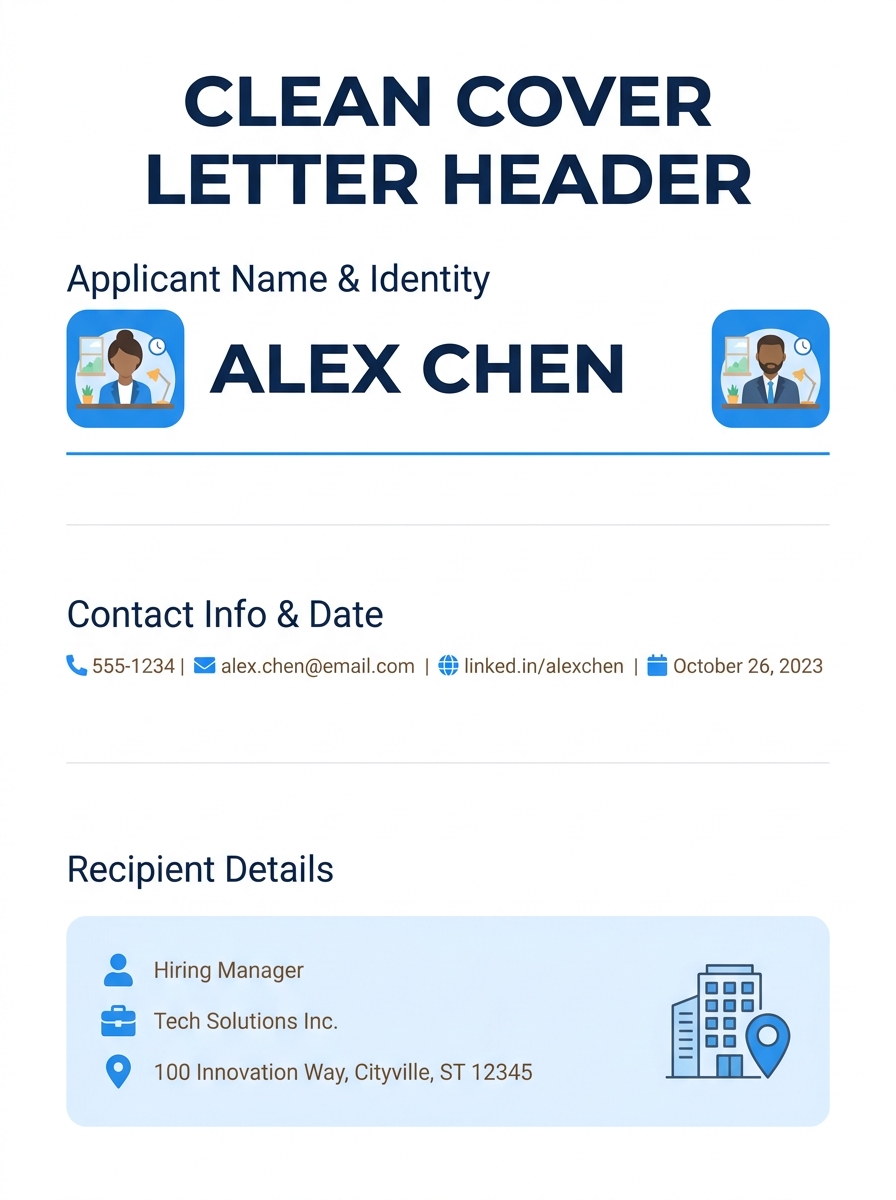
Your header gives the hiring manager your name, contact info, and the date in a clean, scannable format. The University of Michigan Career Center specifies that cover letter layout should be “left justified, beginning no more than 2 inches from the top” of the page.
Here’s exactly what goes in the header, in order:
- Your full name in 14–16 point bold (the only element larger than body text)
- Phone number, professional email, and city/state on one line (no full street address needed)
- LinkedIn profile URL (optional but increasingly expected; optimizing your LinkedIn profile makes this link worth including)
- A blank line, then today’s date
- Another blank line, then the hiring manager’s name, title, company name, and company address
If you don’t know the hiring manager’s name, check LinkedIn or the company’s team page. “Dear Hiring Manager” works as a fallback, but a named greeting performs better because it signals you did the research.
You’ll know this step worked when: your header fits in roughly 1.5 inches of vertical space and mirrors the font and margins of your resume.
Step 2: Write an Opening Paragraph That Earns the Next One
The opening paragraph is where most weak cover letters stall out. They begin with “I am writing to apply for…” which tells the reader nothing they don’t already know. MIT’s Career Advising & Professional Development office recommends a sharper approach: “State clearly in your opening sentence the purpose for your letter and a brief professional introduction.”
That means your first sentence should name the specific role, how you found it (or who referred you), and one credential that earns the reader’s attention. According to Resume Genius’s formatting guide, if someone the hiring manager knows referred you for the role, mention that referral in the opening. Referrals immediately raise your priority in the review pile.
A strong opening paragraph runs 2–3 sentences and roughly 40–60 words. Here’s the formula:
- Sentence one: Name the role and your strongest qualification or referral connection.
- Sentence two: State what excites you about the company specifically (not the industry generally).
- Sentence three (optional): Preview the value you’ll detail in the body.
Before: “I am writing to express my interest in the Marketing Manager position. I believe I would be a great fit.”
After: “Your posting for a Marketing Manager caught my attention because the role’s emphasis on retention campaigns aligns with the subscriber growth system I built at Acme Co., which reduced churn by 18% over two quarters. BrightPath’s mission to make financial literacy accessible is what made me apply here specifically.”
The second version names the role, gives a number, references the company’s mission, and takes 48 words. That’s the density you’re aiming for.
You’ll know this step worked when: your opening paragraph answers “Why this role at this company?” without using the word “passionate.”
Step 3: Build Two Body Paragraphs Around Measurable Results
The body is where your template for a cover letter earns its keep. Forbes contributor Goldie Chan writes: “Use your cover letter to highlight your value and explain how your skills and expertise can help the company reach their goals and fulfil their vision.”
Two paragraphs. Adobe’s cover letter guidelines specify that a good cover letter stays under 500 words, “sharp in structure, and packed with relevant context.” Two body paragraphs keep you well within that ceiling while giving you enough room to make a case.
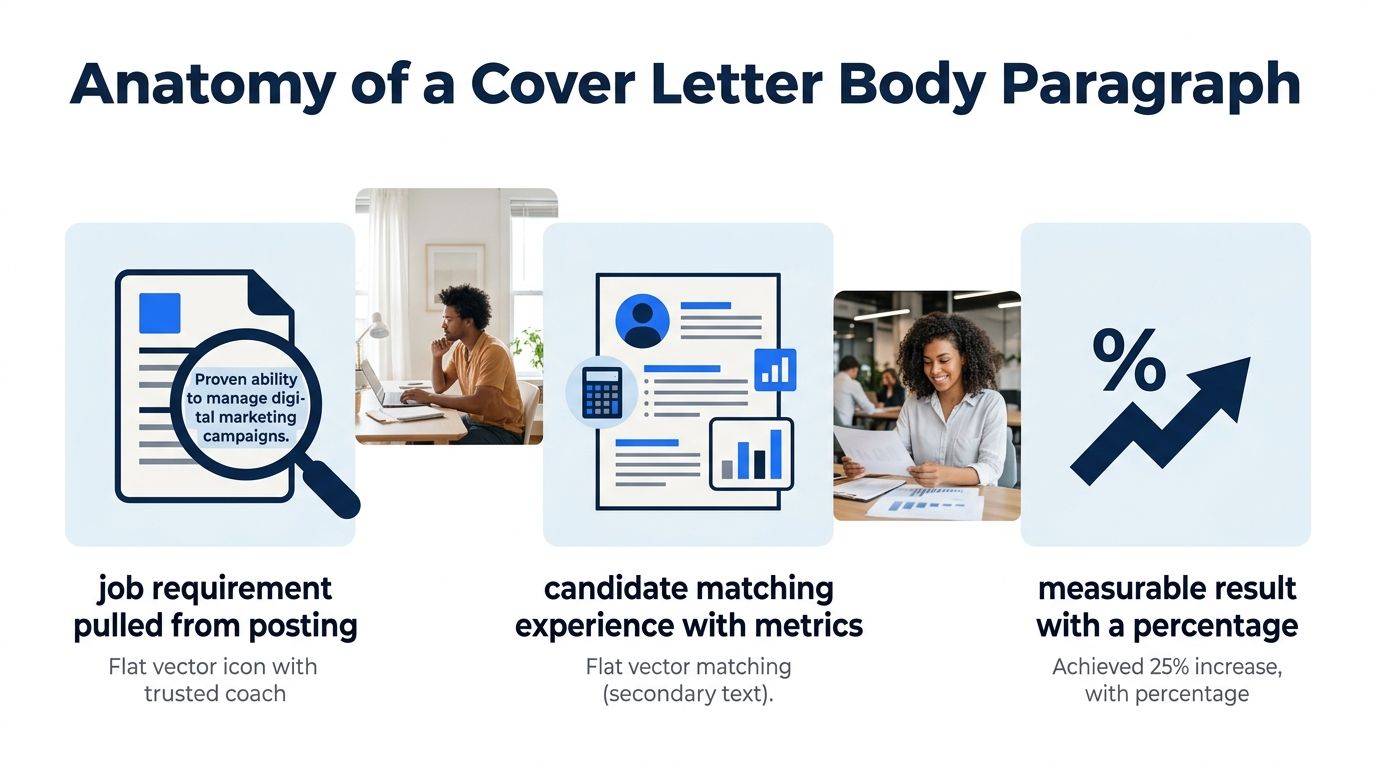
First body paragraph: your strongest match to their requirements
Pull 2–3 requirements directly from the job posting. For each one, describe what you did, the scale you worked at, and the result in numbers. The structure looks like this:
- Requirement from posting: “Experience managing cross-functional teams”
- Your response: “At DataMark, I led a 12-person team across engineering and design, shipping 3 product features in 9 months that increased user engagement by 22%.”
Aim for 60–90 words. Every sentence should include at least one number: a percentage, a dollar figure, a headcount, a timeframe. If you’re already building a resume with quantified bullets, you have this material ready to repurpose.
Second body paragraph: company alignment and cultural fit
This paragraph proves you’ve researched the company beyond the job posting. Name a specific project, product, organizational value, or recent news item. Then connect it to something concrete in your background.
Recruiters scan for intentionality here. Indeed’s cover letter guidance emphasizes: “Explain how you can help. Don’t focus on what the job can do for you.” A sentence like “I’m excited to learn about your platform” is self-focused. A sentence like “Your Q2 expansion into the APAC market maps to my 3 years building regional sales pipelines in Singapore and Tokyo” is employer-focused. The difference determines whether a hiring manager keeps reading.
Every sentence in your body paragraphs should include at least one number: a percentage, a dollar figure, a headcount, or a timeframe.
You’ll know this step worked when: each body paragraph contains at least 2 specific numbers and references something from the job posting or company website by name.
Step 4: Close With a Specific Next-Step Request
The closing paragraph does two things: restates your fit for the role and asks for something concrete. Keep it to 2–3 sentences and under 50 words.
A functional closing follows this pattern:
- One sentence synthesizing your value proposition (not repeating earlier details, but connecting them).
- One sentence requesting an interview or conversation, with your availability or contact preference.
- “Sincerely,” followed by your full name.
Before: “Thank you for your time and consideration. I look forward to hearing from you.”
After: “I’d welcome the chance to discuss how the retention framework I built at Acme Co. could support BrightPath’s 2026 subscriber targets. I’m available for a call any weekday afternoon at 555-0142 or via the email above.”
The second version gives the reader a reason to call and a specific way to do it. According to ResumeBuilder.com’s 2026 industry guide, recruiter Mary Crabtree, who specializes in placing transportation and logistics professionals, confirms that “a well-written cover letter can help you stand out by explaining your experience in more detail than your resume.” Your closing is the last chance to reinforce that differentiation before the hiring manager moves to the next applicant in the stack.
You’ll know this step worked when: your closing includes a specific action the hiring manager can take (call, email, schedule) and doesn’t trail off with a generic thank-you.
Step 5: Format, Proofread, Save as PDF
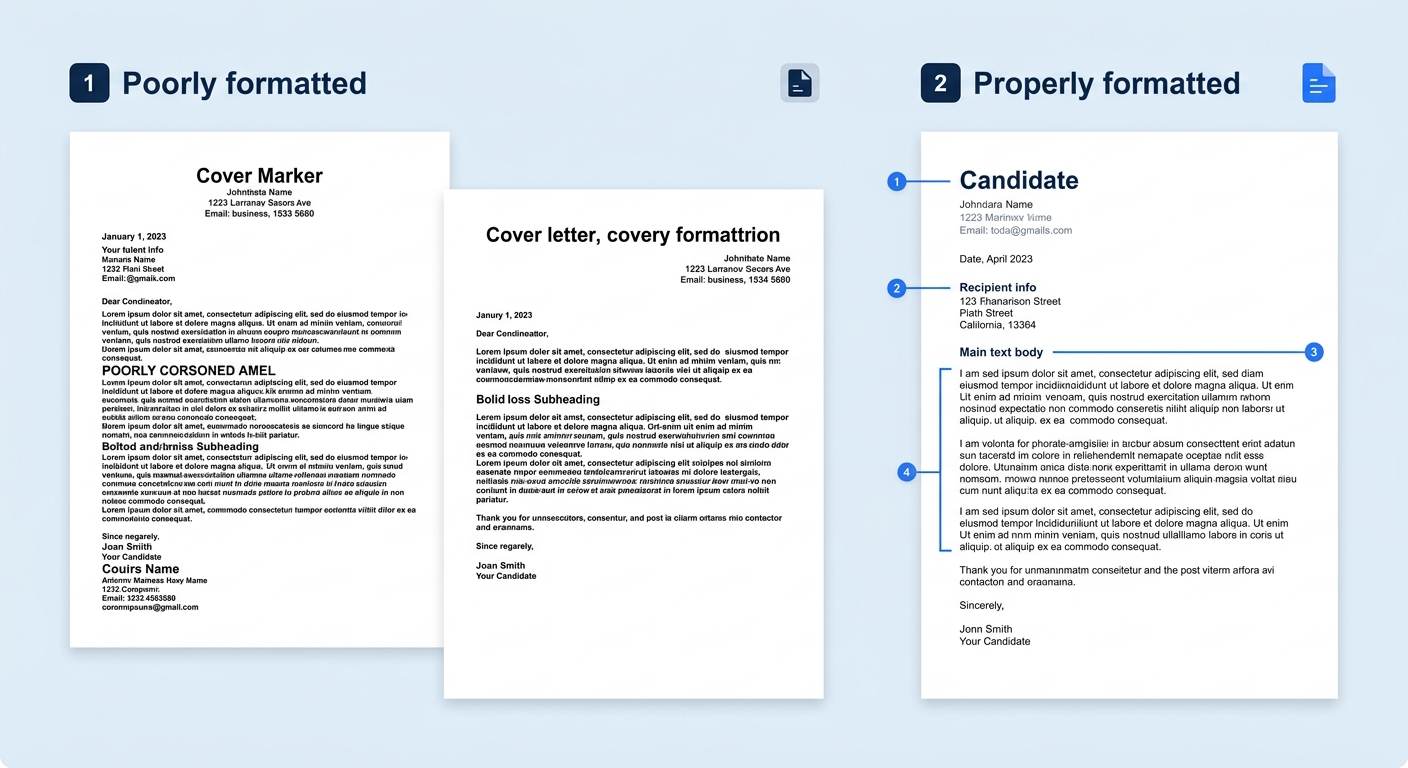
Formatting mistakes disqualify more cover letters than weak content does. Here’s the checklist:
- Font: Arial, Helvetica, Calibri, or Times New Roman. Indeed recommends 10 to 12 points for body text.
- Margins: 1 inch on all four sides. This keeps you within the 2-inch-from-top guideline for the header.
- Alignment: Left-justified throughout. No centered text except possibly your name in the header.
- Length: One page maximum. If you’re spilling onto page two, cut the body paragraphs first.
- File format: PDF. Use the naming convention FirstName_LastName_CoverLetter.pdf so the file is identifiable in a recruiter’s download folder.
- File size: Keep it under 5 MB. A text-only PDF will typically come in under 200 KB.
Before you submit, read the letter out loud. If any sentence makes you stumble, rewrite it shorter. Then check for three errors that spell-check won’t catch: the wrong company name (left over from a previous application), the wrong job title, and the wrong hiring manager’s name.
Warning: If you used AI to draft any portion of your letter, read every line against the actual job posting. Generic phrases like “I am a results-driven professional” signal to recruiters that the letter was mass-produced. Replace any line that could apply to a different company without changes.
You’ll know this step worked when: the PDF opens cleanly on both a phone screen and a laptop, fits on one page, and contains zero references to any company other than your target.
When Things Go Wrong
Three problems come up repeatedly, and each has a fast fix.
The letter runs longer than one page. Cut adverbs first. “Significantly increased” becomes “increased by 34%.” Then look for sentences that restate your resume verbatim; those can go entirely. If you’ve explored free cover letter template examples, you’ll notice the best ones enforce brevity through fixed text boxes that physically prevent overwriting.
You can’t find the hiring manager’s name. Try LinkedIn’s company page and filter by the department listed in the posting. Look for titles like “Talent Acquisition Lead” or “Head of [Department].” If you still come up empty, “Dear [Department] Hiring Team” is more specific than “Dear Hiring Manager” and shows effort.
You don’t have quantifiable achievements. You do; you just haven’t framed them yet. “Handled customer complaints” becomes “Resolved an average of 45 customer inquiries per day with a 92% satisfaction rating.” The guide on using cover letter templates effectively walks through more examples of turning responsibilities into numbers.
Where This Template Goes From Here
Your template is now a working document. Save a master copy with placeholder text in brackets like [Company Name], [Role Title], and [Referral Name] so you can duplicate and customize it in 10–15 minutes per application. The structure stays constant. The details swap out every time.
If you’re applying to roles where LinkedIn recruiter AI is scanning candidate profiles, align the language in your cover letter with the keywords on your LinkedIn headline and summary. Consistency across your application materials helps both human reviewers and automated screening tools match you to the right openings.
One template, built once, adapted dozens of times. That’s how cover letters stop being a dreaded chore and become a 15-minute routine you can run on autopilot.
