


 4.9
4.9 4.5
4.5Ninety-four percent of hiring managers still expect a cover letter with every application, yet 75% of those letters get filtered out by applicant tracking systems before a human reads a single sentence. This tutorial gives you six steps to turn a free template for cover letter into a finished, ATS-safe document in about 25 minutes.
TL;DR: Grab a free template from Microsoft Word, Canva, or Indeed. Customize six sections: header, salutation, opening hook, quantified body, closing line, and sign-off. Keep it under one page at 10–12pt in a standard font, and tailor 50–60% of the content to each specific job description.
Before You Start
You need four things on your desk before touching any template. Missing even one slows the process from 25 minutes to an hour of tab-switching.
What you need:
- The job posting, open in a browser tab. You’ll pull exact phrases from its requirements section.
- Your current resume, so you can grab specific numbers (revenue figures, team sizes, percentage improvements) without inventing them on the fly.
- The hiring manager’s name. Check the company’s team page, LinkedIn, or the job listing itself. If you can’t find it, “Dear Hiring Manager” works, but a named greeting performs better in recruiter testing.
- Access to a template source. This tutorial covers three free ones: Microsoft Word’s template library, Canva, and Indeed. You don’t need a paid account for any of them.
Time commitment: 25 minutes for your first letter using these steps. Subsequent letters for different jobs take about 12–15 minutes because you’ll only be swapping the customized 50–60% of the content.
Step 1. Pick a Template That Passes ATS Filters
The goal here is finding a template with a single-column layout, no text boxes in the header area, and no embedded graphics that confuse parsing software. The wrong template can get your letter rejected regardless of what you write.
The action: Open one of these three sources and select a template:
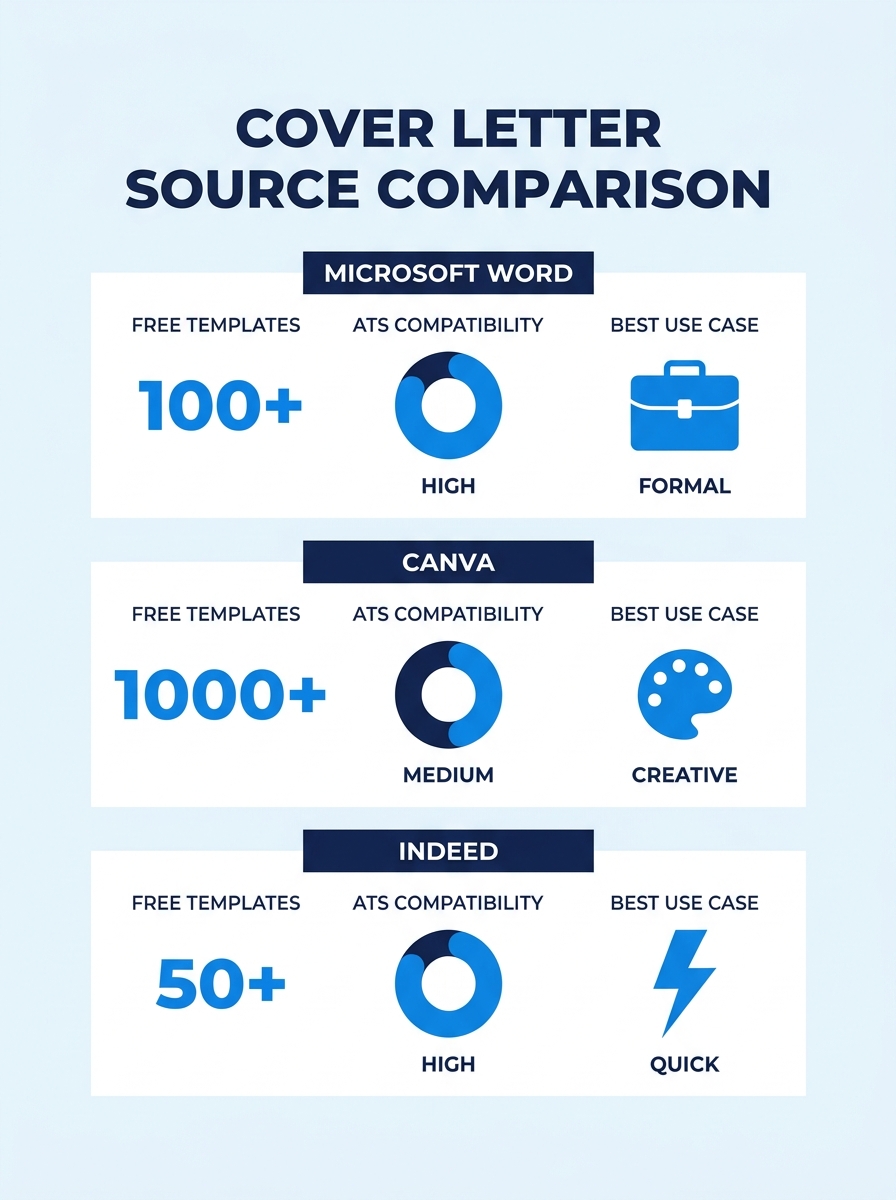
| Source | Number of Free Templates | ATS-Safe Options | Best For |
|---|---|---|---|
| Microsoft Word | 40+ designs | Most single-column options pass ATS | Users already in the Microsoft ecosystem |
| Canva | 100+ designs | Filter by “simple” or “minimal” to find safe layouts | Visual customization and color matching |
| Indeed | 50+ samples by job title | All text-based, inherently ATS-friendly | Copying pre-written content blocks |
When browsing Canva’s cover letter collection, look for templates labeled “simple” or “professional.” Avoid anything with sidebar columns, icons, or decorative borders. Those elements look polished on screen but break when an ATS tries to parse them into plain text.
You’ll know it worked when your chosen template has a straightforward top-to-bottom text flow, one column, and uses a standard font like Calibri, Arial, or Times New Roman in 10–12pt. MIT’s Career Advising and Professional Development office recommends exactly this range: “A cover letter should be no longer than one page with a font size between 10-12 points.”
If you’ve already explored general template options, our roundup of cover letter templates organized by job type can help you find a closer starting point for your industry.
Step 2. Replace the Placeholder Header
The goal is making your contact block match your resume header exactly, same font, same size, same layout order. Hiring managers who review 83% of applications with cover letters (per 2026 recruiting surveys) notice visual inconsistency between documents.
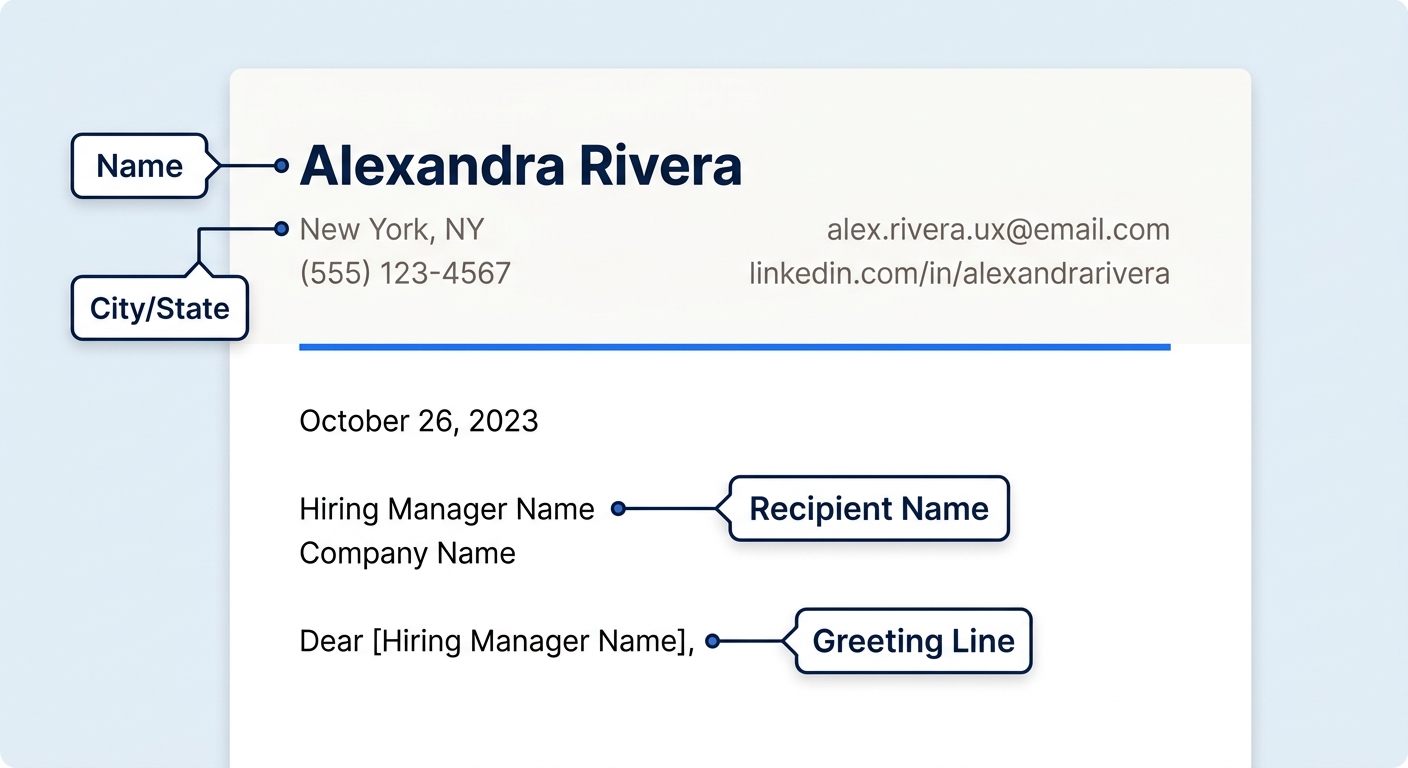
The action: Delete every placeholder field in the template header and type in:
- Your full name (same formatting as your resume header, if it’s bold 14pt on your resume, make it bold 14pt here)
- Your email address
- Your phone number
- Your city and state (full street address is no longer expected)
- Your LinkedIn URL or portfolio link, if relevant
Below your contact info, add the date and the recipient’s details: hiring manager’s name, their title, company name, and company address.
You’ll know it worked when you place your resume and cover letter side by side and the headers look like they came from the same document. If you’re building your resume’s visual identity from scratch, our guide to using Canva’s resume builder covers font pairing and color consistency.
Step 3. Address a Real Person
The goal is replacing “To Whom It May Concern” with a named individual. Generic salutations signal a mass-mailed application.
The action: Write “Dear [First Name] [Last Name],” using the hiring manager’s actual name. If the posting lists a department but no name, try searching LinkedIn for “[Company Name] + [Department] + hiring manager” or “[Company Name] + [Job Title] + recruiter.” If you still come up empty, “Dear Hiring Manager,” is the accepted fallback.
You’ll know it worked when the salutation includes a real name pulled from a verifiable source, the company website, the job listing, or a LinkedIn profile. Since LinkedIn’s recruiter tools now use natural-language queries to surface candidates, having your application addressed to the right person helps when that recruiter cross-references applicants internally.
Step 4. Write an Opening Paragraph With One Measurable Result
The goal is hooking the reader in the first two sentences. Hiring managers spend an average of 7.4 seconds on their initial review of a cover letter, so your opening paragraph carries almost all the persuasive weight.
The action: Write 2–3 sentences that do three things in order:
- Name the specific role and company (proves this letter is tailored)
- State one quantified achievement relevant to the job’s top requirement
- Connect that achievement to what the company needs
Example: “I’m applying for the Senior Marketing Analyst role at Acme Corp. At my current company, I rebuilt the attribution model for paid campaigns, which reduced cost-per-acquisition by 34% over six months. Your job posting emphasizes data-driven budget optimization, and that’s exactly the problem I’ve spent three years solving.”
Columbia University’s Career Education office puts it clearly: your cover letter should “articulate your qualifications and motivation for the position” using examples that demonstrate relevant skills, not generic enthusiasm.
Tip: The Harvard Business Review’s cover letter guidance boils the opening down to three verbs: “Do the research, start off strong, and emphasize your value.” If your first sentence could apply to any company, it’s too vague.
Step 5. Build the Body With Quantified Proof
The goal is giving the reader 2–3 concrete reasons to call you, backed by numbers from your actual work history.
The action: Write 1–2 paragraphs (or a short paragraph plus 2–3 bullet points) that each follow this formula: Skill the job requires → what you did that proves you have it → the measurable result.
Survey data shows 66% of hiring managers prefer cover letters that are half a page or less, around 250 to 400 words total. That means your body section gets roughly 100–150 words. Every sentence must earn its place.
Pull keywords directly from the job description. If the posting says “cross-functional collaboration,” use that exact phrase when describing your experience. If it says “Python” or “Salesforce,” name those tools. ATS systems match on keywords, and so do speed-reading humans.
Every sentence in the body must answer one question: “What did you do, and what number proves it worked?”
For a deeper walkthrough of structuring body content with real examples, our complete cover letter template guide breaks down paragraph-by-paragraph construction.
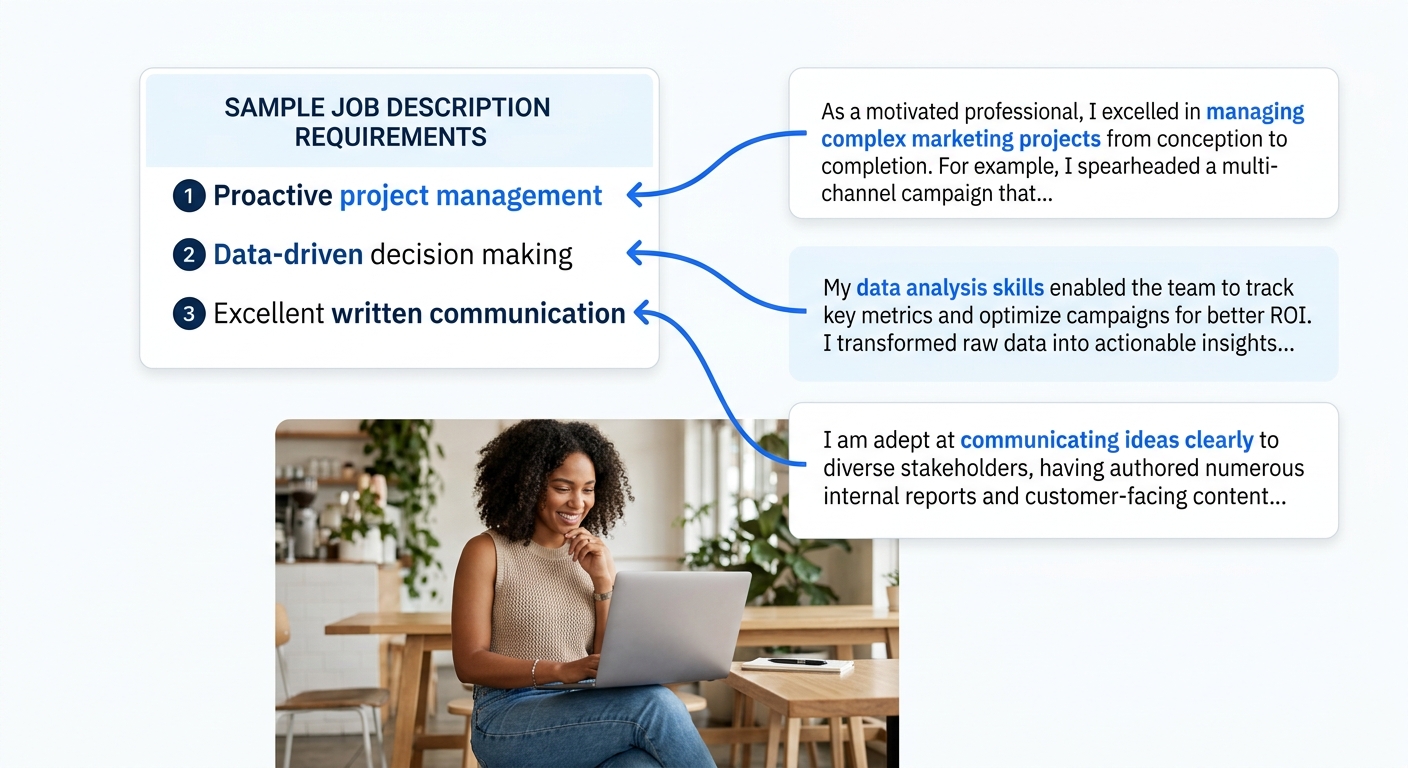
You’ll know it worked when every claim in your body paragraphs includes at least one specific number, a percentage, a dollar figure, a team size, a timeline, and at least two phrases pulled directly from the job posting.
Step 6. Final Format Check and Export
The goal is catching the formatting errors that cause 75% of ATS rejections before you hit submit.
The action: Run through this checklist:
- Length: One page maximum. If you’re over, cut the weakest body bullet first.
- Margins: 1-inch on all sides. This is the standard for professional correspondence and the default in most templates.
- Font and size: 10–12pt Calibri, Arial, or Times New Roman. Decorative fonts break ATS parsing.
- File format: Export as PDF unless the application portal specifically asks for .docx. PDF preserves your formatting across every screen and system.
- File name: Use “FirstName-LastName-CoverLetter-CompanyName.pdf” so recruiters can find your file in a folder of 200 applications.
- Proofread: Read the whole letter out loud. Your ear catches awkward phrasing that your eye skips.
You’ll know it worked when you can open the PDF on your phone and it looks identical to what you see on your computer, one page, clean formatting, no text overflow.
Common Problems and Fixes
Three things go wrong most often when using a template for cover letter creation:
Problem 1: The ATS strips your header. If your name and contact info sit inside a text box or the document header/footer area, many ATS systems skip them entirely. Fix: Move all contact info into the body of the document, above the date line. It won’t look as visually elegant, but it’ll actually get read.
Problem 2: Your letter sounds generic. You swapped your name into the template but left the sample body text mostly unchanged. Recruiters reading 50+ applications per day spot boilerplate immediately. Fix: Rewrite at least 50–60% of the template’s content with details specific to this job, this company, and your actual experience. If you’re dealing with application fatigue from customizing dozens of letters, focus your energy on the opening paragraph and one body bullet, those carry the most weight.
Problem 3: The formatting breaks on upload. You built a beautiful cover letter in Canva, but when the portal processes it, columns merge and text overlaps. Fix: Always export as a single-column PDF. Upload it to the portal, then immediately preview what the system captured. If the preview looks garbled, reformat in Word and re-upload.
Warning: If an application portal only accepts plain text (a paste-in box with no file upload), strip all formatting before pasting. Copy your cover letter into a plain text editor first, then paste from there into the form. This prevents invisible formatting code from corrupting your layout.
Where to Go From Here
You now have a finished cover letter built on an ATS-safe template with quantified proof in every paragraph. The whole process, template selection through export, should have taken about 25 minutes for this first one. Your next letter will be faster because you only need to swap the customized sections (opening paragraph, body proof points, and company-specific details).
Three directions to take from here: browse cover letter examples and templates sorted by industry for a starting point closer to your field; tighten up your resume’s visual consistency to match the header style you just set; or update your LinkedIn profile so the story you tell on paper aligns with what recruiters see online. A polished cover letter creates more impact when every piece of your application tells a coherent, quantified story about what you bring to the role.
