


 4.9
4.9 4.5
4.5MIT’s Career Advising office and the University of Michigan Career Center both recommend the same five-section cover letter structure: header, greeting, introduction, body, closing. This tutorial walks you through picking a free template built on that structure, customizing every section for a specific job posting, and exporting an ATS-safe file in about 30 minutes.
TL;DR: Choose a single-column template from Canva, Word, or Indeed. Replace every line of placeholder text with job-specific language and at least one quantified achievement. Export as PDF, then verify the file’s formatting survives ATS parsing before submitting.
Before You Start
You’ll need four things ready before opening any template:
- The job posting you’re targeting. Have it open in a separate tab. You’ll pull specific language from it throughout this process.
- Your resume. Your cover letter should complement your resume, not repeat it. Keep both visible side by side.
- A free account on at least one template platform. Canva, Microsoft Word online, and Indeed all offer free templates of cover letter without requiring a paid subscription. Canva alone hosts dozens of printable options you can personalize for any industry.
- 20 to 30 minutes of uninterrupted time. Rushing a cover letter produces the same generic output that 32% of job seekers get when they submit unedited AI drafts.
Info: 89% of hiring professionals expect a cover letter with your application. Skipping this step removes you from consideration at nearly 9 out of 10 companies before a human reads your resume.
Step 1: Pick a Template Using the Three-Filter Test
Templates of cover letter vary wildly. Some are design-heavy with multi-column layouts and decorative icons. Others are stripped-down text files. The wrong choice gets your letter rejected by applicant tracking software before anyone reads a word of it. ATS software eliminates up to 50% of candidates before human review, and formatting errors are one of the primary triggers.
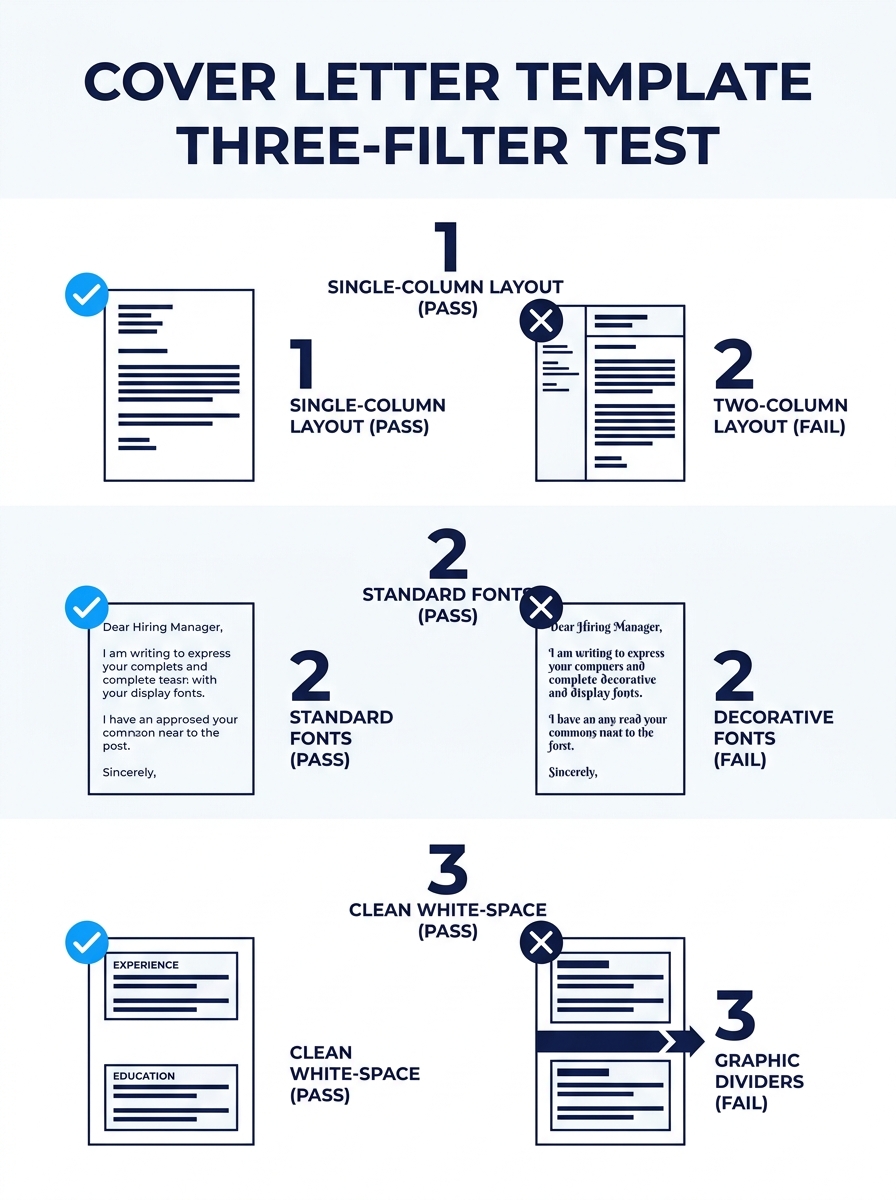
Run every template through three filters before you commit:
Filter 1: Single-column layout. ATS parsers read documents top to bottom, left to right. Two-column designs, sidebars, and text boxes confuse them. If the template puts your contact info in a sidebar, skip it.
Filter 2: Standard font at 10 to 12 point. Arial, Calibri, Garamond, Helvetica, and Times New Roman all parse reliably. Custom or decorative fonts sometimes render as unreadable characters when an ATS ingests your file. Microsoft Word’s free cover letter templates default to ATS-friendly fonts and let you swap color schemes without touching the underlying type.
Filter 3: Clear section breaks using white space, not graphics. Horizontal lines, icons, or colored dividers look sharp on screen but create parsing errors. White space between sections works every time.
| Platform | Free Templates | Default ATS-Safe | Export Formats |
|---|---|---|---|
| Canva | 100+ | No (check layout) | PDF, PNG |
| Microsoft Word | 50+ | Yes (most) | DOCX, PDF |
| Indeed | 30+ by job title | Yes | Copy/paste text |
| MyPerfectResume | 30+ | Yes | TXT, PDF |
If your target company uses an older ATS, the safest bet is a plain DOCX or TXT file. MyPerfectResume’s templates let you edit and download in TXT format specifically for maximum compatibility.
Step 2: Fill In the Header With Exact Contact Details
The header is where most people lose 60 seconds to unnecessary decisions. Your template will have placeholder fields. Replace them with exactly this information, in this order:
- Your full name (first and last)
- Your professional title, matched to the exact job title in the posting
- Phone number
- Email address
- City and state (full street address is no longer standard)
- Date
- Company name
Novoresume’s 2026 cover letter guide specifies matching your professional title to the exact job title of the position you’re applying for. If the posting says “Senior Marketing Analyst,” your header says “Senior Marketing Analyst.” Not “Marketing Professional.” Not “Experienced Marketer.” The match should be word-for-word.
You’ll know this step is done when: every placeholder in the header section contains your real information, and the professional title under your name mirrors the job posting exactly.
Step 3: Replace the Body Text Section by Section
This is where most templates become liabilities. The placeholder text sounds polished, and the temptation is to change a few words and call it done. But 70% of employers prefer concise cover letters at half a page or less, so every sentence needs to earn its place.
Work through four sections in order:
The Greeting
Address the hiring manager by name whenever possible. If the posting doesn’t include a name, check LinkedIn for the department head or recruiter. 26% of hiring managers specifically value being addressed by name. When you can’t find one, “Dear Hiring Manager” works. MIT’s Career Advising office confirms this as the standard fallback.
If the posting includes a reference number or job code, include it in your opening line. HR teams at large companies track applications by these codes, and omitting yours delays processing or loses your application entirely.
The Introduction (2 to 3 sentences)
State the role you’re applying for, where you found the posting, and one sentence about why this company interests you. That “why this company” sentence should reference something specific: a recent product launch, a company value from their About page, a market position. Generic enthusiasm (“I’m excited about the opportunity”) wastes your limited word count.
The Body (3 to 5 sentences or 2 to 3 bullet points)
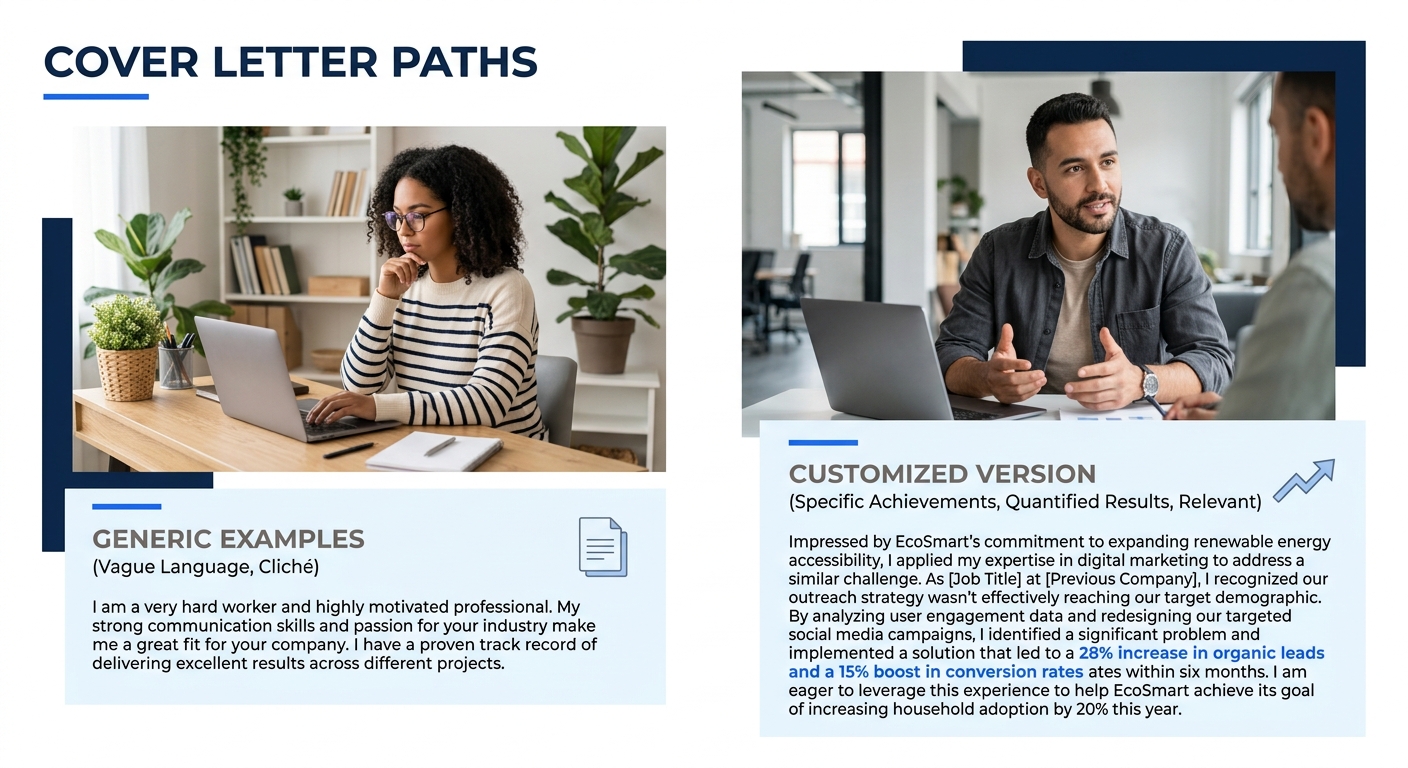
This section is where you differentiate yourself. Pick two or three qualifications from the job posting and show evidence you meet each one. The Problem-Solution format works well here: name a challenge the company faces (drawn from the posting or your research), then describe how your experience addresses it.
Bullet points scan faster than paragraph text when your achievements include numbers. If you’ve already put together a strong resume, your cover letter template should highlight different accomplishments than the ones leading your resume. Repeating the same bullet points across both documents wastes the hiring manager’s reading time and signals low effort.
The Closing (2 to 3 sentences)
Restate your interest, mention your availability for an interview, and thank the reader. Include a specific call to action: “I’d welcome the chance to discuss how my experience with vendor negotiations could support your supply chain restructuring” beats a passive “I look forward to hearing from you.”
You’ll know this step is done when: zero placeholder text remains in the document, and every sentence references either the specific job posting or a concrete detail about your experience.
Every sentence in your cover letter needs to earn its place. If a line could apply to any job at any company, delete it.
Step 4: Add at Least One Quantified Achievement
88% of job seekers believe a well-crafted cover letter improves their interview chances, but “well-crafted” does specific work here. The single highest-impact edit you can make is adding a number to your body section.
Compare these two sentences:
Before: “I increased sales in my region through targeted outreach campaigns.”
After: “I grew Southeast regional sales by 34% over six months through a targeted outreach campaign that added 12 new enterprise accounts.”
The second version gives the hiring manager a concrete data point to anchor on. It also differentiates you from candidates whose letters read like a list of soft adjectives. If you need help identifying which achievements to quantify, the cover letter examples organized by job type show how writers in different fields present their numbers.
You’ll know this step is done when: your cover letter body contains at least one specific number: a percentage, dollar figure, headcount, or timeframe tied to a result you produced.
Step 5: Export, Test, and Send
Your template is now filled with real, specific, job-targeted content. The final step is getting it into a format the employer’s system can read without mangling your work.
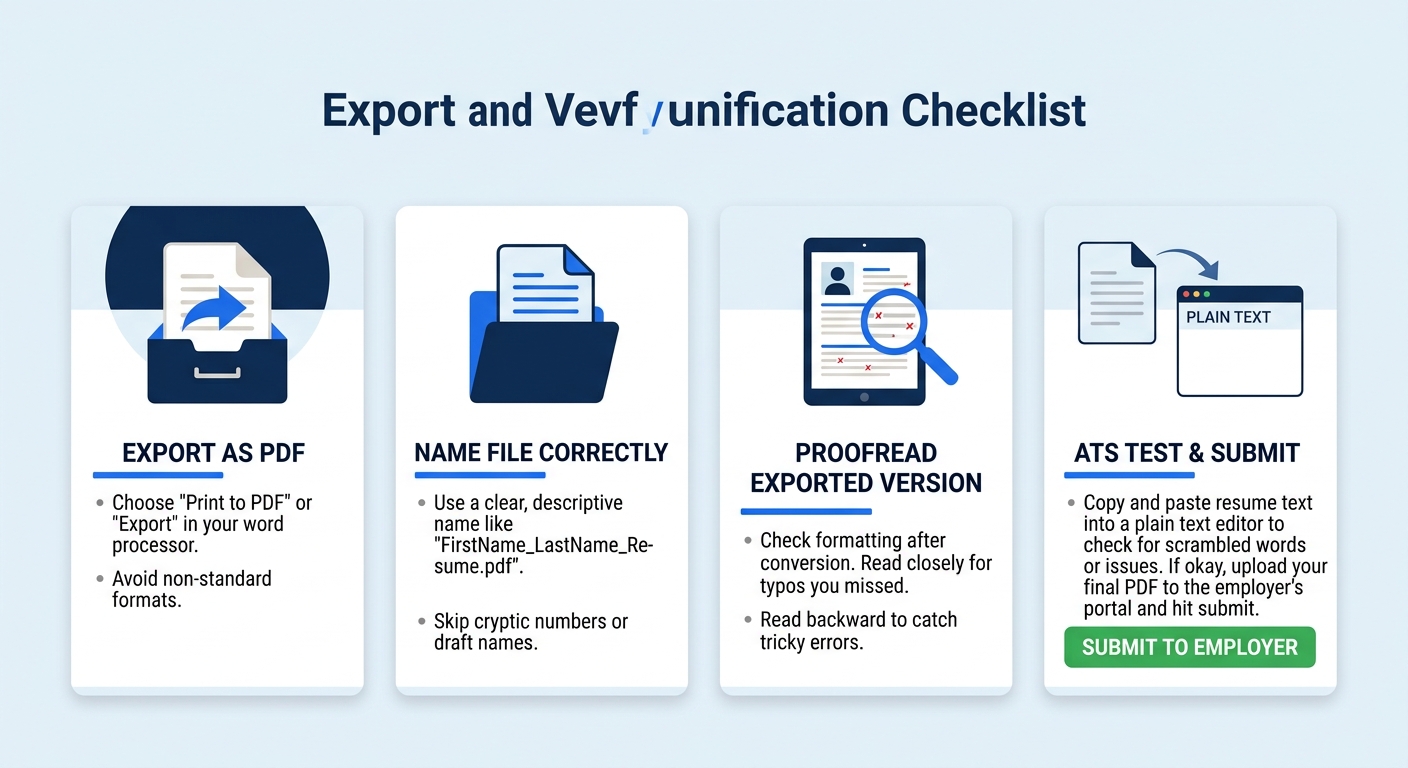
- Export as PDF unless the posting specifically requests DOCX or plain text. PDF preserves formatting across devices and operating systems.
- Name the file using this pattern: FirstName-LastName-CoverLetter-CompanyName.pdf. Hiring managers download dozens of files named “Cover Letter.pdf,” and yours needs to be identifiable at a glance.
- Open the exported file and read it fresh. Check for orphaned placeholder text (the phrase “[Company Name]” in brackets is a common miss), broken formatting, and any font substitutions that happened during export.
- Run a basic ATS test. Copy the entire text from your exported PDF and paste it into a plain text editor like Notepad. If the text comes through in the correct reading order with no jumbled characters, the file will parse correctly. If sections appear out of order or characters are garbled, go back to the template and simplify the layout.
Tip: If you’re applying to multiple roles, save your completed template as a master file. Duplicate it for each new application and swap out only the company-specific details. This cuts your per-application time from 30 minutes to roughly 10. For applicants dealing with [high-volume application fatigue](/blog/reddit-job-seeker-custom-resumes-application-fatigue), this approach prevents burnout while keeping each letter personalized.
When Things Go Wrong
Three problems show up repeatedly when people customize templates of cover letter:
The exported PDF looks different from the template editor. This happens most often with Canva templates that use custom fonts. Canva sometimes substitutes a default font during export if the original isn’t embeddable. Fix it by switching to a standard font (Arial, Calibri) before exporting, and always preview the PDF side by side with your editor view.
The ATS paste test shows garbled text. Your template likely uses text boxes or layered graphic elements. Switch to a simpler template. Microsoft Word’s single-column options are the most reliable for ATS parsing. If you need guidance on what ATS-safe formatting looks like in practice, the complete guide to using cover letter templates walks through the common pitfalls.
The cover letter runs over one page. The University of Michigan Career Center’s guidance is direct: do not exceed one page. If you’re over, cut the least specific sentences first. Any sentence that could apply to multiple jobs at multiple companies is the first to go. 66% of job seekers and 70% of employers prefer letters that are half a page or shorter, so brevity is working in your favor here, not against it.
Where to Go From Here
You now have a completed, ATS-tested cover letter built from a free template. The process you followed here works the same way for every application. Steps 1, 2, and 5 stay roughly constant once you’ve picked your preferred template and export workflow. Steps 3 and 4 are where the real customization happens each time, and they’re where hiring managers notice the difference between a generic submission and a letter that feels written for their specific role.
For more examples organized by industry and career stage, the free cover letter examples collection has templates you can study alongside your own drafts. And if your resume needs the same level of attention you just gave your cover letter, browse our career guides for walkthroughs on everything from ATS formatting to LinkedIn profile strategy. The cover letter opens the conversation. The resume and interview carry it forward.
