


 4.9
4.9 4.5
4.5Free resume builders check formatting and keywords but systematically miss job-specific fit requirements, according to analysis published today by career platform ShouldApply. The gap affects callback rates because most tools grade documents in isolation rather than measuring overlap between a candidate’s experience and individual job posting requirements, the analysis found.
TL;DR: Free resume checkers confirm ATS readability and keyword density but do not evaluate whether a resume answers the specific requirements named in a job posting, according to new analysis from ShouldApply published May 30, 2026.
Generic resume-checking tools confirm files are ATS-readable, verify that bullets start with action verbs, and count keyword frequency, the analysis notes. None of those checks answer whether the candidate fits the role. Keyword scanners flag missing terms but do not distinguish between must-have requirements and passing mentions, nor do they measure skill depth—whether a posting expects occasional scripting or system design, for instance.
The analysis identifies the pattern behind most silent rejections: one resume sent to every role. A coordinator job, a senior manager position, a startup opening, and a Fortune 500 listing all receive the same document despite different requirements. The resume may read well in general but miss specific roles completely, resulting in no feedback and repeated submissions of the same version.
What Free Resume Builders Actually Check
Most free tools evaluate three dimensions: ATS compatibility, formatting consistency, and keyword presence. They confirm that a PDF is machine-readable, that bullet points align properly, and that terms from a job description appear somewhere in the resume text.
The checks stop at surface-level presence. A keyword scanner sees “Python” listed or absent. It does not read whether the posting wants someone who scripts occasionally or someone who architects systems. Two resumes can hit identical keyword counts and fit the job at vastly different depths, the analysis notes.
Format grading tells candidates nothing about overlap with a specific posting. A spell-check confirms the document is clean; it does not confirm the document surfaces the right experience for the role in front of them.
The Job-Matching Gap
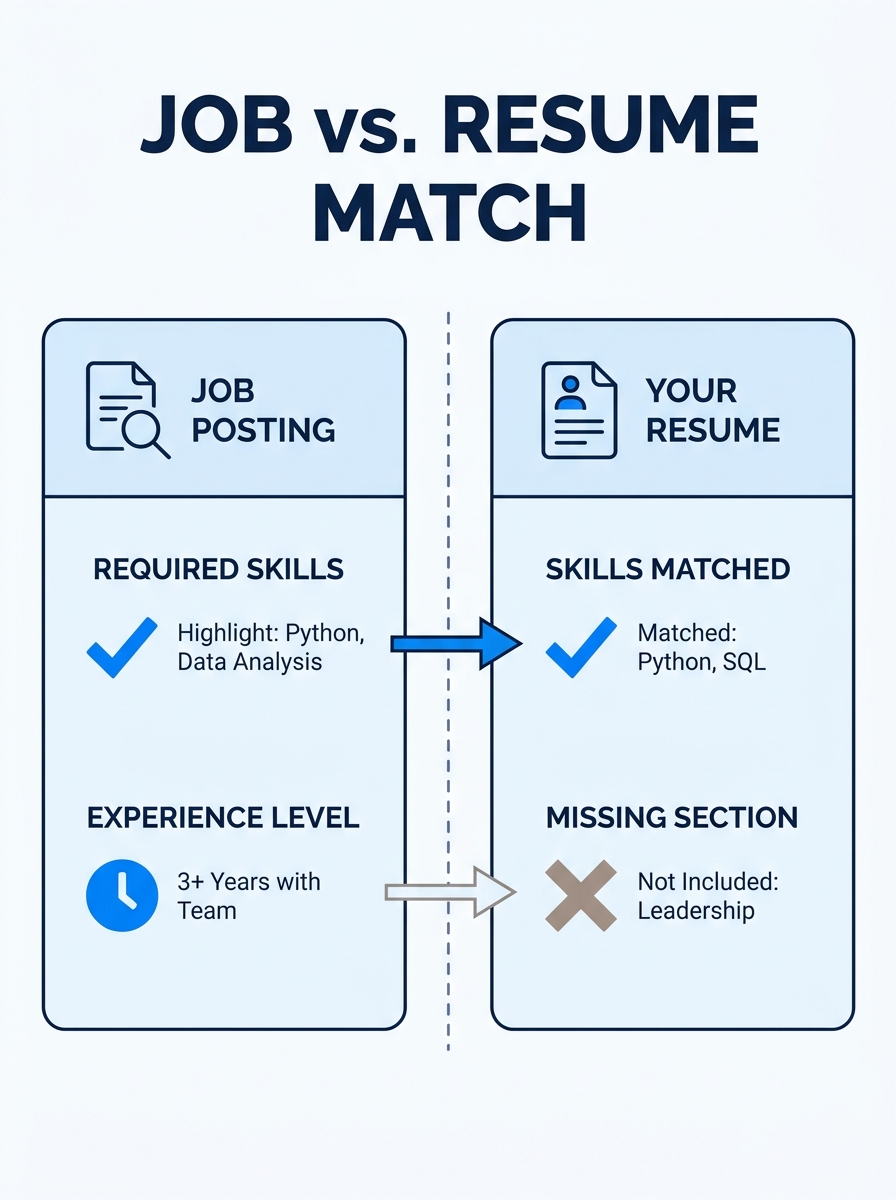
ShouldApply’s analysis introduces a 0-100 scoring methodology that weights profile fit at 70% and resume match at 30%. Profile fit measures whether a candidate’s skills and experience align with posting requirements; resume match evaluates whether the resume document itself surfaces that aligned experience in plain sight.
The platform rates skills at five depth levels, from L1 awareness to L5 architect-level mastery, so passing mentions are not counted as deep expertise. The scoring system identifies which requirements a candidate hits, which they miss, and provides a “Why Not 100” breakdown showing the point cost of each gap.
Jesse Johnson, ShouldApply founder, offers the first check and tailoring free to users who create an account. Subscribers who want matching across multiple roles pay $14 per month for Pro tier access. For a single application, one free run tests whether the matching methodology surfaces gaps a manual check would miss.
Manual Checking vs. Automated Tools
The analysis outlines a ten-minute manual process: open the job posting and resume side by side, extract hard requirements (years of experience, degrees, certifications), list every named tool and skill, and check whether the resume shows each requirement near the top rather than buried three bullets deep.
Must-have requirements—stated as required, repeated, or tied to the core role—sink applications when missing. Nice-to-have items, marked as “bonus” or “plus,” rarely disqualify candidates. Seniority mismatch creates a wrong-fit signal: lead roles expect scope and ownership language; coordinator roles expect execution-focused bullets.
Recency matters. A skill last used six years ago reads weaker than the posting expects. The manual check flags stale experience alongside missing credentials. The automated version runs the same logic in seconds but requires trust that the algorithm weights requirements the way a hiring manager does.
Related context: AI resume builders have drawn scrutiny for optimization that strips authenticity from applications, while open-source resume tools gained ground in 2026 by offering transparency into how matching algorithms work.
Why This Matters Now
Job seekers treating resume building as a one-time formatting exercise lose ground to candidates who tailor each application to individual postings. The analysis confirms what hiring data has shown: callback rates correlate more strongly with job-specific fit than with general resume quality. A document can be beautifully formatted, ATS-compliant, and full of action verbs while still failing to surface the two or three must-have requirements buried in a posting’s third paragraph.
The gap between free tools and actual fit-checking explains why strong candidates go months without callbacks despite clean resumes. Free checkers solve the formatting problem but leave the matching problem untouched. Manual checking closes that gap at the cost of ten minutes per application. Automated matching tools like ShouldApply’s free tier close it faster, though candidates still need to verify that algorithmic weightings align with their read of the posting.
The practical implication is procedural: check fit before applying, either manually or through a tool that reads requirements at depth. Sending one resume to every job and hoping formatting carries it has become a measurably weaker strategy than reverse-engineering each job description into a targeted resume that answers the posting’s specific asks.
